
Home > Gaming Guides > Manor Lords: How To Play In Third Person Mode

Manor Lords: How To Play In Third Person Mode

Published Date :

Manor Lords improves the city builder experience with the Visit Mode which allows players to watch with a third-person perspective. Players can walk as themselves among the city’s population, check out the marketplace, head to the Logging Camp, watch construction work, and even walk up to your troops before they head for war. If you are wondering how to play Manor Lords in Third Person, this guide is all you will need.

The Visit Mode mechanic allows players to switch the camera angle and while it is quite easy, players might miss it altogether. Explore the world that you have built by stepping into the shoes of your lord with this feature. There isn’t a lot that you will have to do but we recommend you use this mode after completing a certain part of the build.

How to Play Manor Lords in Third Person
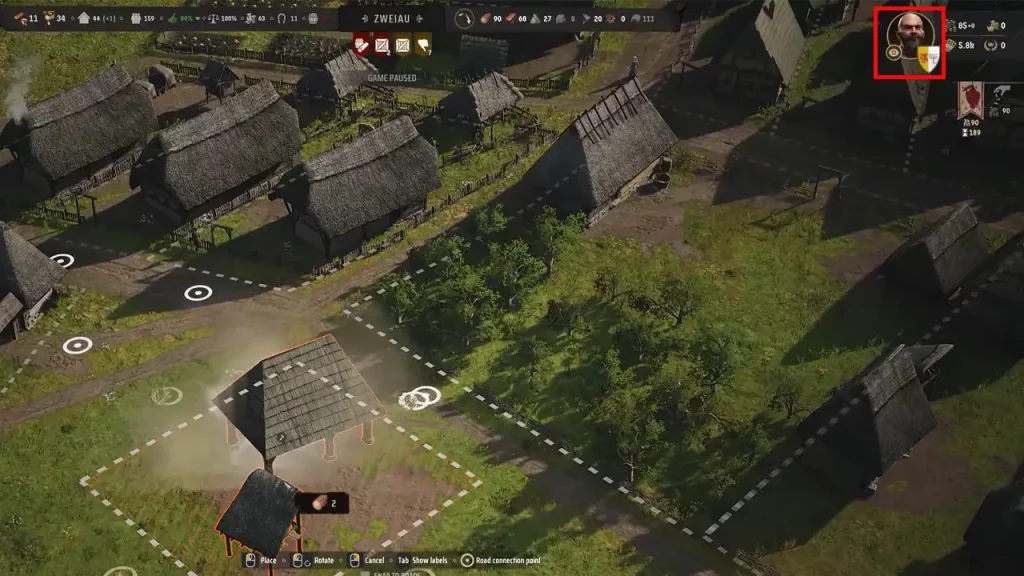
Use Visit Mode to Explore Manor Lords in Third Person Perspective
Image via Manor Lords

To play Manor Lords in Third Person, you need to select the Eye icon on the top right corner of the screen near the Character Portrait. Once you do that, the Visit Mode will be activated and you will receive a prompt. Acknowledge the prompt and then you will be transported to the grounds of your settlement.

There is a bunch of exploring available to players with the third person perspective so it’s best that you use this feature after a while just so you can have more places to explore. If you want to go back to the original perspective, you can click on the button once again and the game will do the rest. While there are more features bound to be added to Visit Mode, we will have to wait and watch if they are made available in the Early Access or with the full game release.

That’s all you will need to play Manor Lords in Third Person perspective with the Visit Mode. If you found this guide helpful, do check out our other Manor Lords guides in our dedicated section here at Gamer Tweak. The Manor Lords cheat engine will provide you with some assistance if you are finding the game hard on your own.


  • Crunch My Butter Codes (August 2026)

    Crunch My Butter Codes (August 2026)

    Published Date :

    Looking for the latest Crunch My Butter codes? This satisfying Roblox simulator lets you crunch different types of butter, earn cash, unlock better butter, and keep your buttery empire growing. While the game continues to receive updates, many players are also hoping for redeemable codes that offer free Cash or other rewards. Here’s the complete… Read More

  • Trench Decay Codes (August 2026)

    Trench Decay Codes (August 2026)

    Published Date :

    Trench Decay is a WW1 squad PvE shooter, and like most games like this, you can redeem codes to unlock cosmetic crates, medals and more. If you don’t wish to miss out, claim the freebies right away. Trench Decay Codes (August 2026) Expired Codes How to Redeem Trench Decay Codes These are the steps you… Read More

  • Capybaras VS Plants Codes (August 2026)

    Capybaras VS Plants Codes (August 2026)

    Published Date :

    Lots of Cash per second, better eggs and Capybaras are what will make you rich in Capybaras VS Plants, and to get a boost during your grind, you need to redeem these new codes. These goodies are regularly dropped by the developers, and with them, you can unlock Hatch Hammers, Totems, exclusive Eggs, and more!… Read More

  • Heal your Injuries Codes (August 2026)

    Heal your Injuries Codes (August 2026)

    Published Date :

    Heal your Injuries is a JJK-inspired game, where you need math to heal yourself as you get hit by bombs, weapons and more. While playing, you will need EXP and Energy to progress, and thankfully, Heal your Injuries codes drop exactly that! Here’s a complete guide with all the latest rewards and how to claim… Read More







