Elden Ring has some ferocious enemies that might be overwhelming to take down solo. But fear not, because you can team up with your friends and defeat the enemy via coop options. How to play Elden Ring with friends, you ask? If you are familiar with other From Software games then you may already have an idea. Here’s how to invite/summon other players, add them to your Elden Ring squad or join them.
How to Join & Play Elden Ring with Friends (Co-op Multiplayer)

To play Elden Ring with friends (summon allies) you need to:
- Open up the Options Menu.
- Visit System > Network.
- Change Display Player Names to Online ID.
- Now open the Multiplayer Menu.
- Add a Multiplayer Password and give the same password to the friends you want to team up with.
- Choose a region where you have to make a summoning sign.
- Then ask your friends to use the Tarnished’s Furled Finger Multiplayer item to create the summon sign for coop multiplayer.
- Ensure that you go to that location and use Furlcalling Finger Remedy to be able to see the summon sign. Now use the sign to summon them.
- Enter the Multiplayer password that you shared before, and then your friend will join you.
- That’s how to add friends and play Elden Ring with allies in Multiplayer mode.
Elden Ring Multiplayer Items Uses
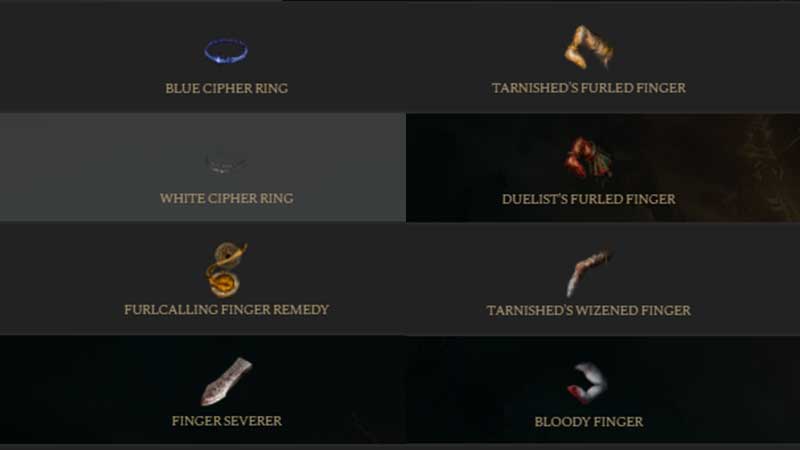
Unlike other games where you have to invite and add players to your team via the menu options, in Elden Ring, you have to use in-game items. Each summoning item has a different purpose.
Furlcalling Finger Remedy
This item will show coop and competitive multiplayer signs. You will see co-op signs in Gold whereas the competitive signs will be shown in read. Multiplayer will start when you summon a player from a different world through their sign.
Finger Severer
When the Host of Fingers uses this item, the selected summoned player will be sent back to their world. It can also be used by the summoned player to go back to own world.
Tarnished’s Furled Finger
This will create a summon sign for coop multiplayer. You must beat the area boss of the world where you were summoned.
Duelist’s Furled Finger
This will create a summon sign for competitive multiplayer. You must beat the Host of Fingers of the world where you were called upon.
Bloody Finger
With this item, you can attempt to invade a player’s world. If it’s successful, then you will have to defeat the Host of Fingers of the world where you were summoned.
Blue Cipher Ring
This Ring will put the wearing character in “ready” mode if someone calls for rescue in another world. And once you are summoned, you enter as a hunter.
White Cipher Ring
This will let you automatically request a hunter from another world to help you out when your world has been invaded. Basically, it brings you recuers, but note that it may not work in some situations.
Taunter’s Tongue
This will bring in the invaders without any Furled Finger cooperators present. Plus, it will also reduce the time between windows of opportunity for invasion. That’s not all – this will also allow the arrival of a second invader.
Tarnished’s Wizened Finger
With this item, you can write messages which will be sent to other worlds and players can read them.
Small Red Effigy
This will send a competitive sign to a summoning pool.
Small Golden Effigy
This will send a summon sign for coop multiplayer to a summoning pool.
Based on these, choose the type of multiplayer you want to participate in and get that item. The main categories of multiplayer are cooperative, invasion and competitive. Select Multiplayer from the main menu to see your Multiplayer items.
That’s basically how to play Elden Ring with friends and more uses of multiplayer items for summoning, coop, invasion and competitive purposes.