
Do you want to know how to play CSGO after the release of CS2? Being an overhaul of Counter-Strike: Global Offensive, Valve has introduced many groundbreaking features and changes into the sequel. As with players who have spent endless hours grinding, letting go of this iconic game might not be easy. Luckily, you can play CSGO but it requires completing some steps. But note that there are also limitations that may follow. Don’t worry, check out our guide to find out the exact steps to play Counter-Strike: GO after the Counter-Strike 2 release.
If you are new, check out our CS2 beginner’s guide for the best tips for new players. Also, find out why are the queue times so long and how to fix the Community Servers not working issue.
How to Play CSGO After CS2
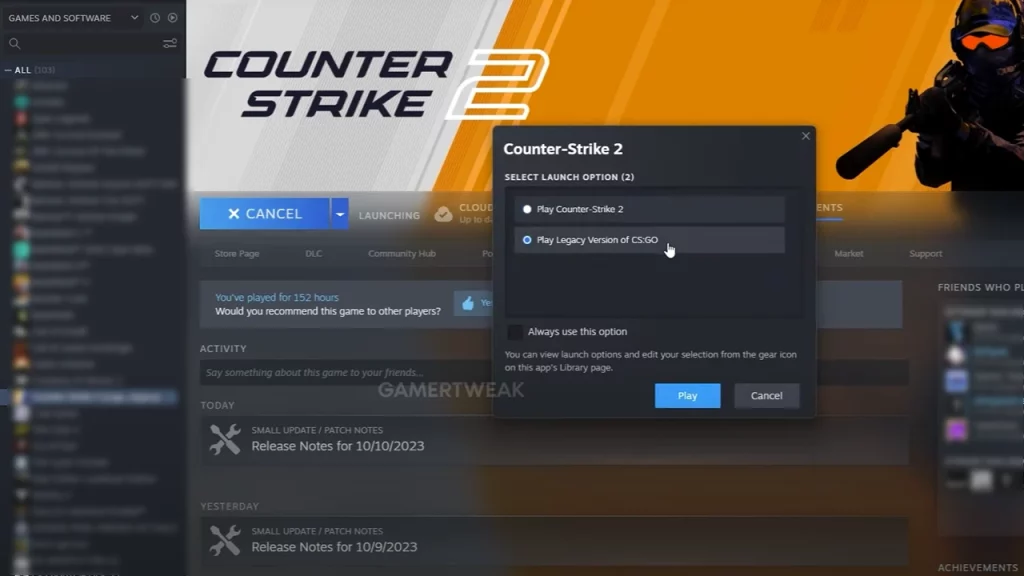
Here’s how to play CSGO after the Counter-Strike 2 launch:
- Launch the Steam client and head to the Library.
- Right-click on Counter-Strike 2 and select the Properties option.
- Head to the Betas option on your left pane.
- Toggle the drop-down menu next to Beta Participation.
- Select the csgo_legacy – Legacy Version of CS: GO from the drag-down menu.
- Close the properties and launch the game.
- You will get the following two options as you do so:
- Play Counter-Strike 2
- Play the Legacy version of CS: GO
- Select the second option and press the Play button to confirm the option.
Validating these files may take some time depending on your PC specs. But once all the files are validated, it will launch Counter-Strike 2 successfully. The support for the Legacy version will end on January 1, 2024. However, it’s worth noting that there is a huge downside to launching CSGO. You cannot play the game since there are no working servers or matchmaking due to the CS2 release. Nevertheless, you can access the workshop maps or the private matches against bots. But for playing against other players in Ranked or Casual matches, you must launch Counter Strike 2.
That’s all about how to play CSGO After CS2. If you found this guide helpful, explore more Counter Strike 2 Guides in our dedicated section right here on Gamer Tweak.











