Many players are facing controller issues on Persona 4 Arena Ultimax on PC and need a fix. It is a fighting game starring popular Persona characters. The game is not only a good fighting game but also doesn’t require a very high-end system for you to play. Thus making it very accessible to many players, but the controller bug can be a problem. So in this guide let us take a look at how to fix the Controller not working issue on PC for Persona 4 Arena Ultimax (P4AU).
How to Fix Controller Not Working on PC for Persona 4 Arena Ultimax
There are three ways to fix controller not working on PC for P4AU on PC and they are:
- Check if it is Connected
- Check if your Controller is Working
- Use Steam Input
The first two are general fixes and the last should work if you don’t get a problem in the first two fixes. Let us check what you need to do in the above fixes.
Check if it is Connected
This is a basic mistake that anyone can do. Check if you have properly connected your controller. If you have a wired controller then simply check if the wire is connected from both ends. As for a wireless controller check if your Bluetooth is connected. In case you use a third-party controller that uses a receiver then check if it is connected properly.
Check if your Controller is Working
Another simple fix, check if your controller works. You can test if your controller works by playing other games. Alternatively, you can also press Win + R and type “joy.cpl”. This will show you all the connected controllers and here you can test if your controller works or not. Another thing that is easy to miss is using empty batteries. If your controller uses batteries then replace them with new ones, and try using your controller again.
Use Steam Input – Persona 4 Arena Ultimax Controller Fix PC
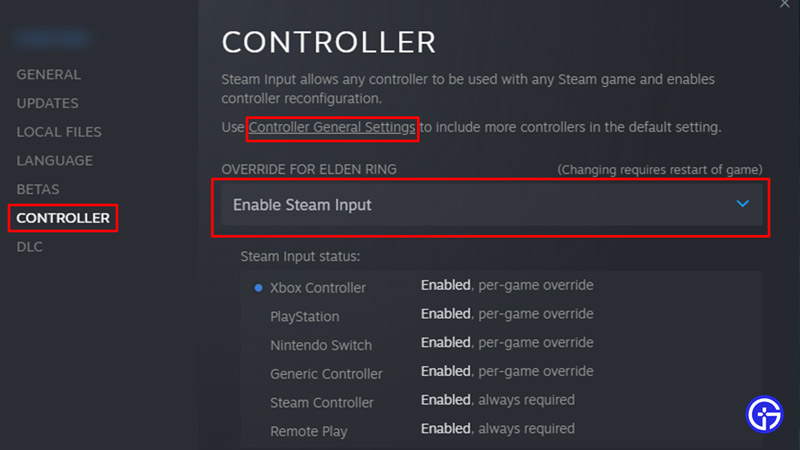
If the above fixes didn’t work this will help you out.
- Launch Steam and go to your Library.
- From your Library look for Persona 4 Arena Ultimax and right-click on it.
- Here, select Properties.
- Now click on Controller.
- Click on Controller General Settings and check the Configuration support for your controller. So if you use an Xbox controller then check Xbox Configuration Support.
- You will find it is set as Use default Settings. Change it to Enable Steam Input.
After you follow the above fixes your controller should start working again.
That sums up this guide on how to fix the controller not working issue for Persona 4 Arena Ultimax (P4AU). If you like playing this game then you should also check our P4AU Tier List.