Several players in the Roblox community are bugged with an error stating that their version is out of date. As the players launch a game or an experience, they are prompted with an error code 280. This error leaves players no choice other than to select the Leave option to exit from the launcher. While there can be several reasons for this error, the solution is pretty simple. So, here’s our guide on how to fix the version of the Roblox out-of-date issue or the Error Code 280.
How to Fix the Version of Roblox Out of Date Issue (Error Code 280)
As mentioned before, there could be several reasons for Error code 280 to occur. Upon launching the Roblox game, the launcher will automatically update it to its latest version. You can also restart the Roblox player and your device to resolve the issue. However, if you are still facing this error, follow the mentioned below methods:
Set the Right Time & Date
This error can occur due to the wrong time and date on your system device. Follow these steps:
- Hit the Win or Start button and search for Settings.
- As you open Settings, search for Time and Language on your search bar.
- Toggle the option to Set time automatically and apply the correct Time zone.
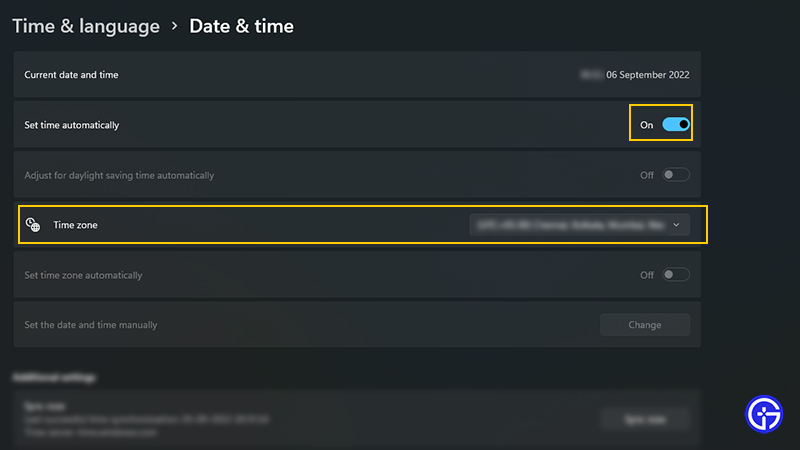
- Click on Save to save your applied settings.
- Now, launch any game or experience on Roblox to check if the issue persists.
If it does, try out the next method to resolve this issue.
Reinstall Roblox App or Launcher
- If setting the above method didn’t work out for you, we suggest reinstalling Roblox Player.
- Head over to the Control Panel and select the Uninstall a Program option.
- Once you have uninstalled it, head over to the Roblox website (link) to download it back again.
That’s everything covered about how to fix the version of Roblox out-of-date issue. If you liked this guide, check out our other guides in our dedication section for Roblox. You can also check out our massive lists of Roblox Game Codes and Roblox Promo Codes for plenty of free rewards right here on Gamer Tweak.