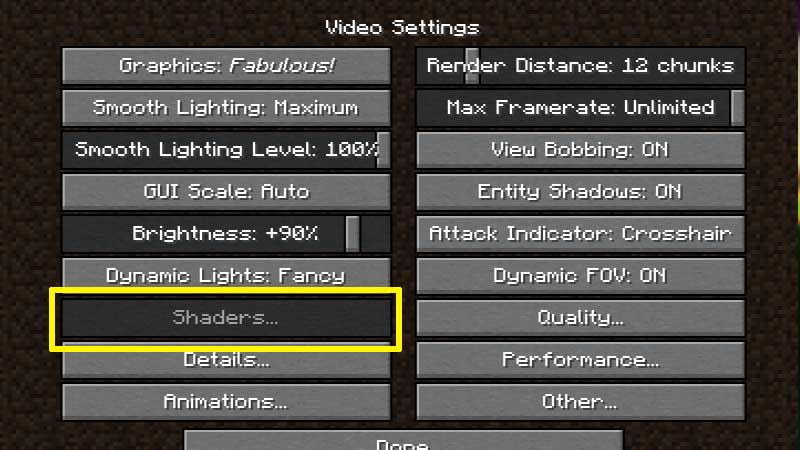
Why are my Optifine 1.17 Shaders not working and greyed out? If this is what you are thinking then keep reading to know more about it. After downloading the newest version and trying to install Shaders, the shader button looks gray and is not getting clicked. Is it a bug and is there a fix?
Optifine 1.17 Shaders Button Not Working and Greyed Out Fix?
Minecraft 1.17 is a massive update and it has made a lot of changes to the back end of the game. This is why the Shaders are still being worked on and it will take some time. There is no ETA as of now, according to @OptiFineNews – the official verified account on Twitter. But when the development is complete and compatibility is taken care of, the Minecraft Optifine 1.17 Shaders not working issue will get sorted. They won’t be grayed out anymore and you can click it easily.
Make sure to stay updated with the latest information by following the official social media channels and turning on the notifications. The devs have promised to keep players updated about any ETAs right there. On June 12, 2021, the team mentioned that OptiFine 1.17 is now 82% complete so the release date doesn’t seem too far! But again, there is no confirmation.
OptiFine 1.17 Preview
They have also posted another tweet with a pre-release version of 1.17:
(PREVIEW) #OptiFine 1.17 G9 pre21 has been released. #OFPRE
- Download (Make sure to click on “Preview Versions”)
- Changelog
- Here’s the Changelog info related to Shaders:
OptiFine 1.17_HD_U_G9_pre21
– not working: shaders
(PREVIEW) #OptiFine 1.17 G9 pre21 has been released. #OFPRE
📥 Download: https://t.co/7QUD3exfJu (click on "Preview Versions")
📄 Changelog: https://t.co/Xb7XAQEWB7If you find any bugs, please report them on GitHub! https://t.co/5TqNF1xNuB
— OptiFine (@OptiFineNews) June 12, 2021
So, all we can do this point is wait until the development is fully done.
That’s everything known right now about the Optifine 1.17 Shaders greyed out issue. We will update this guide with more information as soon as it’s available. Meanwhile, don’t miss out on the huge number of things you can do in the Minecraft Caves and Cliffs update.