To enable cross-progression in Modern Warfare 2 & Warzone 2, players will have to link and merge their gaming account with their Activision profile. By doing this you won’t have to replay the game when you start on a new console/PC, and you can continue using your favorite weapons, attachments, and more in MW2 or Warzone 2.0. If you are not sure how to do it, this guide will come to the rescue. Here’s how to merge accounts in MW2 for PS4, PS5, Xbox, and PC users.
How to Link & Merge Account in MW2 & Warzone 2
- First, head to callofduty.com via your browser.
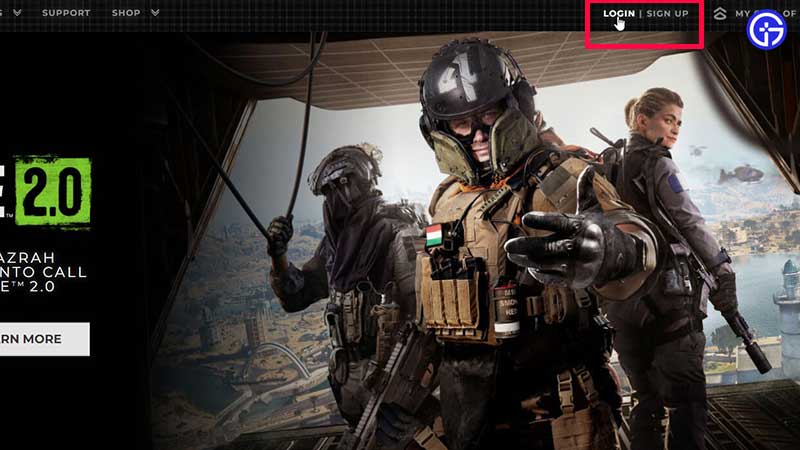
- Sign into your COD account. You can do so by entering the credentials of your PSN/Xbox/Steam or Battle.net account.
- Once you are logged in, check your profile name at the top right of the screen. Then, click on Linked accounts from the drop down menu.
- Under Account Linking, choose the Gaming Networks that you wish to link through which you would like to save your progress across platforms.
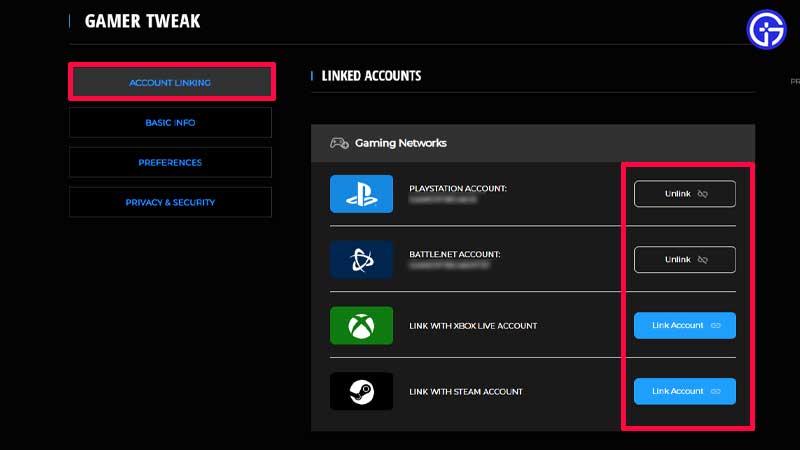
- Complete the steps to connect your accounts and you will be ready to get right into the game.
- Now whenever you wish to switch to a different console or computer, your progress will be right where you left off.
How to Unlink Accounts for MW2 & Warzone 2
- To unlink a particular account, all you have to do is log in to Callofduty.com and click on your profile name at the top right of the screen.
- Next, click on Linked accounts > Account Linking.
- From here, you will be able to click on the unlink button next to the gaming network you wish to remove your game’s connection with.
- The last step is to confirm your action and click on Continue.
You may need to do this if you linked your Activision account to the wrong Battle.net account. Do keep in mind that games that have cross-progression will store the game progress on your Activision account and not your platform account. This is how the progress and content will carry over.
Another important thing to note is that you may unlink individual platform accounts from an Activision account once every 12 months. So do it wisely.
For more related to MW2 and Warzone 2, check out our guides on Gamer Tweak.