Home > Minecraft > Minecraft Launcher Is Currently Not Available In Your Account

Minecraft Launcher Is Currently Not Available In Your Account (Fix)

Published Date :

While one of the most famous sandbox video games developed by Mahjong, Minecraft is home to strange bugs. Over the year numerous issues have been part of the classic dungeon crawler. Each error has a dedicated error code and a new one has surfaced among players. Recent complaints have been regarding error code 0x803F8001 with the display Minecraft launcher is currently not available in your account and players are looking for a fix. If you are looking for the same, look no further as we have you covered.

Error Code 0x803F8001 Minecraft Launcher is Currently Not Available in Your Account Fix
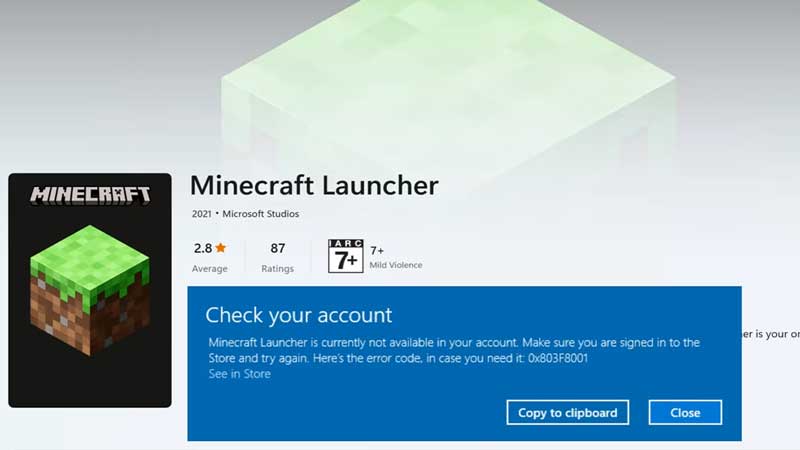
Minecraft Launcher is Currently Not Available in Your Account Fix

While this is not quite frequent, the reason behind it seems to be downloading the game from the Minecraft site. Here are a few things that you need to do in order to fix the Minecraft Launcher Error Code 0x803F8001:

  • Firstly, you need to remove the already installed game from your PC. You can do this from the Settings of your PC.
  • Next, make sure that the timezone and region of your PC are correct. While you are at it, make sure that the Set Time Automatically button is turned on.
  • Once this is done, head over to the Microsoft Store on your PC. Next, click on the Profile on top and then click Sign Out.
  • This next step is quite important, as you head over to the Settings, click on Apps, and open App Features. Once open, select Microsoft Store using the three vertical dots on the right. Click on Advanced Options and then scroll down to the Reset option.
  • Additionally, as the Reset is complete you will have to restart your PC before moving ahead.
  • And then the final step is to open Microsoft Store and Sign In to your account. Along with this, you need to install Minecraft Launcher but from the Store itself.

That’s all you need to fix Error Code 0x803F8001 Minecraft Launcher is Currently Not Available in Your Account. While you are here, make sure you check out our Minecraft guides, tips, and tricks with Gamer Tweak.

  • +1 Speed Evolve Codes (July 2026)

    +1 Speed Evolve Codes (July 2026)

    Published Date :

    Speed-based games on Roblox will always stay popular, and this particular experience is quite addictive! Here, you play as an animal and your goal is to evolve into stronger animals, unlock new worlds, and be the fastest player on the server! +1 Speed Evolve codes offer free Speed and Win Boosts that can make your… Read More

  • Yeet a Brainrot Codes (July 2026)

    Yeet a Brainrot Codes (July 2026)

    Published Date :

    If you’re annoyed at the Brainrot trend, this is your opportunity to “yeet” them into the distance! To launch Brainrots farther, you need better pets, potions, and more rewards, and thankfully, these Yeet a Brainrot codes will come to the rescue. You can easily unlock various Divine Relic Chests, Primeval Relic Chests, Coin/Luck/Power potions, exclusive… Read More

  • Build A Soccer Squad Codes (July 2026)

    Build A Soccer Squad Codes (July 2026)

    Published Date :

    To build your dream team, you’ll need plenty of rerolls and shop refreshes, which is how you can get better cards and complete your collection. Build A Soccer Squad codes can help with exactly that, giving you various freebies so you get more chances to improve your lineup without waiting. Here’s the complete list of… Read More

  • Aura Monster Simulator Codes (July 2026)

    Aura Monster Simulator Codes (July 2026)

    Published Date :

    Climbing an endless staircase might sound simple at first, but the higher you go, the more Aura you’ll need to keep progressing and unlock stronger upgrades. Thankfully, Aura Monster Simulator codes provide free Gems and Aura Boosts, helping you strengthen your character and reach new heights. More specifically, you can use these Gems to unlock… Read More