
Developers have begun to roll out COD Modern Warfare 2’s Beta version with tons of new in-game features. The game offers multiple gaming modes that can keep you entertained. This game is known for its multiplayer matches that are intense yet fun to play. Meanwhile, players enjoy these modes on random servers, it is also possible to Add and Invite friends so that you can play multiplayer games with them in COD MW2. If you are looking for how? then this article got you covered. Check out this guide and know how to do so in this game.
How to Play with Friends in Modern Warfare 2
Here’s how to add and invite friends to play matches with them and redeem all the fun:
How to Add Friends in Modern Warfare 2:
- Launch the game and enter the Main Menu screen.
- Further, enter the Social tab.
- From there, click on Add Friends option and enter their Activision ID.
- Thereafter, click on the Send Request button next to it.
- They’ll be added to your friend list as soon as they accept your friend request.
- However, if you don’t know how to find the Activision ID, then follow these steps:
- Enter Settings and navigate to the Account & Network tab.
- Further, click on Activision Account to retrieve the ID.
How to Invite friends in Modern Warfare 2:
- Enter the Hub section in the Social tab.
- Later, click on Your Party and select the Invite to Player option.
- Thereafter, you can select your friends from the list to invite them to Modern Warfare 2.
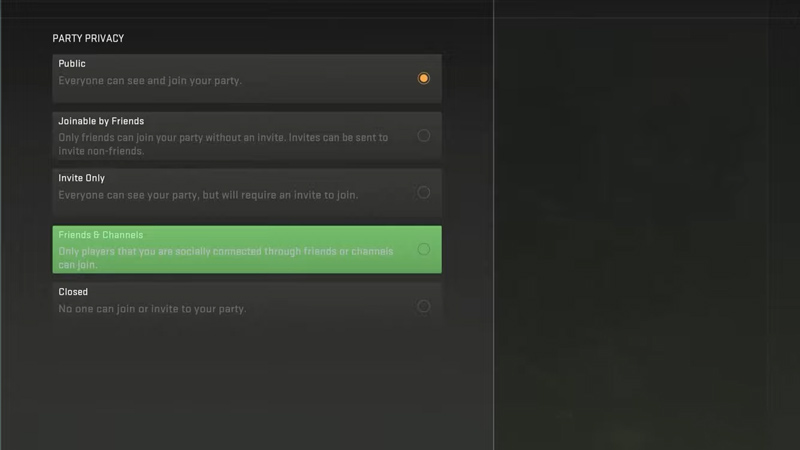
- Also, it is possible to change Party Settings to:
- Public – Everyone is able to join your party.
- Joinable by Friends – Only your friends will be able to join your party.
- Invite Only – Only those who are invited can join the party.
- Friends & Channels – Players with whom you are friends or are connected through Channels can join.
- Closed – No one can join or invite you to your party.
That’s all you have to do in order to invite and play with your friends in MW2. If you found this article helpful, then make sure to check out our other guides on COD MW 2 guides.










