In this game, players can customize their own mushroom, choose from different classes, create their garden, go mining, defeat dangerous enemy bosses, compete with different alliances alongside their friends, and take advantage of all the other features this RPG offers. However, partaking in all these various in-game activities can get monotonous after a while. To deal with this, you can add friends in Legend of Mushroom and invite them to play with you.
Additionally, apart from curing your boredom, your friends can also help you earn Gold. This is because every single player in your friend list will give you 2000 Gold every day once the server rests. Here’s how you can complete this process by using a few simple steps.
How to Invite Friends in Legend of Mushroom
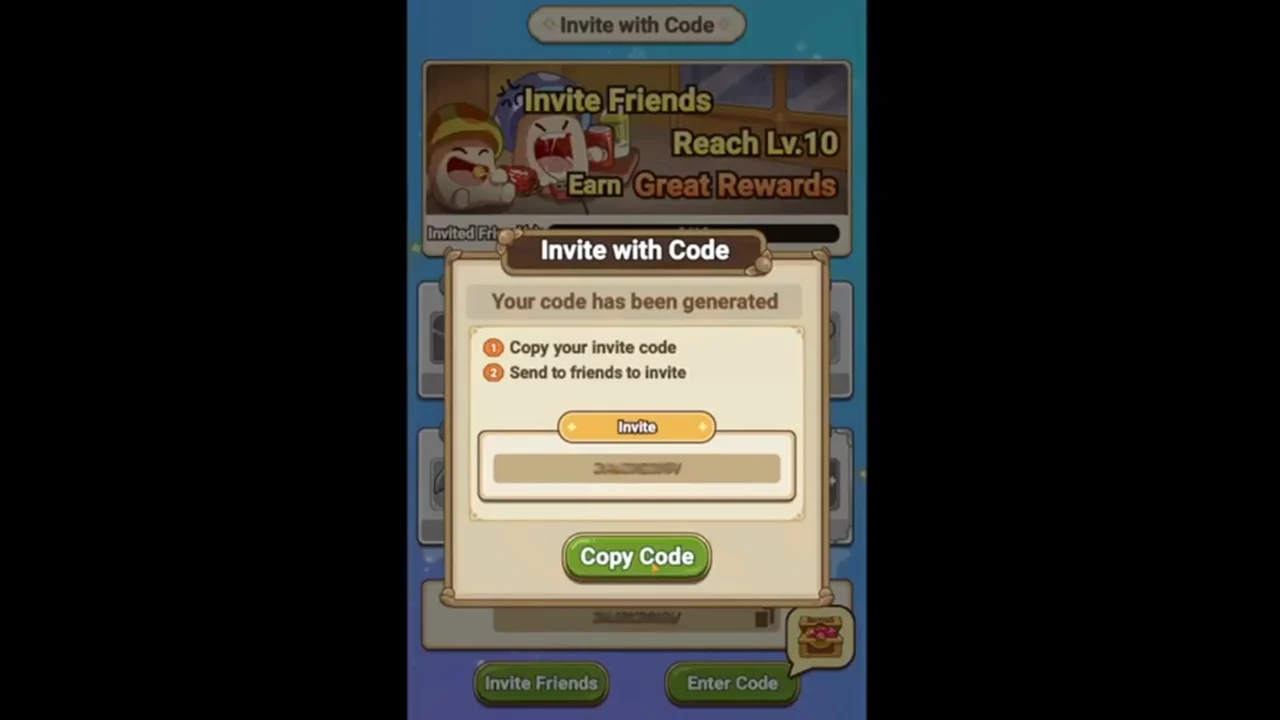
To quickly add your friends in the game so that you can fight dangerous dragons with their help, here’s everything you need to do –
- Once you have launched Legend of Mushroom on your device, click on your mushroom’s icon which is located in the top left corner of the screen.
- Once the menu opens up, select the ‘Invite‘ option.
- Click on the ‘Invite Friends‘ option that appears towards the bottom of the screen.
- A unique code will be generated, click on the ‘Copy Code‘ button and send this invite code to your friends. They can then use this code to add you as their friend.
Additionally, you can follow the same process if you want to use the code that is sent to you by your friend. Once you click on the ‘Invite‘ option from the menu, instead of clicking on the ‘Invite Friends’ option click on ‘Enter Code.’ Paste the invite code that is given to you by your friend and add them.
Once you have followed this process and added all the players you want, click on the ‘Friend‘ option from the menu to check the list of all the new friends you have in Legend Of Mushroom.
Here, you will also have the option to ‘Claim and Gift All‘ that you can use. Apart from this, you can also check the requests you have received from other players by accessing the ‘Friend Requests‘ option.
This is everything you need to know if you want to add friends to Legend of Mushroom. If you are interested in learning more about this game, don’t forget to check out the Legend of Mushroom class tier list and use all the Legend of Mushroom codes to redeem free goodies in the game.