Ark Survival Ascended, the latest installment in the survival adventure series reimagines everything from exploration to the unique creatures & dinosaurs available to interact with. Players can take this gameplay experience even further and improve it by learning how to install mods in the game. With each mod, you will be able to add in different species of dinosaurs or even slot in some useful equipment like the Super Spyglass and a bunch of maps.
Having said that, it is worth mentioning that since Ark Survival Ascended is still in its early access, there won’t be a long list of mods available for players just yet. However, more mods will be added in as the game goes on in its early access. And with the mods available, players can still drastically improve their experience and even make it fun while playing with their tribe of friends. So if you are looking to make things interesting and wondering how to install mods, then here is a guide with everything you need to know.
How to Install & Activate Mods in Ark Survival Ascended
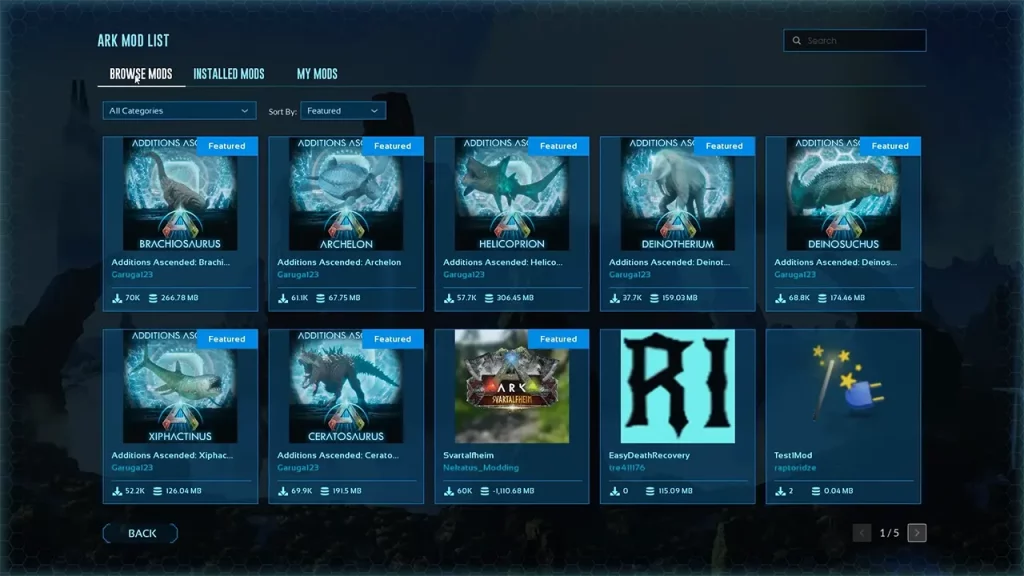
To install mods in Ark Survival Ascended, players will have to first open up the Mods List option from the game’s main menu. After which here are the steps you can follow to install the mods available:
- After selecting the Mods List option, you will come across several mods in the game.
- In the Browse Mods tab, you can search for the mods you are looking to install.
- Once you come across it, simply select and click on it.
- After which you will come across the mod description and an Install option on the top left corner.
- Once the mod is installed, head back to the main menu in the game.
- Here, select the Create or Resume Game option and head over to the Mods Settings tab.
- After that, select the Available Mods option and click on the mod you want to activate.
- You can activate the mod by pressing the Activate button at the bottom of the screen.
You can then find all the activated mods in the Active Mods option in Ark Survival Ascended. It is worth mentioning that you can increase and decrease the priority of all the active mods in the game. Players can also simply deactivate or update the mod by selecting the specific mod and clicking on the options available at the bottom.
How to Find Mod ID in Ark Survival Ascended
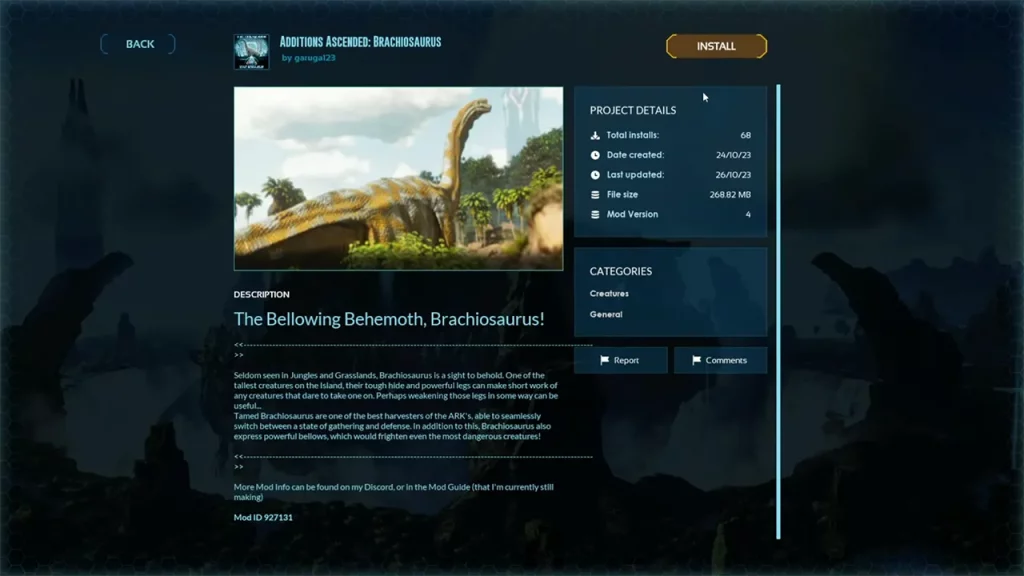
To find Mod ID in Ark Survival Ascended, you will have to head over to the mod description. Here are the steps you can follow to find the mod ID:
- Head over to the Mods List section in the main menu.
- Browse the mod of which you want to find the ID.
- Simply select the mod and head into the description.
- Once done you will come across the Mod ID at the end of the description on the left.
That’s everything covered on how to install mods in Ark Survival. For more interesting guides like these, check out our dedicated Ark Survival Ascended section, right here on Gamer Tweak.