
ATS or Vault-tec Assisted Targeting System was first introduced in Fallout 3. Under VATS, players could slow down time and deliver critical hits to different body parts rendering them useless. While this was a brilliant feature, players became quite a lot dependent on it. VATS is also featured in Fallout 4 with a few minor tweaks. If you have not used this mechanism in Fallout 4, we recommend you go through this guide to know how to use VATS and get on to dominating the wastelands.
How to Use VATS in Fallout 4
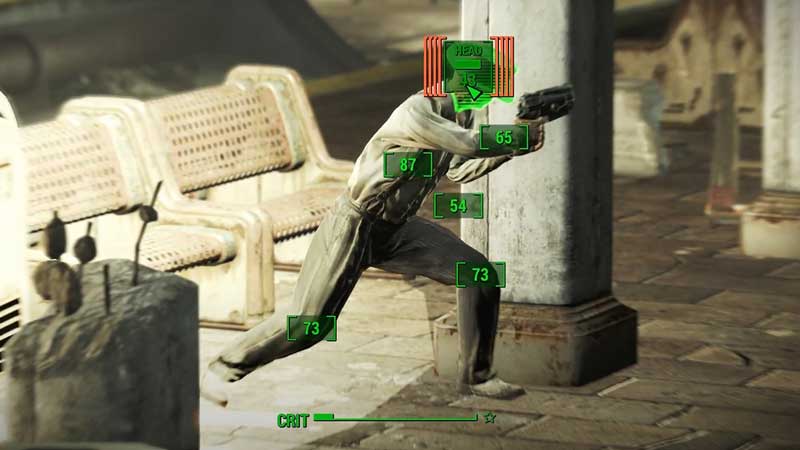
VATS is a brilliant feature of the game. It is advantageous in slowing enemies with a leg shot, rendering their arm useless with a bullet, or even a quick headshot. Here’s how you can use VATS in the game:
- VATS can be activated by pressing Q on PC, L1 on PS4, or LB on Xbox.
- Once activated, time will slow down for you to select one of the numbered boxes on your enemy’s body parts.
- These numbered boxes are the percentage of successful hits so choose wisely.
- Additionally, hovering above these boxes show the potential damage that can be dealt with.
- To use VATS, you will need to have Action Points which basically is your Stamina.
Any stamina-related activities, sprinting, use of melee and VATS will reduce your stamina. We recommend using a smaller size gun like a pistol while using VATS. This reduces the action points consumption to a certain limit. This problem is such that you might lose stamina and won’t even have time to reload if your ammo ends while using VATS.
Additionally, using VATS is a limited time period in which you have to actively take a decision. Use the percentage bar and potential damage bar wisely and you will soon be able to master this amazing mechanism.
That’s all you need on how to use VATS in Fallout 4. While you are here, make sure you check out our Fallout 4 guides, tips, and tricks with Gamer Tweak.











