Home > Roblox Guides > How To Rebirth In Pet Simulator 99

How To Rebirth In Pet Simulator 99

Published Date :

Rebirthing is one of the most common features appearing in Roblox Games. The benefit of performing a Rebirth is that it provides you with a reward or a permanent upgrade. But there is a catch. It resets all your stats and everything else that you have unlocked in-game (like currency). In a game like Pet Simulator 99 where having strong Pets is a must, this Rebirth feature can serve greatly.

Since many of you might be unaware of how it works, we are here to explain it. So if are interested in learning about how to Rebirth in Pet Sim 99, this is the perfect place to start.

Here’s How to Rebirth in Pet Simulator 99
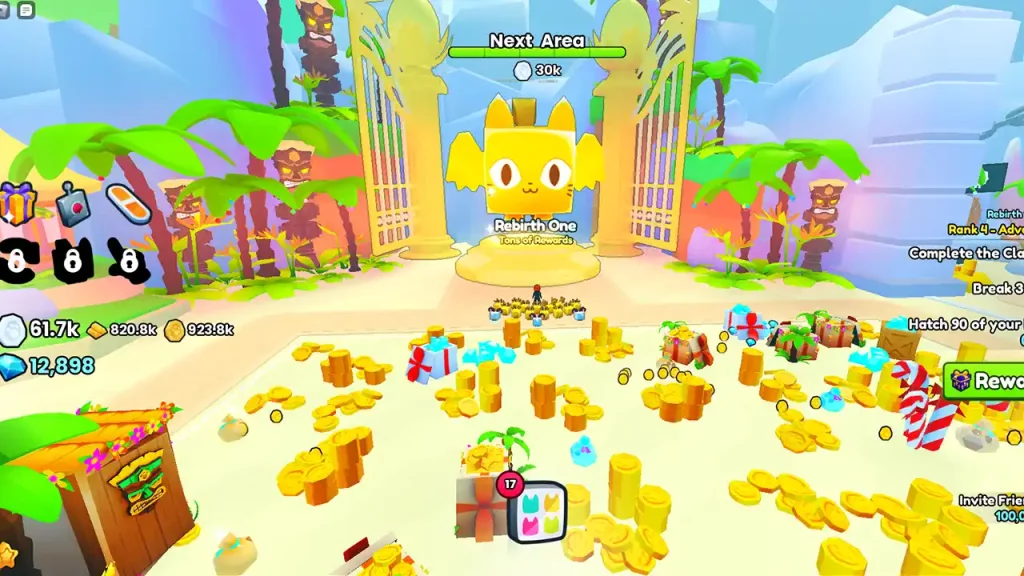
How to Rebirth in Pet Simulator 99

First of all, make sure that you have unlocked Area 25 (Tiki) because that is where you can perform your first Rebirth. In Area 25, you will find a giant golden cat statue. Go to that statue and press E and click on the green ‘Rebirth’ button on the screen. Once you do so, all of your coins and unlocked biomes will be lost. However, you will also get the following rewards from it:

  • Teleport (Portable Cannon)
  • Increased pet strength (75%)
  • Castle Key
  • 10,000 diamonds

While this was about your first Rebirth, you will get different rewards the second time. Speaking of it, you can Rebirth again after reaching Area 50 in Pet Sim 99. During this time, you will get the following items:

  • Clans
  • Auto Hatch
  • Increased pet strength (75%)
  • Huge Pets can be hatched (Only applicable to Egg 76 as of Update 2)
  • 25,000 diamonds

One important thing to note here is that once you have exhausted your Rebirth in Area 25 and Area 50, you won’t be able to use it again. You will have to wait until further areas are introduced in the game. Lastly, thanks to Pet Simulator Fandom for providing us with all the information.

That covers everything about our topic. Now that you know everything about the Rebirth feature, why don’t you expand your knowledge by checking out our Pet Simulator 99 Guides on Gamer Tweak?


  • Clean the Squishies Codes (July 2026)

    Clean the Squishies Codes (July 2026)

    Published Date :

    There’s something surprisingly satisfying about picking up the cute Squishies and putting them back on their designated shelves. If you’re interested in getting some unique rewards including free Squishies, this guide is for you. Here’s the complete list of all the working rewards. Last checked for new codes on July 13, 2026 All Clean the… Read More

  • Scratchy Loot Codes (July 2026)

    Scratchy Loot Codes (July 2026)

    Published Date :

    If you want a little luck boost while playing Scratch Loot, codes come to the rescue! In this experience, you scratch cards, reveal symbols, earn coins, and keep upgrading to get better rewards. To make this journey easier, the developers regularly release codes, and if you don’t want to miss out, redeem the freebies mentioned… Read More

  • My Squishy Box Store Codes (July 2026)

    My Squishy Box Store Codes (July 2026)

    Published Date :

    Every new customer brings another opportunity to grow your business and expand your collection of adorable squishies. To help you even more, the devs release My Squishy Box Store codes that provide free cash and in-game items. These freebies that can help you upgrade your shop faster and earn more while handling a steady flow… Read More

  • GTA 6 Players in Australia May Need Age Verification Due to New Online Safety Rules

    GTA 6 Players in Australia May Need Age Verification Due to New Online Safety Rules

    Published Date :

    Australian players could have an extra requirement to meet before accessing Grand Theft Auto VI’s online features. Under the country’s updated online safety regulations, games classified as R18+ may need to verify that players are adults instead of relying on a simple age confirmation (as per news.com.au). If GTA 6 falls under those requirements, Rockstar… Read More