
You can get fireworks in Minecraft and for that you need a Firework Rocket. Players can set off decorative explosions in the game that have an added effect on the creatures that dare come in its path. To know more about how to make a Firework Rocket in Minecraft and all the combinations you can use, keep reading this guide till the end.
How to Craft Fireworks in Minecraft?
You need 1 Paper and 1 Gunpowder to craft the basic Firework Rocket in Minecraft. With more of Gunpowder, you will be able to increase the time for which the Rocket flies. In the 3×3 crafting grid, make sure to place the paper in the top left section and gunpowder in the box next to it. With this Minecraft Firework crafting recipe, you can get the basic rocket which will appear on the right side. After that, you need to move the Firework Rocket to your inventory.
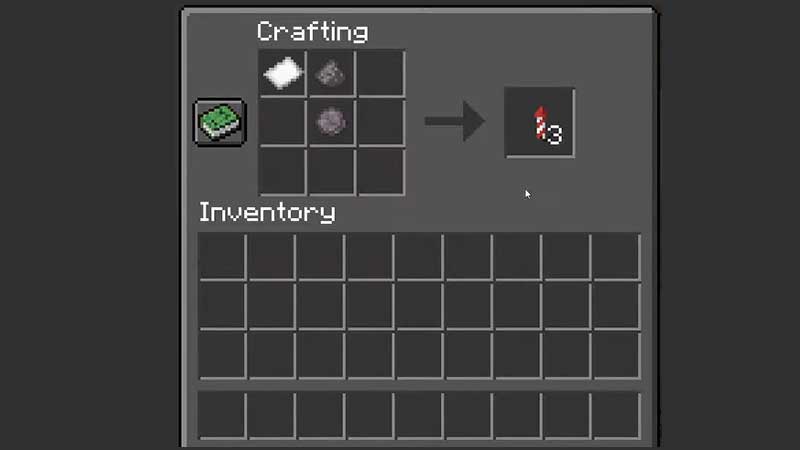
As mentioned before, the more gunpowder you use, the longer the flight duration will be. So with 1 gunpowder, the duration is 1 while with 3 gunpowder, it will be 3.
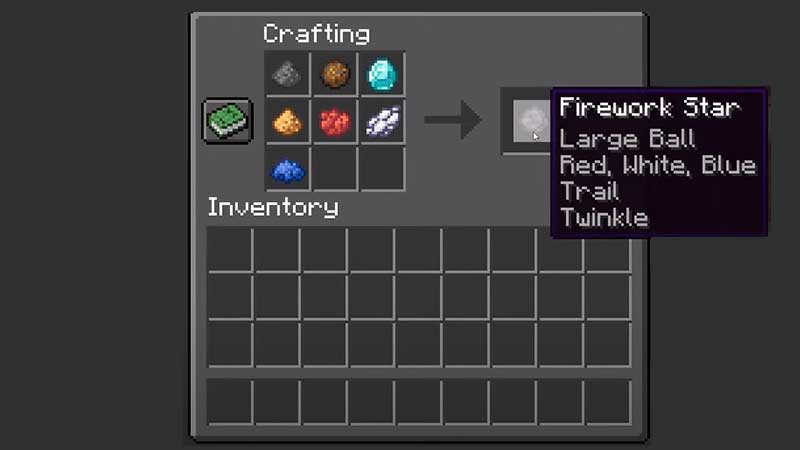
Also you need to remember is that when you add a Firework star to the mix, you will get the explosion effects. It will change the color, shape and overall effect. You can create it with gunpowder and matching dyes (up to 8 dyes) which will determine the color of the explosion effect. There’s more stuff you can add:
- Fire Charge: It will create the effect of a large ball exploding with a heavy sound.
- Gold Nugget: It will create a star shaped explosion.
- Head: This will create a creeper-face-shaped explosion.
- Feather: This will give it a burst explosion effect.
- Glowstone Dust: There will be a crackle effect with sounds and your firework will twinkle.
- Diamond: There will be a trail effect after the firework explodes.
- Glowstone Dust + Diamond: You will get the combined effect of twinkling and trail in your explosion.
Moreover, when you match Firework star with any dye, you will get the Fade to Color effect.
How to Launch Minecraft Fireworks
To create the epic Minecraft Firework display, you need to use it on a block which will set it off immediately. In case you want to activate them at a particular time, you can put them inside dispensers and use redstone to launch them. You can also use a crossbow for this purpose. Note that if you shoot a firework from a Multishot Crossbow, then 3 Firework Rockets will get launched having the same effects.
Minecraft Fireworks and Elytra
Another side note to keep in mind is that if you use a Firework rocket while flying with Elytra, you will get propelled in the direction you are facing. It’s a flying boost that can come in handy and how long you fly will be based on the gunpowder amount. If the rocket has a Firework star then you will end up taking damage when it eventually explodes so be careful.
That’s everything about how to make a Firework Rocket and launch Fireworks in Minecraft. For more hidden secrets and crafting that you can do in this game, check out our Minecraft guides.











