Cross play is an important feature which takes Call of Duty: Warzone to a whole another level. If you can’t wait to play with your friends on different platforms, this guide will show you how cross platform play really works in COD Warzone.
Call of Duty: Warzone – How To Enable Cross Play on PS4, Xbox and PC
Players across different platforms can play COD Warzone and Modern Warfare easily and it works pretty well. Activision has provided cross-platform support where you can join your friends and play together. Let’s find out how to enable cross-play on PC, PS4 and Xbox One.
The first thing you should do is this:
- Go to Options from the main menu
- Select Account
- Enable Crossplay and Crossplay Communication
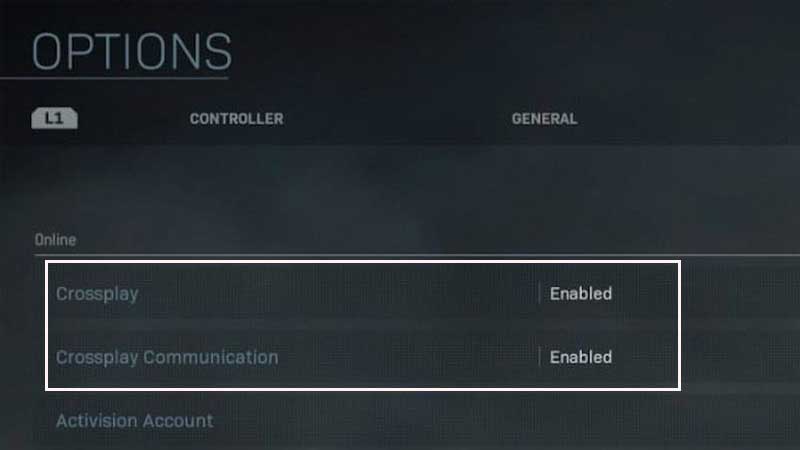
Once these are enabled, you need to check that they are indeed enabled. After that, your next step is to add friends to your party. Here’s how:
If you are on the PlayStation 4, press triangle and if you are on the Xbox One, press Y. This will open up the ‘Add Friends’ menu. Check out the drop down called “Search Friend Using“. This is what you will see:
- Add friends through the Activision account
- Add friends through the PSN Online ID
- Add friends from other console
- Add friends from PC
The best way to add friends on COD Warzone is to get your friends to sign up for the Activision account, if they haven’t already. Once their account is up and running, simply type their Activision ID and your friend invite will be sent.
Next, your friends need to accept your invite and that’s pretty much it. This is how to set up cross play in COD Warzone for PS4, Xbox and PC. Note that this is how you can enable crossplay in Modern Warfare as well.
How to Disable Cross Play in COD Warzone
In case you want to disable cross platform function in Call of Duty: Warzone, here’s how you can do it.
- Go to Options
- Select Account
- Change the Crossplay and Crossplay Communication settings to Disabled
That’s it. Very simple! Thanks to such a seamless way to enable and disable cross play on PS4, Xbox and PC, players can have a blast with their friends despite being on different platforms.
Want more Call of Duty: Warzone guides? We’ve got you covered. Check them all out in our COD Warzone section.