In the expansive world of Once Human, players can customize and alter their characters’ appearances, allowing for a truly immersive and personalized experience. Today, we will walk you through how to change your character appearance in Once Human, from finding the necessary resources you will need for this.
How to Change Your Character Appearance in Once Human
To change your character appearance in Once Human, you’ll need to follow these steps:
- Get a Chrysalis Token: This item is necessary to change your character’s appearance and can be purchased from the in-game shop.
- Build a Floor Mirror:
- Open the build menu by pressing B on your keyboard.
- Navigate to the Furniture tab and select the Floor Mirror.
- Gather the required materials: 20 logs and 10 glass.
- Use the Floor Mirror:
- Place the Floor Mirror in your territory.
- Interact with the mirror to access the character creator and customize your appearance.
Chrysalis Token
To modify your character appearance in Once Human, you will need a Chrysalis Token. This special in-game item is the key to unlocking the character creator and changing your character’s look. To get a Chrysalis Token in Once Human, access the main settings menu and go to the in-game shop. Follow these simple steps to obtain a Chrysalis Token:
- Press the Esc key on your keyboard to open the main settings menu.
- Access the in-game shop from the menu.
- Click on the “Other” category within the shop.
- Locate the Chrysalis Token, which can be purchased for 480 Crystgin.
It is important to understand that the Chrysalis Token in Once Human is a premium item available solely through the in-game shop. As such, it is not obtainable for free through any of various gameplay mechanics, including but not limited to:
- Completing in-game achievements
- Looting during gameplay
- Participating in limited-time events
- Trading with other players
Additionally, the crafting system within the game does not provide an alternative way to acquire the Chrysalis Token. The only way to obtain this unique item is by purchasing it using Crystgin, a currency acquired with real-world money.
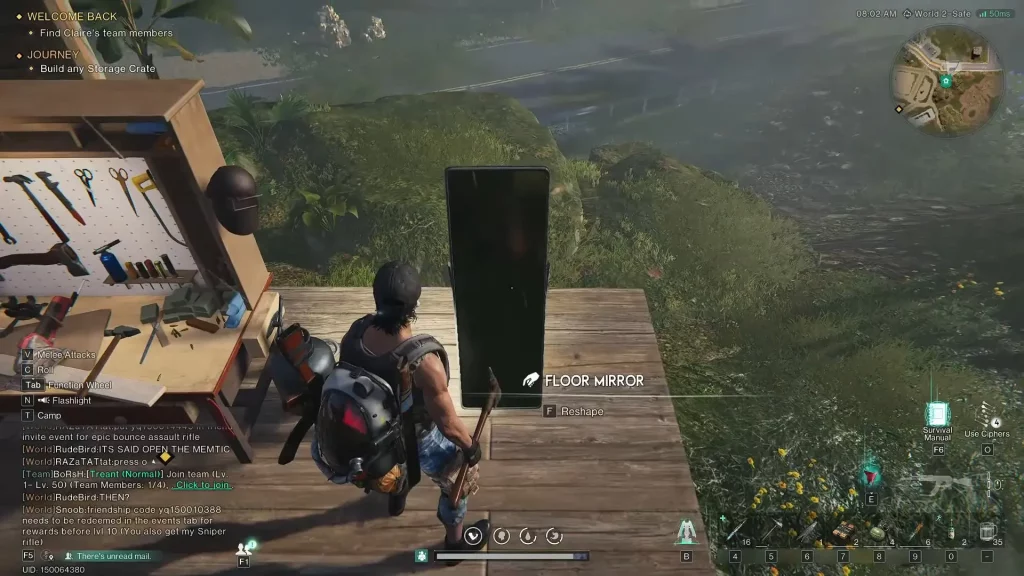
Floor Mirror
After successfully purchasing a Chrysalis Token from the in-game shop, return to the game and follow these steps to construct a Floor Mirror within your territory:
- Press your keyboard’s ‘B’ key to access the build menu.
- Navigate to the Furniture section and select “Furnishing Items.”
- Locate the Floor Mirror within this category; it requires 20 Logs and 10 Glass to build and must be placed within your territory.
Once the Floor Mirror is built and you have the Chrysalis Token in your inventory, you can re-enter the character creator and modify your character’s appearance. Remember that the token is a single-use item, so choose your preferred customizations carefully, or you’ll need to purchase another token for further changes.
That’s everything you need to know about how to change your character appearance in Once Human. If this guide helped you, check out our dedicated Once Human Guides page for more tips and tricks.