Home > Diablo 4 > How To Add Sockets In Diablo IV

How To Add Sockets To Gear In Diablo 4

Published Date :

Diablo 4 has brought back the ability to add sockets to your gear. Gear plays an important role in your build as it can dictate things like your movement speed, defense, and more. And that is where gems come in. You can use them to make your gear better. So here is a quick guide on how it works in Diablo 4.

How to Add Socket in Diablo 4
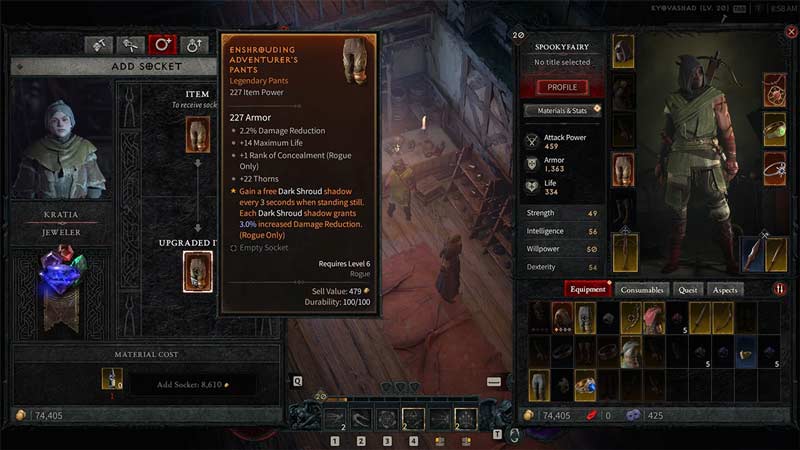
diablo 4 add socket and how gems work
Image Credit: SpookyFairy on YouTube

You need to be level 20 and have Scattered Prisms & gold on you to be able to add sockets to your gear in Diablo 4. The process is quite simple, here is what you have to do for it:

  1. Level up your character to level 20. You can do that as you play through the game. Kill various enemies, world bosses, etc.
  2. Next, go to a Jeweler. You can find a Jeweler “Kratia” at Kyovashad.
  3. A menu will open on the left, click on the third tab which is Add Sockets.
  4. Next, from the right screen drag and drop a piece of gear on the left screen. This gear will be the one where you get a new socket.
  5. Finally, spend the amount of Scattered Prisms and gold needed for it.

You will now add a socket to your gear. While getting gold is easy, you need to beat World Bosses to get Scattered Prisms.

What are Sockets used for?

Sockets are useful in Diablo IV to give an additional attribute to your gear. They don’t do anything on their own instead they make a slot space on your gear which allows you to add gems to it. And each gem has different attributes. Thus when you get a gear that has excellent but limited stats. You can improve it by adding sockets and gems to them. Some gears might also come with sockets already on them.

That covers this guide on how to Add Sockets in Diablo 4 and what they do. For more help on other topics for this game check out our guides on the best sorcerer build, character name ideas, and how to increase world tier. Also, check out our Diablo 4 section to get help with other things on this game.
  • ZZZ Version 3.0 Is the Biggest Patch Yet: Here’s What Changed and Why It Matters More Than You Think

    ZZZ Version 3.0 Is the Biggest Patch Yet: Here’s What Changed and Why It Matters More Than You Think

    Published Date :

    Zenless Zone Zero 3.0 patch is the biggest patch since the launch of this game. With the introduction of a new element, a rarity tier, a free anniversary character, and an explorable region, you will find this patch launch exciting. It is necessary to learn what you should prioritize from all of these because of… Read More

  • Anime Duelists Codes (July 2026)

    Anime Duelists Codes (July 2026)

    Published Date :

    Anime Duelists follows the tried and tested formula of spinning stars to unlock fighters, sending them into battle and collecting rewards. If you want to get unique fighters, abilities, and progress through various realms, you need these code rewards! You can get anything from free Gems, Trait Rerolls, Stats Reroll, Super Luck, Star Speed potion,… Read More

  • Mini Cup Codes (July 2026)

    Mini Cup Codes (July 2026)

    Published Date :

    In Mini Cup, you open up packs to unlock footballers, build houses, and win matches against rival teams. This makes it a perfect mix of some of the most popular gameplay loops for soccer fans on Roblox. To grow your club, you’ll need cash, as well as special packs, which is where Mini Cup codes… Read More

  • Be The Final Boss Codes (July 2026)

    Be The Final Boss Codes (July 2026)

    Published Date :

    Now you can be the final boss! In this experience, you summon minions to fight for you and take down waves of heroes. To level up, you’ll need plenty of coins and various resources, which is where Be The Final Boss codes come in handy. If you wish to boost your character and stay one… Read More