
Home > Hogwarts Legacy > Hogwarts Legacy: How To Change Time Of Day

How To Change Time Of Day In Hogwarts Legacy

Updated Date :

Do you want to know how to change the time of day or how to wait until night in Hogwarts Legacy? Well, then look no further. Skipping the time of day has been seen in several games over the years. Avalanche Software’s Hogwarts Legacy is no different as it helps players wait until the dark. This guide will show you how to pass time in the game easily.

How to Advance Time of Day in Hogwarts Legacy
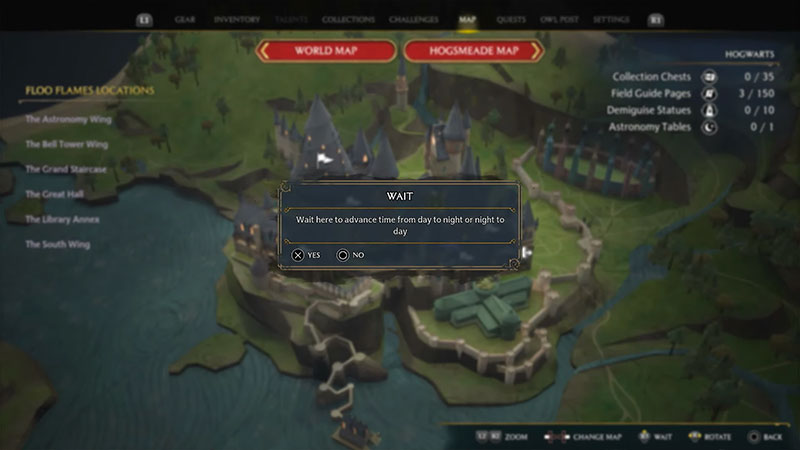
wait option hogwarts legacy

If you want to change the time of day in Hogwarts Legacy, then you will simply need to open the map and press the R3 stick on your controller to “Wait.” Now, if the time was day, then it will turn into night after you use this feature. Now that you know how to pass time on consoles, here’s how to wait until dark if you’re a PC user on Hogwarts Legacy:

On PC

  • Open the World Map of the game.
  • Now, press the “F” button on your keyboard to “Wait”.

After using the “Wait” option, you will see a cutscene of your character getting up from the ground. So now, the time of day will successfully change and you will not need to wait until night in Hogwarts Legacy. If it was day, it would turn into night and vice-versa.

While players roam around the overworld of Hogwarts Legacy, they will need to take up quests and also search for collectibles. Some of them are available during certain parts of the day. For instance, you can only attend classes during the daytime. Also, you will come across specific creatures only at night. To make this easier, Avalanche Software has added this feature to help players pass time in Hogwarts Legacy. In this way, you won’t need to waste your time at the same spot or return again at another time.

That’s all you need to know about how to change the time of day in Hogwarts Legacy. If you found this guide helpful, then do check out how to save game or use the FOV slider in our Hogwarts Legacy section on Gamer Tweak.

  • Stream a Mukbang Codes (August 2026)

    Stream a Mukbang Codes (August 2026)

    Published Date :

    Mukbang games are gaining more popularity on Roblox these days, and Stream a Mukbang is where you eat food live, gain views, likes, followers, and earn cash for upgrades. As your live videos become more popular, you’ll need more resources to keep attracting new viewers, and that’s where free rewards can make a difference. Redeeming… Read More

  • Become an Anime Billionaire Codes (August 2026)

    Become an Anime Billionaire Codes (August 2026)

    Published Date :

    In Become an Anime Billionaire, you roll for anime characters, earn money, rebirth, climb the leaderboard and this journey becomes much easier when you have plenty of rewards. Thankfully, the developers release new Become an Anime Billionaire codes pretty regularly, such as free Units, Lucky Blocks, Cash, and more. Here’s the complete list of all… Read More

  • BikeLife Society Codes (August 2026)

    BikeLife Society Codes (August 2026)

    Published Date :

    Pulling off wheelies, upgrading your ride, and traveling across the city is what BikeLife Society is all about. As you unlock better bikes and customize them to match your style, you’ll need plenty of in-game resources to keep progressing. Free rewards can make that journey much easier, so it’s always worth redeeming the latest BikeLife… Read More

  • Coach a Fighter Codes (August 2026)

    Coach a Fighter Codes (August 2026)

    Published Date :

    In this boxing game, you don’t throw the punches yourself – you’re the coach who watches matches and helps train fighters. You’re tasked with upgrading your gym, improving your roster, and climbing through stronger leagues, which is why you’ll need every boost you can get. So, make sure to redeem these Coach a Fighter codes… Read More







