
Home > Gaming Guides > Marvel’s Guardians Of The Galaxy Game Steam Controller Buttons Mapped Wrong Fix

Marvel’s Guardians Of The Galaxy Game Steam Controller Buttons Mapped Wrong Fix

Published Date :

Marvel’s Guardians Of The Galaxy is finally here. But it has its own share of issues and crashes. One of the main ones is that controller buttons are not working properly. One button seems to not match with the ones shown on the game screen. SO if you also facing the same issues don’t worry today we will help you to fix this issue right away. So here’s how to Fix steam Controller Buttons Mapped Wrong Issues in Marvel’s Guardians of the Galaxy game.

How to Fix Steam Controller Mapped Wrong Issue in Marvel’s Guardians of the Galaxy
How to Fix Steam Controller Mapped Wrong Issue in Marvel's Guardians of the Galaxy

Here’s how to fix Marvel’s Guardians of the Galaxy controller issues in Steam:

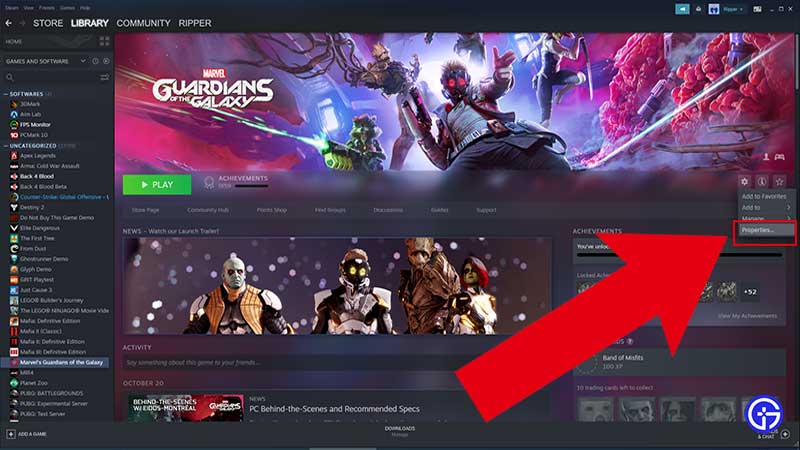
  • Open steam and click Guardians of the Galaxy from your game library.
  • Right-click on it and select “Properties”.
    Fix Steam Controller Mapped Wrong Issue in Marvel's Guardians of the Galaxy
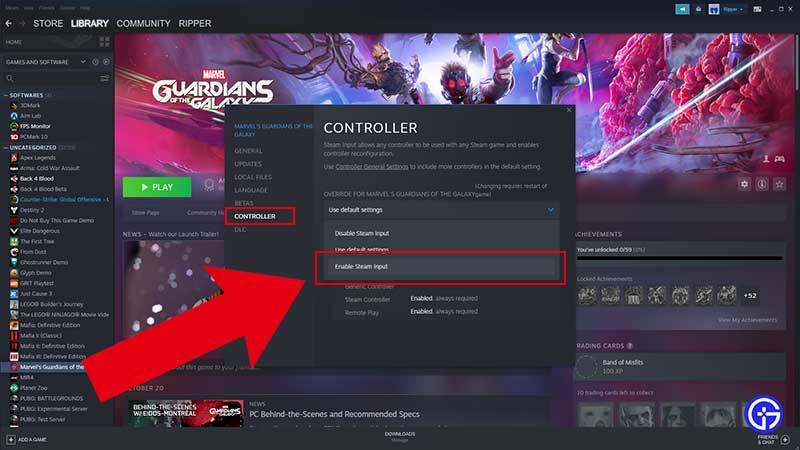
  • Now select “Controller” from the left side tab.
  • Under “OVERRIDE FOR MARVEL’S GUARDIANS OF THE GALAXY”, change from “Use default settings” to “Enable Steam Input”.
    Controller Fix Marvel's Guardians of the Galaxy
  • Now if Guardians of the Galaxy is running, you need to restart it.
  • Now you will be able to reconfigure inputs again using your controller buttons, let it be Steam, Xbox, or DualShock controllers.
  • You can also sometimes switch to Keyboard to input any action and switch back to the controller to solve this issue.
  • Now your controller mapped wrong issue will be fixed for the game in steam.

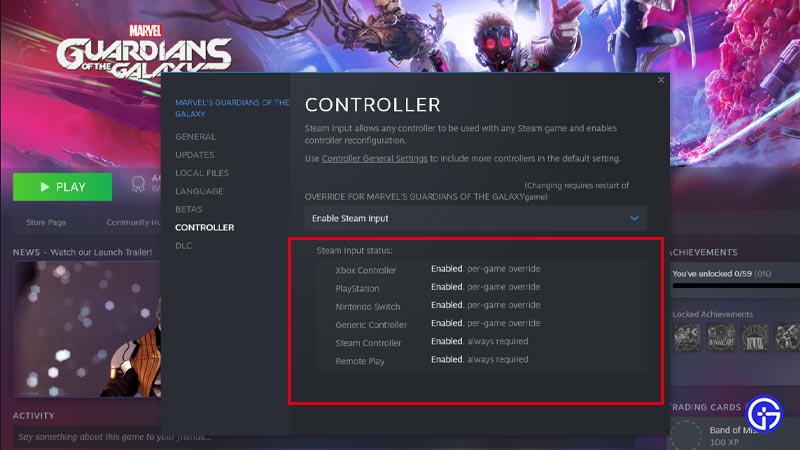
So to conclude reconfiguring a new controller button layout is the quick workaround you can use till an official fix is released by devs for the Guardians of the Galaxy game. As soon as you enable the Steam input option, steam input status for Xbox, PlayStation, Switch, or Generic controller is will be enabled, and you will be able to play the game with the correct layout.

That’s everything you need to know about how to fix steam Controller Buttons Mapped Wrong Issues in Marvel’s Guardians of the Galaxy game. While you are here, make sure to check out our Guardians Of The Galaxy Guides right here on Gamer Tweak.


  • Bending Grounds Codes (August 2026)

    Bending Grounds Codes (August 2026)

    Published Date :

    Bending Grounds is a Roblox fighting game where you use different elemental abilities, complete quests and take part in PvP battles. You can experiment with various bending styles, and improve your character as you keep playing. Spins are useful for getting new options, so redeeming the available codes can give you a few extra chances.… Read More

  • Sell Ores Codes (August 2026)

    Sell Ores Codes (August 2026)

    Published Date :

    Mining and processing ores is the main way to earn cash in Sell Ores. You can upgrade your setup, unlock new machines, and work toward getting better ores as your operation grows. Since progress can take time, free rewards from codes can help you move ahead a little faster and so, here are the latest… Read More

  • Build a Military Base Codes (August 2026)

    Build a Military Base Codes (August 2026)

    Published Date :

    Build a Military Base lets you create and upgrade your own military base while unlocking new tanks, helicopters, jets and more. As your base grows, you can prepare for battles against other players. Free Premium Crates and other rewards can help you unlock useful items without spending extra resources, so here are all the Build… Read More

  • Karinderya Codes (August 2026)

    Karinderya Codes (August 2026)

    Published Date :

    Running a busy karinderya (a Filipino Restaurant) means you have a lot to keep up with. You need to cook meals, serve customers, improve your kitchen, and make enough Cash to keep upgrading your small food stall. The good news is that a few free rewards can make the early grind easier, especially if you’re… Read More






