Looking to fix “Your graphics card encountered a problem with Detroit: Become Human (VK_ERROR_DEVICE_LOST)” error message? Don’t worry, as you are not alone because there are several users reporting this error which makes the game almost unplayable. Due to this error message the game even crashes every now and then even with a compatible graphics card and stable FPS with the lowest settings. Check out the steps below to fix the Detroit: Become Human GPU error.
How to Fix “Your graphics card encountered a problem with Detroit”
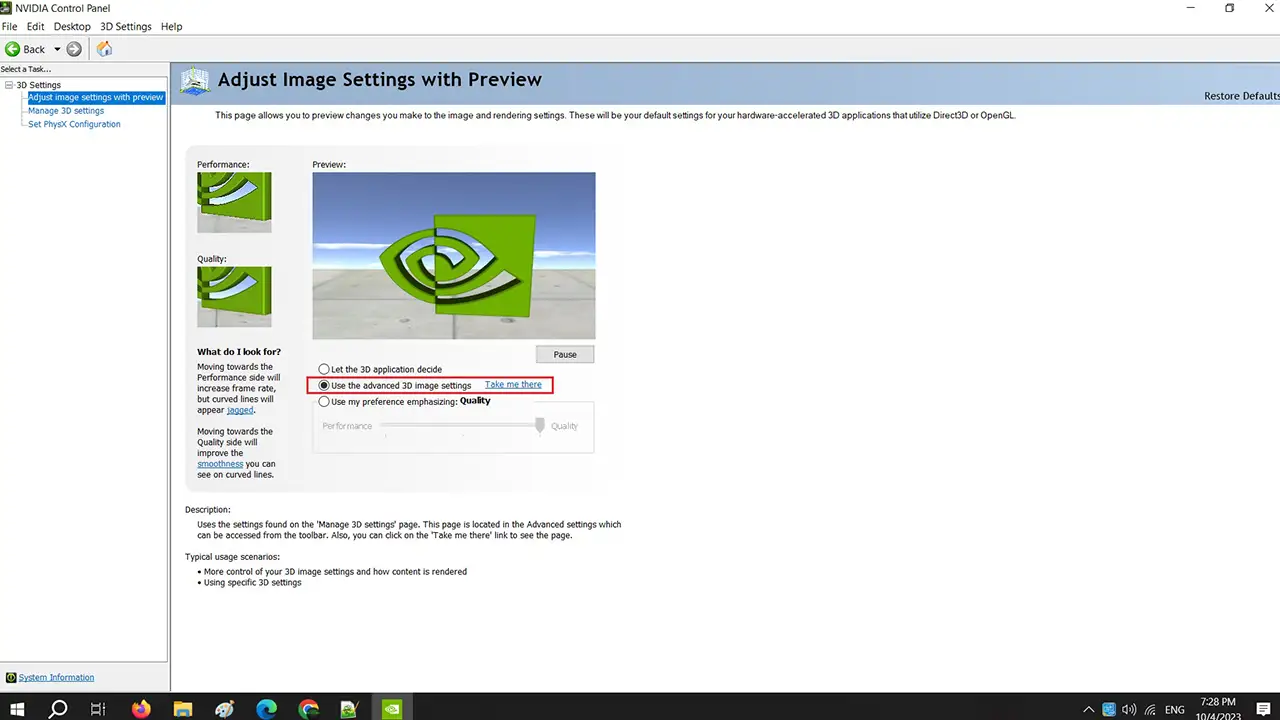
You can easily fix “Your graphics card encountered a problem with Detroit: Become Human (VK_ERROR_DEVICE_LOST)” error by using the advanced 3D image settings in the Nvidia Control Panel, disabling/enabling the GPU device and updating the driver, or turning off In-Game Overlay. Check out all the solutions listed below to fix the Detroit: Become Human GPU error.
Using Advanced 3D Image Settings in Nvidia Control Panel
- First of all, you need to right-click on an empty desktop.
- Then select the Nvidia control panel to open it.
- Click the option “Adjust image settings with preview” which is located on the left side on the top.
- You must select the “Use the advanced 3D image settings” option here.
- Finally, click “Apply” and then try to open the game and check that the error will be resolved now.
Disable or Enable the GPU Device and Update Driver
- In the Search bar, type Device Manager and press Enter key.
- When a new window of Device Manager opens, click on the arrow next to Device adapter.
- Here, you have to right-click on the graphics card installed on your PC and then click on Disable Device, and Enable it back again.
- After that click on Update Drivers.
- Finally, choose the option to download and install drivers, and Windows automatically will search and perform the same action for you.
- Once done, restart your PC and then launch the Detroit game without any error messages.
Turn OFF In-Game Overlay
- First, launch the Steam client.
- Then click on the Steam tab in the top left corner.
- Now click on Settings.
- Choose the In-Game option which is located on the left side.
- On the right side, uncheck the box next to the “Enable Steam Overlay while in-game” option and click OK.
- That’s it, this will now fix the “Your Graphics Card Encountered a Problem with Detroit” error message.
That’s everything there is to know about how to fix “Your graphics card encountered a problem with Detroit: Become Human (VK_ERROR_DEVICE_LOST)” error message. In the meantime, do not forget to check out our other similar types of Video Game Tutorials only on our website Gamer Tweak.