Close Menu
    Facebook X (Twitter) Instagram
    Gamer TweakGamer Tweak
    • GT Originals
    • Guides
      • AC Mirage
      • Starfield
      • Wordle
      • Mobile
      • GTA 6
      • AC Valhalla
      • Genshin Impact
      • Honkai Star Rail
      • Minecraft
      • Discord
      • Street Fighter 6
      • Project Slayers
      • The Sims 4
      • Lies of P
      • Zelda TOTK
    • Roblox
      • Roblox Codes
      • Blox Fruits
      • Type Soul
      • Grow a Garden
      • 99 Nights in the Forest
    • Review
    • Roblox Codes
    • BG3
    • CS2
    Gamer TweakGamer Tweak
    Home > Lost Ark > Lost Ark Get Unicorn Mount
    Lost Ark

    Lost Ark: How To Get The Unicorn Mount

    Karan PahujaBy Karan PahujaApril 19, 20223 Mins Read

    Unicorn Mount is the latest limited-time Twitch drop for Lost Ark. Just like the previous drops you will need to schedule your time to watch the stream if you want this item. There are 4 different versions of the mount that you can claim. The rewards don’t stop there you also get Amethyst Shards for it. So keep reading this guide to learn everything you should know about the Unicorn Mount Twitch Drop for Lost Ark.

    How to Get the Unicorn Mount in Lost Ark
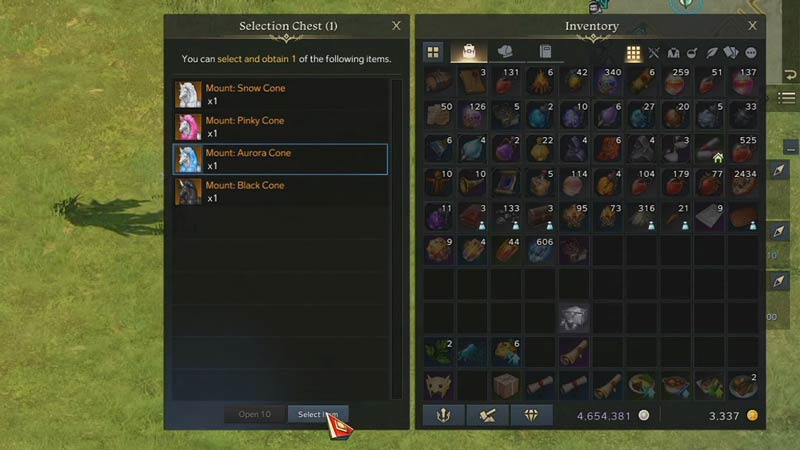
    lost ark how to get unicorn mount
    Image Credit: RaZzi on YouTube

    You can get the Unicorn Mount in Lost Ark as a Twitch Drop. Once you watch the needed stream you can claim the reward from your mail. Here is how you can get it.

    1. To begin with, you will have to have your Twitch account linked with Lost Ark and have Twitch drops enabled. You can skip to Step 6 if you have already done that. Else follow the steps below.
    2. Go to the official Lost Ark Website
    3. Log in to your Twitch account. When done correctly you will see your Twitch account logged in.
    4. Next, you will have to log in with your Steam account.
    5. Once your account is linked you are ready to watch the stream.
    6. Go to Twitch and watch the streams of Lost Ark for Streamers that have “Drops Enabled” tag.
    7. Watch their Stream for 2 hours to get the reward.
    8. When you complete watching the stream for the required time, go to your Twitch Inventory and claim it.
    9. Now go to Lost Ark and check your mail.
    10. Claim the Mount: Unicorn Selection Chest.
    11. Open the chest and select the Mount that you want. You can only claim one. You also get 1000 Amethyst Shards.
      • White Cone (White mount)
      • Pinky Cone (Pink mount)
      • Aurora Cone (Blue mount)
      • Black Cone (Black mount)

    As I mentioned before it is a limited-time event, so this event will run only for a few days. You can claim the Unicorn Mount between April 12 and May 9. The event starts at 2 PM PT (9 PM UTC) and will end at 12 AM PST (7 AM UTC).

    That covers everything you should know about how to get Unicorn Mount in Lost Ark. If you like playing this game then also check our other guides on how to get to the Little Luck Island and how to get to Nada in this game.

    Lost Ark Guides PC Tips and Tricks
    Share. Facebook Twitter Pinterest LinkedIn Tumblr Email Reddit
    Karan Pahuja

    Karan is a Soulsborne enjoyer who grew up playing NES classics like Contra, Mario, Zelda, Kirby, Megaman, and a list of other games that go on. He also enjoys FPS games like Overwatch 2 and Valorant. Currently, he is maining Cammy in Street Fighter 6, while experimenting some Sorcerer builds in Diablo 4. And if you need help with some boss fights in a game, he is your guy!

    Related Posts

    Players Are Spending More Time in Virtual Worlds Than Ever Before, Showcasing the Largest Surge on Record

    December 3, 2025

    Unwritten Helldivers 2 Rules – Don’t Make These Mistakes!

    November 20, 2025

    Where Winds Meet Codes (December 2025)

    November 19, 2025

    User Experience in Quick Online Games – How to Retain Players

    November 11, 2025
    Latest Codes

    Anime Vanguards Codes (December 2025)

    December 4, 2025

    Last Letter Codes (December 2025)

    December 3, 2025

    The Forge Codes Roblox (December 2025)

    December 1, 2025

    Inazuma Strikers Codes (December 2025)

    November 26, 2025

    Deadly Delivery Codes (December 2025)

    November 26, 2025

    Roblox Hypershot Codes (December 2025)

    November 26, 2025
    Trending
    • Anime Vanguards Codes (December 2025)
    • How to Get Ruby in The Forge (Roblox)
    • Players Are Spending More Time in Virtual Worlds Than Ever Before, Showcasing the Largest Surge on Record
    • Last Letter Codes (December 2025)
    © 2025 Gamertweak.
    • Advertise With Us
    • About Us
    • Team
    • Contact Us
    • Privacy Policy
    • Terms
    • Open Critic

    Type above and press Enter to search. Press Esc to cancel.