Home > Steam Guides > How To Get A Refund For The Day Before On Steam

How To Get A Refund For The Day Before On Steam

Updated Date :

Although it was one of the most anticipated games before launch, The Day Before has met with overwhelmingly negative reviews and the situation of the early access is so grave that players are looking to get a refund for The Day Before on Steam. Since Steam follows a policy when it comes to refund, you would want to know whether you are eligible for it and if so, how to get the refund. Our guide has covered it all right here.

Everyone wants to live in a better world like before The Day Before – that’s how bad the game is right now and players would rather have their money back instead of playing it any further.

How to Get The Day Before Refund on Steam

The Day Before Refund Initiation On Steam
Image Source: Steam

If you want to get a refund for The Day Before on Steam, the best case scenario to get your money back is to follow Steam Policy on refunds. You need to have purchased the game less than 14 days prior and played it for less than two hours. If you are fulfilling these conditions, here’s what you need to do next:

  • Head to Steam Help via this link and then Sign In.
  • After that, head to the Purchases tab and then you can see the list of games you have.
  • Since you are fulfilling the conditions mentioned above, you will get the option for The Day Before.
  • Select the reason of the refund and validate the request and that should be it.
  • The refund will be initiated soon enough based on their policy and you will get your money back.

But as a special case for this game, Fntastic has mentioned that along with Mytona, they are working with Steam to allow refunds for any player who chooses to request one, regardless of game time. They also added “Fntastic received $0 and will receive nothing from The Day Before sales.”
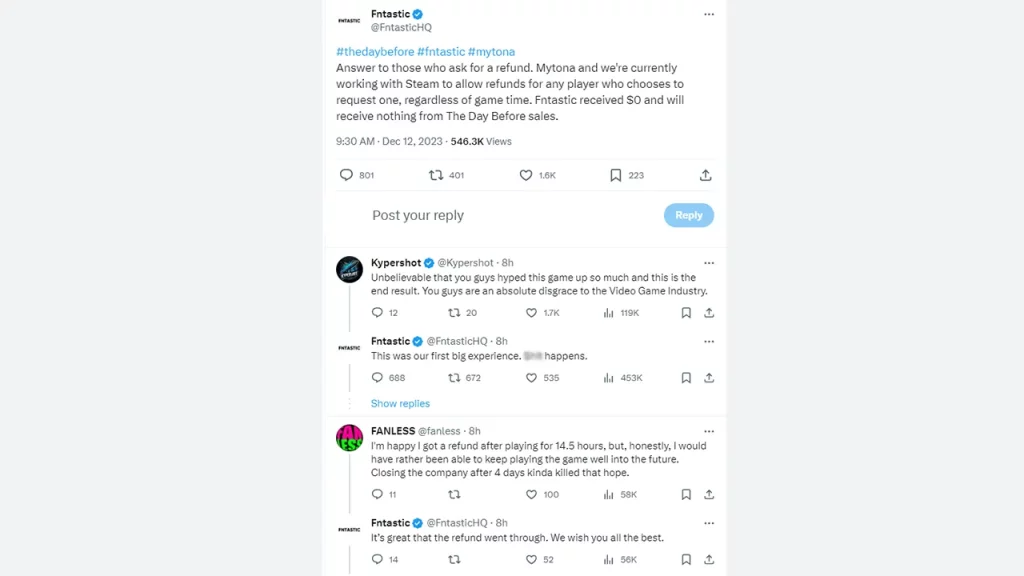
fntastic talks about the day before refunds
Source: Twitter

So, even if you have passed the eligibility criteria for refunds for this game, it’s recommended that you apply for it because you might just get your money back.

The Day Before is now taken off Steam only four days after launch, and the Studio has announced a shut down too.


  • Be a Soccer Manager Codes (October 2026)

    Be a Soccer Manager Codes (October 2026)

    Published Date :

    Your first club in Be a Soccer Manager probably won’t look much like a title-winning side, and that’s where the fun starts. You get to decide how the team plays, build a squad through player packs and transfers, train your players, and watch your decisions play out in live matches. Be a Soccer Manager codes… Read More

  • Tower Incremental Codes (October 2026)

    Tower Incremental Codes (October 2026)

    Published Date :

    Tower Incremental starts with a pretty simple idea: buy a stair, climb higher, and use each step to unlock the next source of income. From there, things get much busier as you roll Glyphs, mine and smelt materials, forge metals, train Dragons, and keep upgrading your tower. Tower Incremental codes can give you some extra… Read More

  • Risky Catch Codes (October 2026)

    Risky Catch Codes (October 2026)

    Published Date :

    A calm fishing trip can quickly turn into a fight with the ocean in Risky Catch. You’ll head offshore to hunt rare fish, but keeping your boat running means watching your fuel, dealing with flooding, and handling rough weather as you upgrade your rod, line, and bait. Our list of all Risky Catch codes will… Read More

  • Anime Ball Duels Codes (October 2026)

    Anime Ball Duels Codes (October 2026)

    Published Date :

    Every round in Anime Ball Duels gives you three random Anime Balls, so you never quite know what your lineup will look like before a duel starts. You can take those balls into 1v1 or 2v2 battles, collect Coins, Gems and Crystals, and build a bigger collection through the gacha. Anime Ball Duels codes can… Read More