BIG Games Pets, the developers behind Pet Simulator 99 and its predecessor PSX, have brought in a lot of additional rewards for players to get into the Christmas Spirit. The recent Update 2 brings the Advent Calendar which is an exclusive limited-time event where players can unlock rewards during the Christmas Event in PS99. Each day it will let you unlock different gifts full of useful items, potions, enchants, etc.
However, Advent Calendar rewards are not just login rewards and players will have to complete certain tasks in Pet Simulator 99. Not to mention, since it is a limited-time event, it will soon run out of all rewards. So if you are looking to claim the rewards in-game, then here is everything you need to know about them.
How to Get Advent Calendar Rewards in Pet Simulator 99
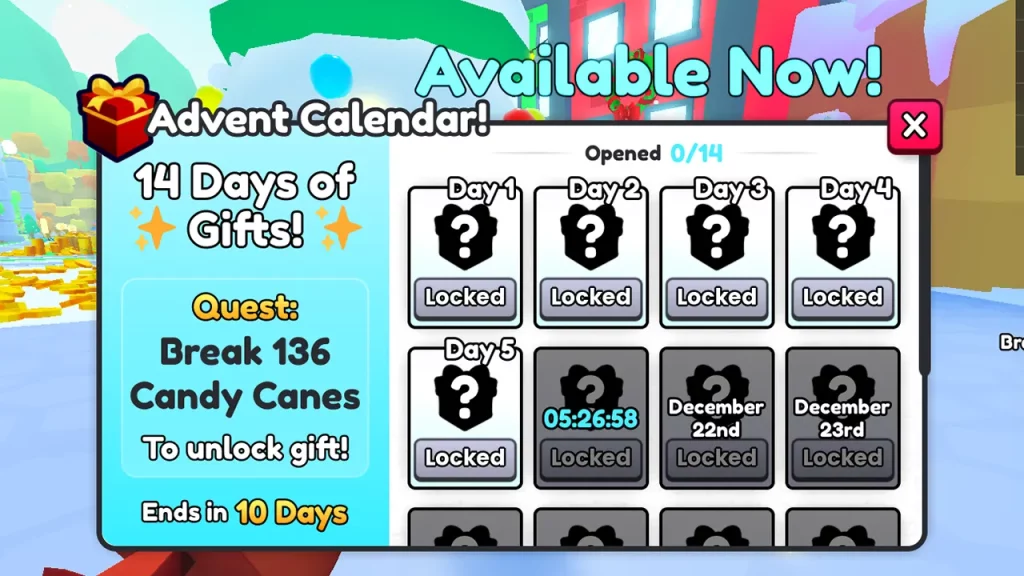
To claim Advent Calendar Gifts in Pet Simulator 99, players will first need to unlock them in the game. This can be done by completing the daily quests during the Christmas Event. You will be able to see what the daily quest objectives are by interacting with the Christmas Tree at spawn in the game. The quest will be given on the left side along with the remaining time of the event.
Once you complete the daily quest objective, you can head back to spawn by traveling back or using the Home option on the left side. Simply interact with the Christmas Tree again and your Advent Calendar reward will be available for you to claim in Pet Sim 99. It is worth mentioning that the event is available till 29th December and players will be able to collect all the rewards till then.
However, you don’t have to worry if you forgot to claim any of your Advent Calendar Gifts in Pet Simulator 99. You can interact with the Christmas Tree whenever you want to get the reward up until the last day. Each day you will have a different quest to complete, so don’t forget to check the Advent Calendar menu to see what task you have to complete next in the game.
That’s everything covered in this guide. If you find this guide helpful, be sure to go through our dedicated PS99 Guides section, right here on Gamer Tweak.