Home > Genshin Impact > Enter And Leave Serenitea Pot

How To Enter And Leave Serenitea Pot In Genshin Impact

Updated Date :

With the 1.5 update, players get a new mechanic called Serenitea Pot in Genshin Impact. It’s a housing island where you can build houses, furniture and customize the decor as you want. We’ve got a guide on the Serenitea Pot which will explain things in more detail. But if you are unsure about how to enter and leave Serenitea Pot in Genshin Impact, keep reading.

How to Enter Serenitea Housing Island

exit how to enter serenitea pot Genshin Impact

To enter Serenitea Pot, select the Gadgets menu from your inventory and click on the Teapot. Once you interact with this Teapot, you will enter the realm and you can get started with creation of your housing and tis decoration. Once you are done with the customization of your housing island, you will have to know how to go back to the normal world. Take a look below to know how to return to Teyvat.

How to Exit Serenitea Pot in Genshin Impact

  • You can leave Serenitea housing island in Genshin Impact by opening up the Inventory > Gadgets menu. Next, Place the Serenitea Pot and interact with it. This will return you to the normal world.
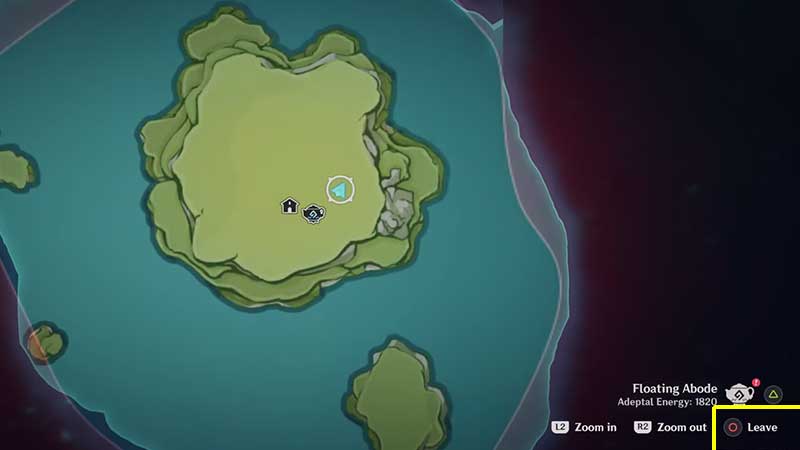
enter exit housing island

  • You can also open up the map and use the Leave button present at the bottom right of the screen. Then on the right side, you will see Serenitea Pot and Teyvat. Go ahead and click on Teyvat and choose the Switch button. This will return you to the usual world map and you can teleport to any location you want.
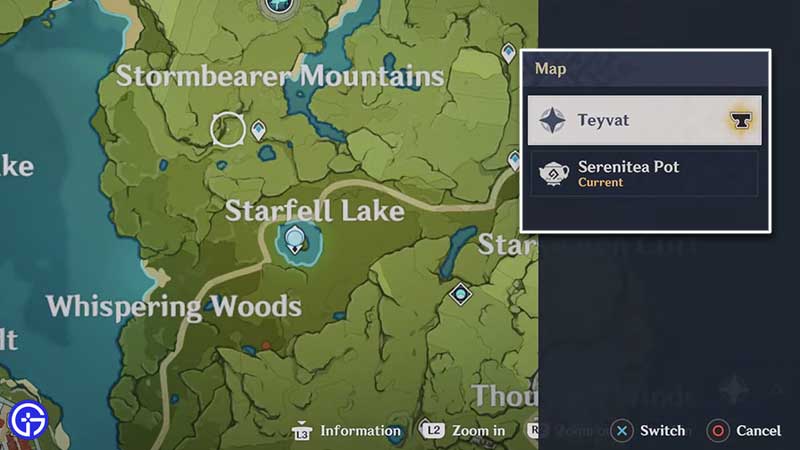
how to leave serenitea pot

These were the ways to enter and leave Serenitea Pot in Genshin Impact easily. Once you do any of these things, you will leave the pocket dimension and go back to the normal world. We hope this helped you leave the housing island.

While you are here, you can check out our other Genshin Impact guides like version 1.5 Secret Achievements, how to get and use Dream Solvent and how to unlock Realms and how to get all types of Woods and their location.


  • Heal your Injuries Codes (August 2026)

    Heal your Injuries Codes (August 2026)

    Published Date :

    Heal your Injuries is a JJK-inspired game, where you need math to heal yourself as you get hit by bombs, weapons and more. While playing, you will need EXP and Energy to progress, and thankfully, Heal your Injuries codes drop exactly that! Here’s a complete guide with all the latest rewards and how to claim… Read More

  • Steel Crossfire Codes (August 2026)

    Steel Crossfire Codes (August 2026)

    Published Date :

    Steel Crossfire is a thrilling PvP robot-fighting game inspired by Transformers, so yes, you can change into a vehicle, get into Jet mode, and get into some explosive battles. To make things interesting, you can unlock more characters and skins using Shards, which is what Steel Crossfire codes frequently drop! Here’s the complete list of… Read More

  • CookieRun: Crumble Codes (August 2026)

    CookieRun: Crumble Codes (August 2026)

    Published Date :

    The Devsisters Corporation is back with another Cookie adventure, and like other games, there is a code redemption system in CookieRun: Crumble too! This means we can expect to get regular rewards as drops to help you assemble a team of adorable yet powerful Cookies. Here’s a list of everything currently available. Last checked for… Read More

  • Smiles Codes (August 2026)

    Smiles Codes (August 2026)

    Published Date :

    Smiles is a multiplayer survival mascot horror game where you join other players, complete objectives and survive the dangers lurking in the dark. To make the game more interesting, you can unlock emojis, animations, and more that require in-game currency (Fluff), but it can be quite a grind to earn. Don’t worry, you can redeem… Read More