
Farming Simulator 22 is here and there are some awesome mods to level up the base game. With mods, you can get a lot of new things such as new vehicles, structures, equipment, and more which will enhance your overall gameplay and experience. So, in this guide, we will explain the steps on how to download and install Farming Simulator 22 Mods for PC and consoles.
How to Download and Install Farming Simulator 22 Mods (PC & Consoles)
This is how you can download FS 22 mods and install them.
In-Game Mod DLC Download
There is a Modhub in Farming Simulator 22 and to get to it, follow these steps:
- Click on Downloadable Content on the main game screen.
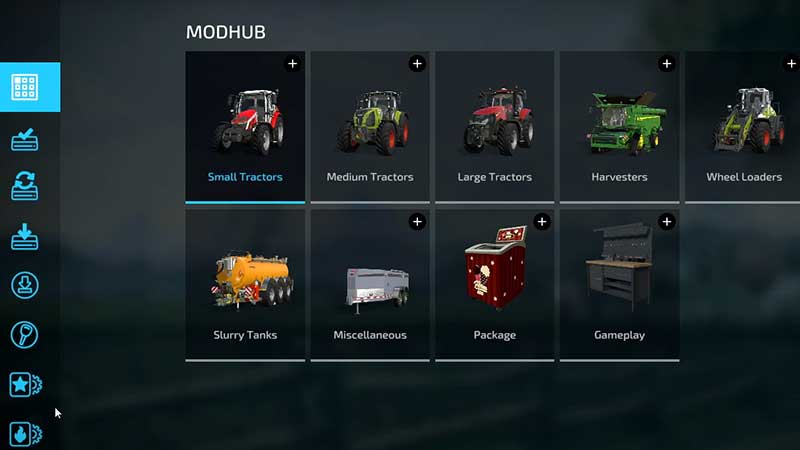
- This will take you to the Modhub which will include:
- Small Tractors
- Medium Tractors
- Large Tractors
- Harvesters
- Wheel Loaders
- Trailers
- Seeders
- Slurry Tanks
- Miscellaneous
- Package
- Gameplay
- Make sure to check every category and download the mods that you’d like to use.
- You can also use the filters on the left side which will show you the most downloaded, the best, the latest, and recommended mods.
- Pick the one you want and check out its details.
- Then at the bottom of the screen, you will see the button to press to install the mod. Press the Install button and it will download the mod for you.
- After the download process is over, you will see them under the Downloads section.
- Now to install the in-game mods, you need to restart the game.
- Click YES on the prompt which asks to confirm this and that’s it. This is how you can download and install the in-game mods in Farming Simulator 22. With every new mod, you will have to reload the game.
- Now, after relaunching the game and opening up your game save, you will get the choice to select a mod(s) to use. This will enable the specific mods in that save game.
- Next, click on Start.
- The new equipment should be available to use from this point onwards.
- To remove mods, you have to do the same process but instead of selecting the mods, simply deselect them, save your game and relaunch it. Now in the fresh boot up, you should not see the unchecked mods anymore.
Official Website (PC/Mac)
- Head to farming-simulator.com.
- Click on the Mods category.
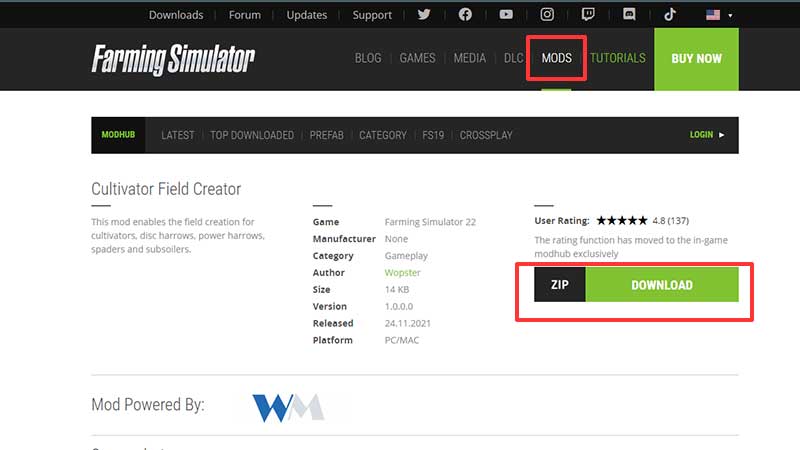
- Browse through the options you have including the featured mod, user favorite, top downloaded, category and more.
- Click on More Info and check the user ratings for the same.
- Then, all you have to do is click on the green Download ZIP file.
These were the official ways to get Farming Simulator 22 Mods and you can use these without worrying about compatibility or authorization issues from Giants Software.
Apart from these, you can download FS22 mods from third-party sites and websites of modders. But in this case, you need to use them at your own risk and make sure you have a save file to go back to, if needed. Sites such as NexusMods are famous but if you decide to use any other site, make sure to download them only if you trust the modder/site.
- Find the location where you have your Farming Simulator 22 folder and there will be a mods folder within it. What you need to do is copy the downloaded zip file of your mod and paste it in FS22’s mod folder.
- Even though you may be tempted to extract the zip file, you do not need to. Keep it as it is – the game will recognize the mod and add it to the game.
- Launch FS22 and select your preferred mods from the options shown under Mods/DLC.
- Note that, if possible, try to add mods one by one so that if there’s any issue in the game, you know that the latest mod that you added may have caused the problem.
This is everything you need to know about how to download and install Farming Simulator 22 mods. For more FS22 guides, stay with Gamer Tweak!










