Lag in Wuthering Waves can be due to multiple reasons — the device you’re playing the game on could be struggling to handle the system requirements or it could be server/network connection issues. There are some ways to fix the game if Wuthering Waves is too laggy; take a look at the troubleshooting tips here.

How to Fix Wuthering Waves Lag and Stutter
One or more of these steps can help you run the game smoothly without interruptions.
Close Background Apps
If there are any resource-hogging programs simultaneously running in the background, it will create additional stress on a game like WuWa, leading to lag, stutters and frame drops. Make sure to disable every other unnecessary processes and only run Wuthering Waves for the best possible performance.
Reduce your Graphics Settings
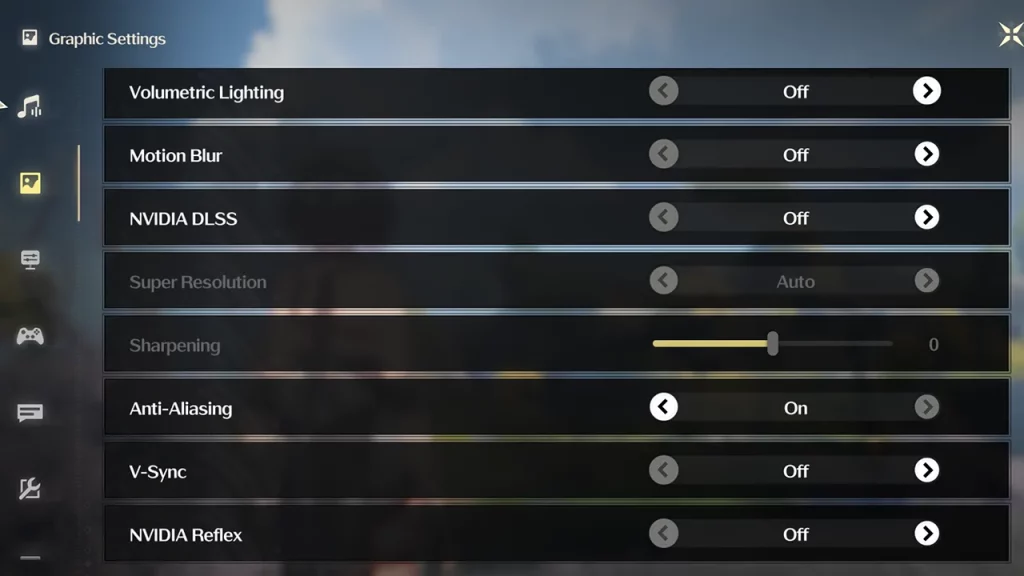
Speaking of performance, you might have to sacrifice some graphics quality to reduce lag in Wuthering Waves. Go to the game settings and lower the settings bit by bit to see what works best for your system/device.
You can experiment by turning off Volumetric Fog, reducing Shadow Quality, disabling Volumetric Lighting, Motion blue and more similar settings.
Related | How to Fix Crashes in Wuthering Waves
Update the Game and Graphics Drivers
Keep your device’s operating system, graphics drivers, and the Wuthering Waves app itself updated to benefit from bug fixes and performance improvements.
- Know your graphics card model.
- Visit the website of your graphics card manufacturer (AMD, Nvidia, or Intel).
- Go to the driver download section for your specific graphics card model.
- Download the latest driver compatible with your Windows version.
- Once downloaded, run the installer file and follow the instructions to complete the driver update process.
- You will need to restart your PC after installing the updated driver.
Play in Full Screen Mode
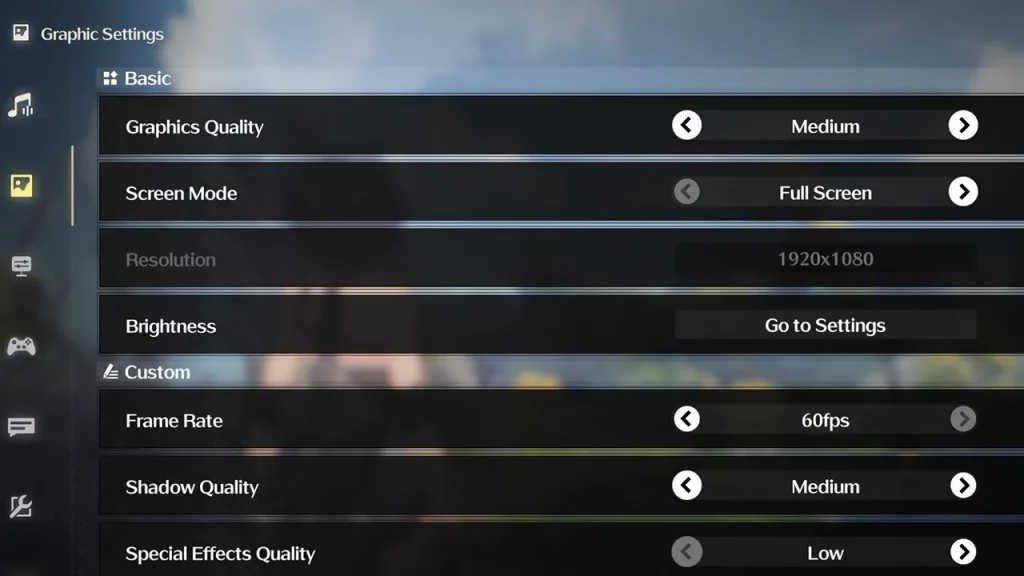
In general, full screen mode can actually improve performance in games compared to windowed mode, and thus help reduce lag. When a game runs in full screen mode on your PC, it has complete control over your computer’s graphics resources. So, the game can use your GPU to its full potential without sharing resources with other programs running on your desktop.
To change to Full Screen, go to WuWa’s Graphic Settings and select Full Screen for Screen Mode.
Disable VSync, NVIDIA DLSS, and Reflex
Visit the game’s Graphic Settings and turn off VSync, NVIDIA DLSS, and NVIDIA Reflex to reduce lag and get a smoother experience.
Install WuWa on an SSD
If you have installed Wuthering Waves on an HDD, you will frequently entire lag, stutters and frame drops. Your gaming experience will significantly improve if you choose to reinstall the game on a fast SSD.
Check for Server Issues
Since Wuthering Waves is pretty popular, the servers can get overloaded during peak hours on your server, leading to lag. In such a scenario, you can wait for a few hours until the servers aren’t so packed, and enjoy the game without stutters.
Since the game was recently released at the time of writing, it might not be perfectly optimized yet, leading to lag even on high-end devices. The developers might release updates to improve performance, so be sure to keep an eye out for more information on their Twitter/X handle.