
Ready or Not is one of the finest tactical FPS games available on the internet. It brings so much realism that you would want to replay it several times. But due to insane detailing and elements, several players have encountered frequent drops in framerate. We all know that shooter games are no stranger to lags, stutters, and FPS issues. So we already have a few solutions in stock that can fix such issues.
And today, we will tell you all those solutions that you can use to fix Stutters and FPS Drops in Ready or Not. So if you ever notice drops in Framerates while playing, you should what to do.
Here’s What To Do if Ready Or Not FPS Drops or Stutters
First of all, make sure that your system is capable enough to run Ready or Not smoothly. You can check out the following specifications and compare it with your rig to know about it:
- Requires a 64-bit processor and operating system
- OS: 64-bit Windows 7, Windows 8.1, Windows 10
- Processor: Intel Core i5-4430 / AMD FX-6300
- Memory: 8 GB RAM
- Graphics: NVIDIA GeForce GTX 960 2GB / AMD Radeon R7 370 2GB
- DirectX: Version 11
- Storage: 90 GB available space
If your PC meets the above requirements, then only you will be able to play Ready or Not properly. In case you facing lags and stutters despite having a capable system, then here are a few fixes that you should try out:
Close Background Apps
This is one of the first things that you should try if you face stutters and fps drops in any game. Simply open the Task Manager and end all those processes that are using too much CPU and GPU memory. Once closed, you can relaunch Ready or Not and check if the FPS is stable. If not, then continue with other fixes below.
Set System to High-Performance Mode
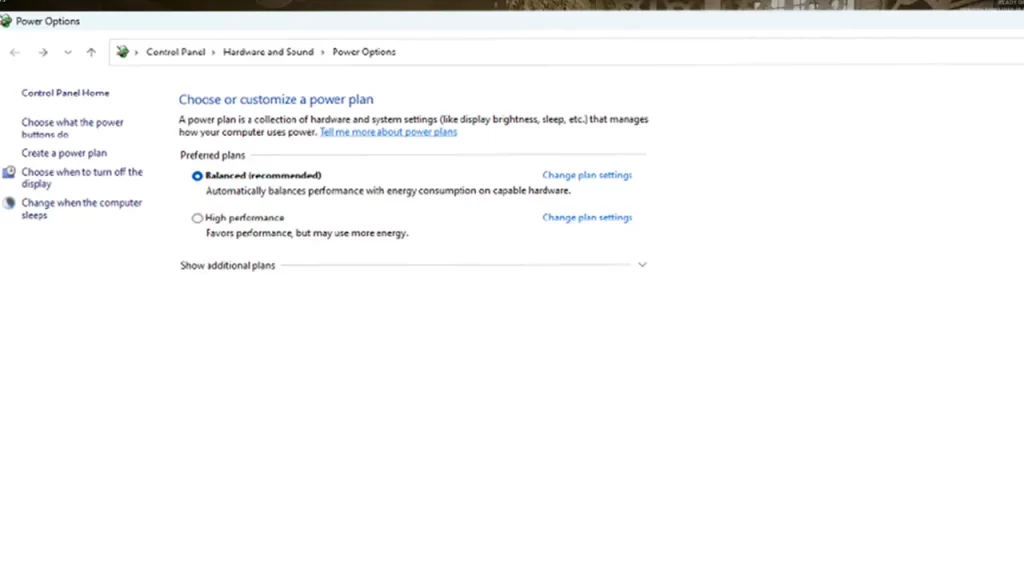
The easiest way to get high framerates is by simply setting your computer to be on High Performance Mode. To do so, use the steps below:
- Press the Windows + R key to open the Run
- Now type powercfg.cpl in the text bar and hit enter
- Now select Show Additional Plans and select High-Performance Mode.
Adjust Graphics
Sometimes adjusting the Graphics to the highest possible settings overheats the GPU. This eventually makes your game lag. As a result of that, you may also face constant FPS drops in Ready or Not. So I highly suggest you tweak your Graphic and Video settings to medium or low. You may have to compromise with visuals but your FPS issues will be fixed for sure.
That’s pretty much everything that fixes FPS Drops and Stuttering in Ready or Not. For more such content, feel free to check out our Ready or Not section on Gamer Tweak.











