Finding Villages in Minecraft is tough but rewarding. You will get access to Traders, through which you can get important items like Food, Armor, Maps, Enchanted Books, and much more. As you purchase more items, their rank will increase and they will offer rarer items. Apart from that, you will also get loot and rewards in a village. Using these items, you can craft better gear and survive longer in this game. This guide will tell you methods to find these small communities of Minecraft NPCs.
Villages in this game appear as small clusters of houses and fenced animals. There, you will find many villagers, children, livestock, Iron Golems, and more. You can interact with the villagers to complete their requests to start trading.
How to Find a Village in Minecraft
There are three ways you can find a village in Minecraft:
- Finding a High Point
- Using Seed to search while flying
- Using Village Finder
Finding a High Point
The first method may seem like the obvious thing to do but if you want to find a village naturally then it’s the best method. Look for a high point like a hill or a mountain. Once there, go to Options or Menu, turn your FOV down, and increase your Render Distance. By doing so, you will get a wider view of the landscape.
Using Seed to Search while Flying
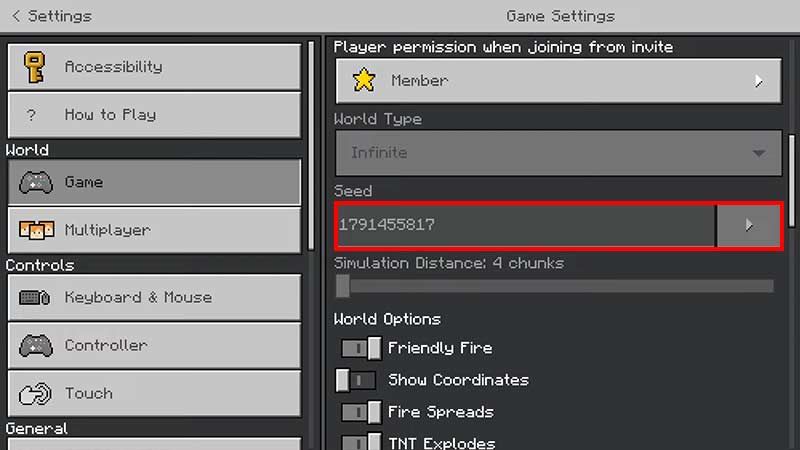
The next method to find a village in Minecraft is by using Seeds. Go to your Settings and under the Game tab, scroll down to “Seed”. Note down that number, save the game, and quit that world. Then, create a New World and set it to Creative Mode. Again under the Game tab, go to Seed and paste the number from before. This will generate the exact same world as the previous one but you can fly around to look for villages. Once you find it, you can note down the coordinates. If they are not visible, go to Settings and scroll down until you find the “Show Coordinates” option and switch it on. Then head back to the old world and head over to those coordinates.
Using Village Finder
The last method is by using the third-party Village Finder on Chunkbase. There, enter the Seed of your world and select the version you are playing on. Then insert your X and Y coordinates at the bottom and click on “Go!”. This will generate a table showing your location in Red and the villages around you. Each dot represents the Biome in which the village is located.
Minecraft Command to Find Villages
If you don’t mind using cheats then you can just type /locate village in the chat command to get the coordinates of the closest village.
That’s everything from us on how to find villages in Minecraft. For more helpful guides like Best Place to Fish, make sure you visit our Minecraft section.