Knowing how to fast travel in Soulmask can be a lifesaver and save you a lot of time. Since this is a survival game at its core, you will spend a lot of time looking for resources in different locations and getting it to your base or just exploring. However, the map is quite big in this game, and even riding Alpacas or Ostriches may feel taxing when you are going back and forth between places. Especially the ones that you have already discovered. That is where the portals come in to help you speed things up.
How to Fast Travel in Soulmask using Portals
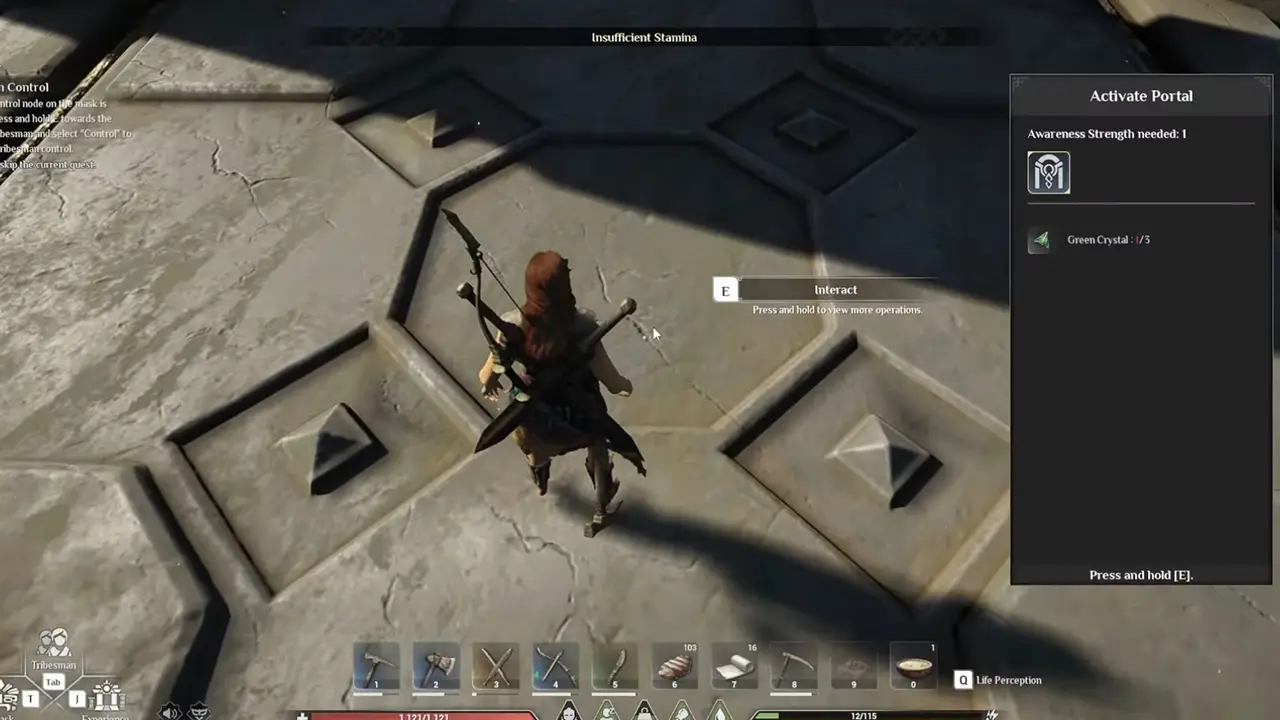
You can use Mysterious Portals in the game to fast travel. Currently, these are the main ways you can go around quickly to the different regions. However, the problem is there are only a few of them in the game at the time of writing this guide. Although in a recent Fast Q&A, the developers have addressed this issue and plan to add more ways to fast travel with future updates, you can check it here. For now, this is how it works:
- Find Pyramid-like structures when you get to a new region.
- Go and stand inside it and interact with it.
- You need 3x Green Crystal to activate one. To get them you can open chests found at Ancient or Holy Ruins for a few locations. You can also defeat Temple Guardians to get them as a drop.
- Once, activated you simply need to open the map and select the portal to fast travel to it.
How to Fast Travel using Bonfires
Another way you can fast-travel in this game is by respawning at your bonfires. Thanks to Quick Tips on YouTube for sharing this trick, be sure to check out their video below:
Here is what you have to do:
- Save your game and exit to the main menu.
- Next, select your World and choose Advanced Settings.
- Here, look for the option “Post-Respawn Death Pack On/Off” and have it enabled.
- Now, go back to the game and set up a bonfire. Make sure you add plenty of wooden logs so it doesn’t die out quickly.
- Next, whenever you want to travel back to it press Esc and choose Respawn.
- The game will ask for a confirmation, click Confirm. Here you will see your character lose all the items.
- Now, you get to choose where you want to respawn. Select the bonfire that you previously lit.
- Click on Respawn: Bonfire.
- Once you spawn, you can find all your loot at your feet that you can easily pick up again.
That sums up both ways you can use to fast travel in Soulmask. For more help on other such guides for this game be sure to also check out how to move your base, get logs, transfer world saves, and fix lag spikes.