Fallout 4, developed by Bethesda Game Studios, is the fourth main game in the Fallout series. The game is set in a post-apocalyptic environment which is based in the city of Boston and nearby regions of Massachusetts and the player’s role represents that of a survivor in the open world. The game was launched on PC, PS4 and Xbox One but the Fallout 4 is not launching in a few PCs and here is the fix to this issue.
Why is Fallout 4 Not Starting on PC?
There is no particular or single issue in the game. The issue can lie within a combination of multiple possibilities that lead to Fallout 4 not launching or crashing on your PC. The game does not open for some users and stays stuck on a black screen for a few. The following list contains a few reasons that has caused problems in launching the game –
- The game files could be corrupted.
- The PC might not be meeting the System Requirement for the game.
- The Graphic Drivers of the PC might have become outdated.
- If you have Enabled any Game Mods, the game might crash.
- The use of Antivirus or active Firewalls may lead to a crash.
How to Fix Fallout 4 Not Launching Problem
There are a few methods which have been helpful for users to fix Fallout 4 not launching issue. Try the methods mentioned below to fix the problems –
Check the Integrity of the Game
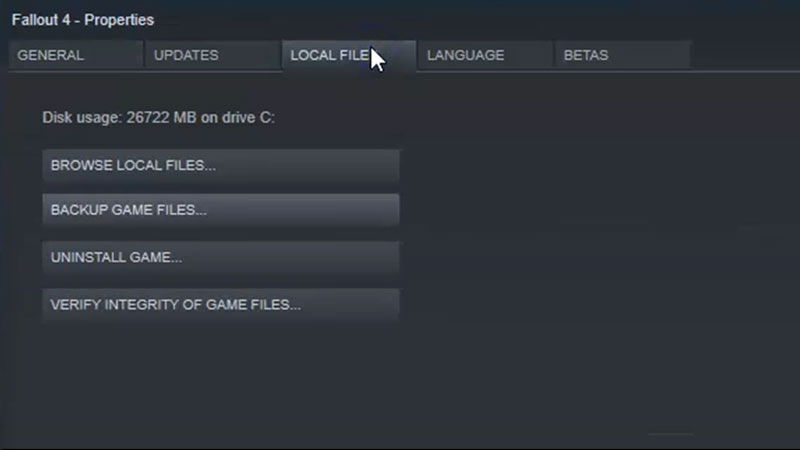
- Make sure you have a working Internet connection. Go to the Game Library in Steam and search for Fallout 4.
- When you right click on the game, select Properties.
- In the Local Files section is the button named Verify Integrity of Game Files.
- Start the process by clicking the button and try running the game once the process is complete.
This should fix the issue. If not check the other options.
Disable and Remove Game Mods
Game Mods alter the game codes and game services. These programs may work for some users but usually causes crashes in most users. If you have any Game Mods enabled the disable and remove them. This will fix the launch issue.
Turn on Compatibility
Once again go to the Local Files section on Steam (by following the above steps) and then select the Browse Game Files option. This opens the location where your game is installed. Follow the step by step process now –
- Right Click on Fallout 4 application
- Select Properties
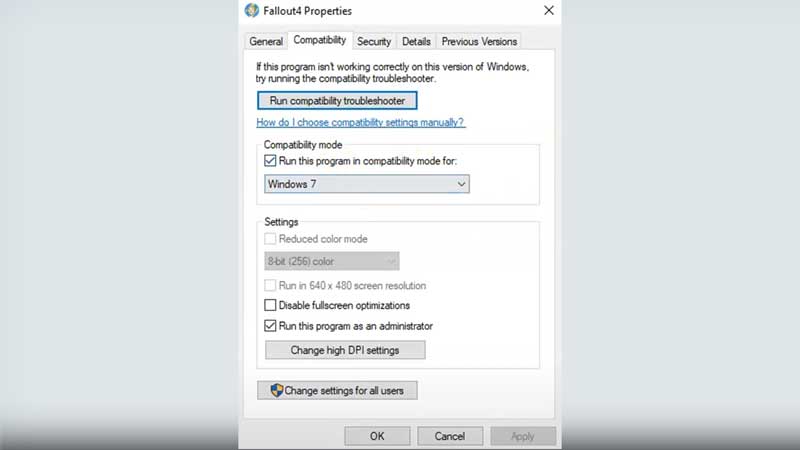
- Go to Compatibility tab
- Turn on Compatibility Mode
- Select Windows 7 or Windows 8
- Run the program as admin
- Apply the changes
Again follow the same steps for Fallout4 Launcher application and open the game. Finally go to options and then select the Advanced tab and change the details to the recommended ones mentioned in the image below.
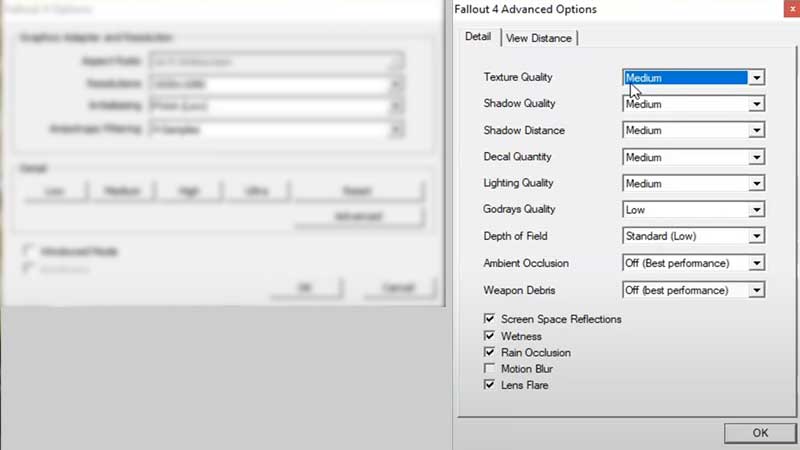
In addition to the methods mentioned above, make sure that your Graphics and CPU drivers are updated. Its equally important to make sure that your PC meets the system requirements mentioned on Steam.
Try the methods from the list to fix the Fallout 4 not launching issue and since you are here check out other Fallout 4 content and many other guides, tips and tricks on Gamer Tweak.