
Dolby Vision is the newest addition to the Xbox Series X/S games list along with Dolby Atmos support. So if you have a TV that supports Dolby Vision, then we will tell you how to set it up and we will also give you a list of all the games you can play right now. So let elevate your gaming experience right away.
Dolby Vision Games List on Xbox Series X|S
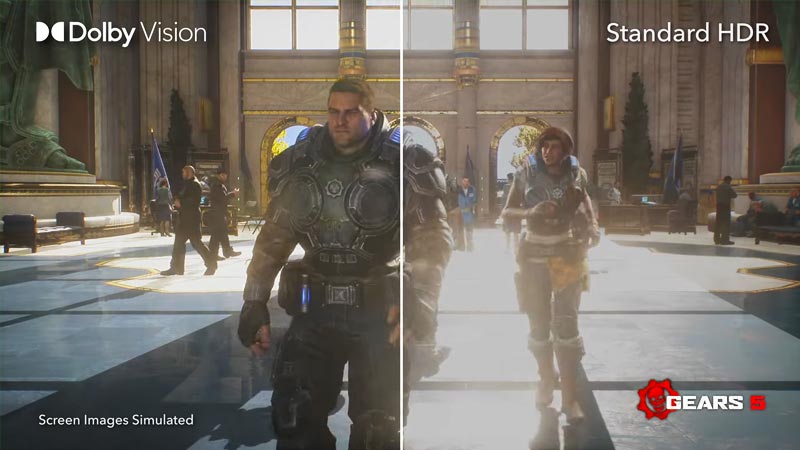
Edit #1: Even though Dolby Vision kicks in for many games like Forza Horizon 5 when we start it, these games are not officially listed in Xbox or Dolby websites for Supported games list. So for me almost 75% of all games are played in Dolby Vision, as soon as I start them. Still here are the games revealed by Xbox support.
Microsoft and Dolby are working together with game devs to allow Dolby Vision in 100+ games by the end of the year. Meanwhile, we have the updated list of all the games you can play right with Dolby Vision on Xbox Series X|S:
- Borderlands 3
- Call of Duty Black Ops Cold War
- Dirt 5
- F1 2021
- Gears 5
- Guardians of the Galaxy
- Halo Infinite
- Immortals Fenyx Rising
- Metro Exodus
- Microsoft Flight Simulator
- Psychonauts 2
Right now we have 10 game with Dolby Vision, but additional games like Ori and the Will of the Wisps, and more are in the works to be added to Dolby Vision enhanced Xbox games list soon. We ill update them here, as soon as they are available with this feature.
How to Enable Dolby Vision on Xbox Series X|S?
To enable your Dolby Vision on Xbox Series X|S you can follow below steps:
- Make sure your TV model supports Dolby Vision.
- You can refer to the manual or by checking online.
- Update your TV firmware, and get the latest Xbox update.
- Once done click on the Xbox button on your controller.
- Your Xbox Guide will open up now.
- Use LB & RB to go to Profile & System.
- Open Settings.
- The General tab will open now.
- Now go to the TV & Display Options tab.
- Click on 4K TV details, to see your TV details here.
- Press back once you see the details.
- Now within the TV & Display Options tab, select Video Modes (under Advanced).
- Enable Dolby Vision for Gaming option.
- Now you can see in 4K TV details, that your TV now supports Dolby Vision in Xbox games.
How to Enable Dolby Atmos on Xbox?
To enable Dolby Atmos on Xbox Series X|S:
- Open the Guide by pressing Xbox button on the controller.
- Open Settings.
- Now select Volume & Audio Output.
- Then select HDMI Audio under the Speaker Audio option.
- Select Bitstream Out.
- Now click on Bitstream Format and select Dolby.
- If you have the license for Dolby headphones, make sure to set it also here.
- Now your games will output Dolby Atmos if your soundbar or speaker system supports it.
That’s the list of all the games that support Dolby Vision on Xbox Series X|S. While you are here make sure to check out more of our Guides on the most popular games on Xbox right now.











