Home > Gaming Guides > Deathloop Crashing And Not Launching On PC Fix

Deathloop PC Crashing At Startup And Won’t Launching Fix

Updated Date :

Deathloop is finally here and players can’t wait to jump in. But unfortunately for some, the game is crashing at startup which is causing much frustration. In this guide, we will take a look at the different causes of Deathloop crashing on PC and how to fix the issue of the game not launching.

Deathloop PC Crashing Fix – Game Won’t Launch Solution

  • First, check if your system matches the game’s minimum or recommended system requirements.
    • Here are the minimum requirements:
    • 64-bit processor and Operating system
    • OS: 64 bit Windows 10 version 1909 or higher
    • Processor: Intel Core i5-8400 @ 2.80GHz or AMD Ryzen 5 1600
    • Memory: 12 GB RAM
    • Graphics: Nvidia GTX 1060 (6GB) or AMD Radeon RX 580 (8GB)
    • DirectX: Version 12
    • Storage: 30 GB available space
  • Ensure that there are no other applications or programs running in the background.
  • Update your Graphics card drivers from the official site of the manufacturer. Once done, make sure to reboot your computer and try to launch the game again.
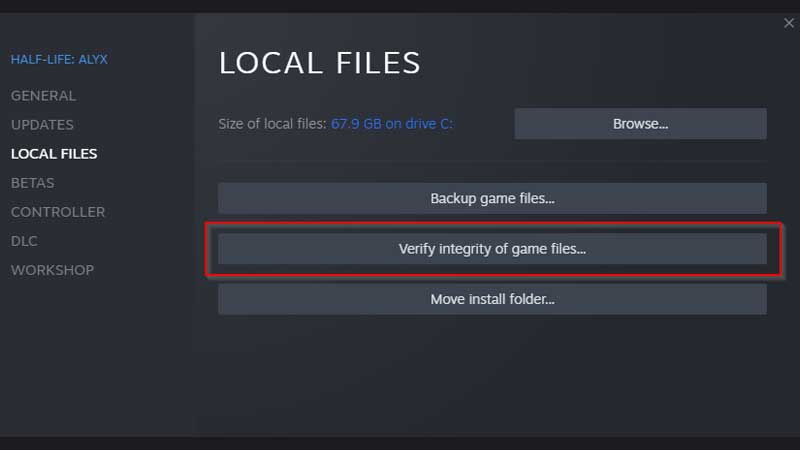
  • Verify Game file integrity on Steam.

verify game file integrity on steam

    • First, restart your computer and launch Steam.
    • Right-click on the game in your Library.
    • Click on Properties.
    • Select the Local Files tab.
    • Click on Verify Integrity of Game Files.
    • Wait until the game files are verified.
    • Try to launch the game after the entire process is done.
  • Check if your Windows is up-to-date. You can check your windows version by pressing Windows + R key and typing winver in the text box. Press enter and you will see your windows version right there.
  • Download and install the latest version of DirectX.
  • Run the .exe file as administrator.
  • Check if your antivirus or firewall is blocking the launch of Deathloop. If yes, provide the necessary permissions and try to launch the game again.

We hope these troubleshooting tips help you get the game launched on your PC. That’s all for this one. For more Deathloop guides, stay with Gamer Tweak!


  • Crunch My Butter Codes (August 2026)

    Crunch My Butter Codes (August 2026)

    Published Date :

    Looking for the latest Crunch My Butter codes? This satisfying Roblox simulator lets you crunch different types of butter, earn cash, unlock better butter, and keep your buttery empire growing. While the game continues to receive updates, many players are also hoping for redeemable codes that offer free Cash or other rewards. Here’s the complete… Read More

  • Trench Decay Codes (August 2026)

    Trench Decay Codes (August 2026)

    Published Date :

    Trench Decay is a WW1 squad PvE shooter, and like most games like this, you can redeem codes to unlock cosmetic crates, medals and more. If you don’t wish to miss out, claim the freebies right away. Trench Decay Codes (August 2026) Expired Codes How to Redeem Trench Decay Codes These are the steps you… Read More

  • Capybaras VS Plants Codes (August 2026)

    Capybaras VS Plants Codes (August 2026)

    Published Date :

    Lots of Cash per second, better eggs and Capybaras are what will make you rich in Capybaras VS Plants, and to get a boost during your grind, you need to redeem these new codes. These goodies are regularly dropped by the developers, and with them, you can unlock Hatch Hammers, Totems, exclusive Eggs, and more!… Read More

  • Heal your Injuries Codes (August 2026)

    Heal your Injuries Codes (August 2026)

    Published Date :

    Heal your Injuries is a JJK-inspired game, where you need math to heal yourself as you get hit by bombs, weapons and more. While playing, you will need EXP and Energy to progress, and thankfully, Heal your Injuries codes drop exactly that! Here’s a complete guide with all the latest rewards and how to claim… Read More