
With Destiny 2’s Season of the Lost, we also get the much-requested crossplay feature in the game. This will surely expand the already massive fan-following of this free-to-play title by Bungie. In this article, we will look at how it works and how to easily add your cross-platform friends to play together.
How to Enable Crossplay in Destiny 2
Follow the steps given below to enable crossplay and start playing with your friends on different platforms right away.
- Make sure the game is updated to the latest version and then log in.
- You will see a notification related to crossplay.
- It says that cross-platform play is now live and a Bungie name has been generated from your platform name.
- Basically, it adds 4 digits after your platform name. This will help you join your friends easily.
- Soon, you will also be able to edit and change your Bungie name. New players will be asked to generated their very own unique Bungie name while making their account.
How to Add Cross-Platform Friends in Destiny 2
Here’s how to invite and add friends from different platforms. There are two ways to do it – you can do it while you are in the game or you can do it externally from Bungie’s website.
How to Invite Friends in Destiny 2 (In-game)
- Open the Director menu.
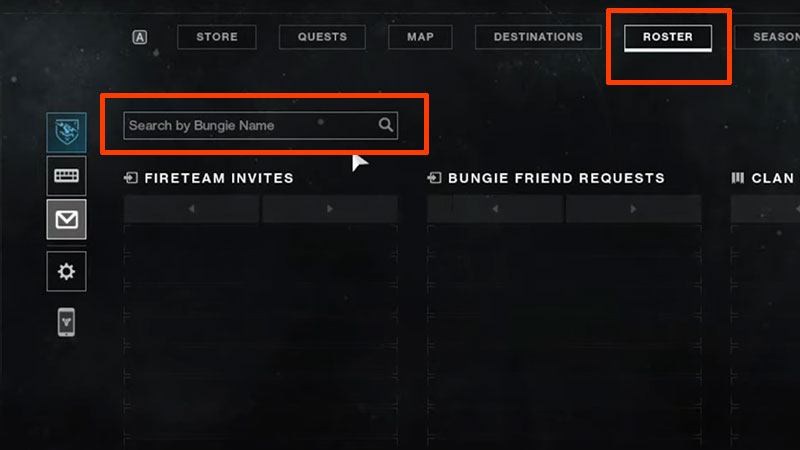
- Head to the Roster tab.
- Click on Invites.
- Find the section with Search by Bungie name.
- Type the Bungie name with 4 digits of your friend.
- That’s pretty much it. From the Invites tab, you can check all your pending Fireteam invites, Clan invites as well as Bungie friend requests.
If your Bungie name violates the profanity filters of the game, it will be changed to Guardian and then it will have 4 new digits after the hash.
How to Add friends from Bungie.net
- Visit this link.
- Go to Account Settings.
- Choose Import Friends.
- With this, you can get your friend lists from Steam, PSN and Xbox Live easily.
Destiny 2 Crossplay In-Game Voice Chat
There is no voice chat available in game right now but it will be added soon. Meanwhile, you can use Discord.
How does Destiny 2 Crossplay Work?
Crossplay matchmaking in Destiny 2 depends on a few factors.
- Gambit and Crucible playlists (competitive game modes) will have two matchmaking pools. One for Console players (including PS, Xbox and Stadia) and another for PC players. So, if a Console player joins a fireteam which has PC players, the fireteam will be matchmade into the PC player pool for the activity.
- Plus, you have to enable Crossplay to participate in Trials of Osiris.
- For non-competitive modes like Strikes, you will be matchmade into all available platforms and you won’t be partitioned into specific pools like above.
- Note that if you have disabled crossplay, you will only be able to play with other players on the same platform who also have this option disabled. Another thing to know is that players need not have a Bungie.net account in order to use Crossplay.
How to Disable Crossplay?
PlayStation and Xbox players can disable crossplay.
- PS players can turn off crossplay from the settings menu in-game.
- Xbox players can turn off crossplay via the Xbox console settings.
- Head to Settings and then select General.
- Select Online Safety and Family.
- Choose Privacy and Online safety > Xbox Privacy.
- Then select View Details and Customize > Communication and Multiplayer.
- Choose “You can join Cross-Network play” and set it to Block.
This is basically all you need to know to get started and play with your friends across platforms. In case you come across any errors, we’ve got fixes for those right here in our Destiny 2 guides.











