If you feel like decorating a house, but virtually, then House Flipper 2 is the closest you can get. The game is dedicated to serving its players one of the finest home decor experiences. But before you put your foot on the gas pedal, you must know all the controls. If you think it’s not important then you are completely wrong.
Say, if you have applied the wrong wall color, then you must know how to undo it. Because if you don’t, then you will have to repay to color the wall again. So for your reference, we will mention all the House Flipper 2 Controls below. Also, if you wish to change the keybinds, we will tell how to do it as well.
All House Flipper 2 Controls
| Controls | Keybinds |
|---|---|
| Move forward | W / Arrow Up |
| Move backward | S / Arrow Down |
| Move left | A / Arrow Left |
| Move right | D / Arrow Right |
| Jump | Spacebar |
| Crouch | C |
| Sprint | Shift |
| Interact | E |
| Open Tablet | Tab |
| Use Tool | MB1 |
| Choose Tool | MB2 |
| Cancel Tool | MB2 |
| Change Tool Mode | Q |
| Tool Settings | R |
| Rotate Item Left/Tool Options Scroll Left | [ |
| Rotate Item Right/ Tool Options Scroll Right | ] |
| Change Item Orientation | V |
| Flashlight On/Off | F |
| Hide HUD | H |
| Quick Save | F5 |
| Quick Load | F8 |
| Answer Phone Call | Z |
| Decline Phone Call | X |
| Undo | Z |
| Redo | Y |
| Flying On/Off | G |
| Fly Up | Spacebar |
| Fly Down | C |
| Tool 1 | 1 |
| Tool 2 | 2 |
| Tool 3 | 3 |
| Tool 4 | 4 |
| Tool 5 | 5 |
| Tool 6 | 6 |
| Tool 7 | 7 |
| Tool 8 | 8 |
| Tool 9 | 9 |
| Tool 10 | 10 |
Here’s How to Change Controls in House Flipper 2
- Head over to the Main Menu and enter Settings.
- From there, navigate and enter the Key Bindings section.
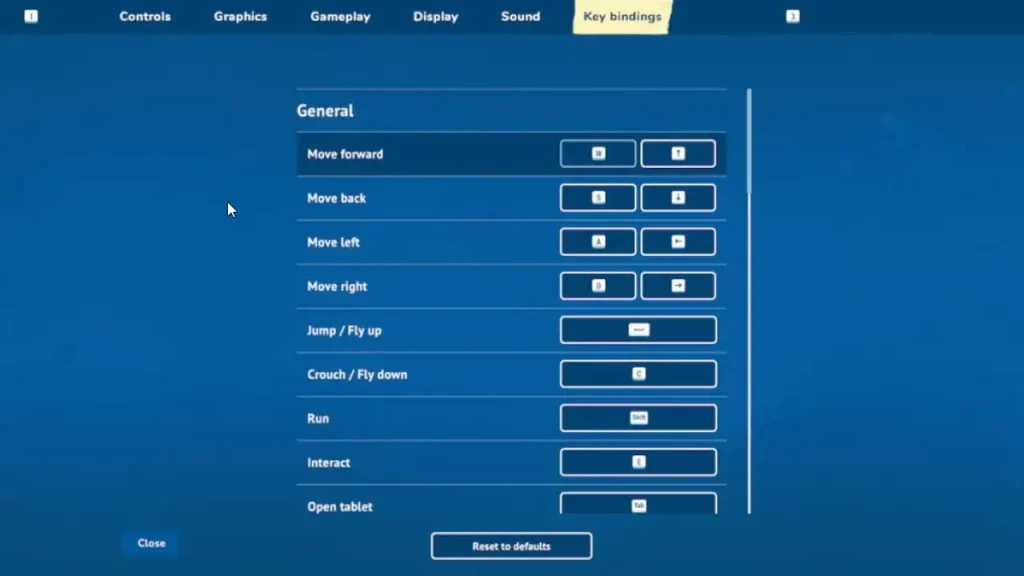
- Now, you should click on the control you want to change.
- After that, press the button you want to set that control to.
- That’s it, you have successfully changed the keybinds in House Flipper 2 now.
Can you Undo Changes in House Flipper 2?
Unfortunately, there is no ‘Undo’ option in House Flipper 2’s Story Mode as it would defeat the whole point of this game. The aim is to provide you with the most realistic house-flipping experience. So if you mess things up, you will have to figure out a way to sort it out as well.
Don’t be disheartened as you can undo your changes in House Flipper 2’s Sandbox Mode instead. You just need to press the ‘Z’ button to do that. Sandbox Mode offers complete edit control over everything about house flipping. So you can head over and showcase your creativity there.
That’s everything covered on our topic. With the House Flipper 2 Controls, you can never get confused again. For more information like this, feel free to check out our dedicated section for House Flipper 2 Guides on Gamer Tweak.