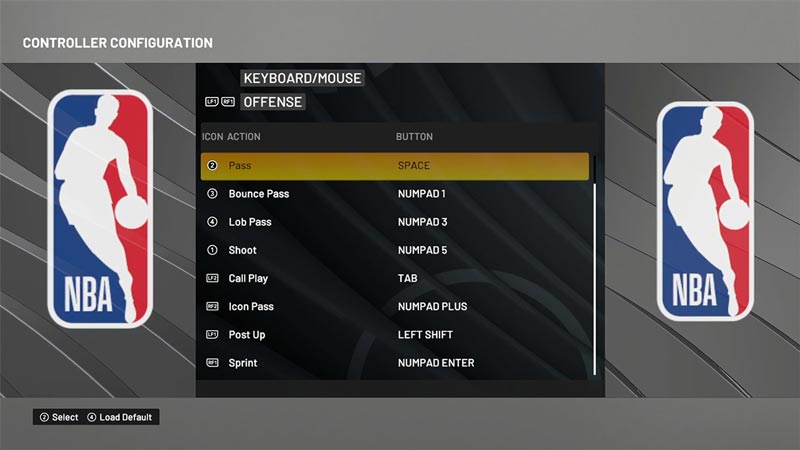
NBA 2K22 is out now and you can play it on PC, Xbox, and PlayStation. While many players consider the best way to enjoy NBA is by playing with a controller, you can have an equal amount of fun while playing on a keyboard. Hence, knowing the controls will come in handy when you want to pull some of the most advanced moves. So in this guide let us take a look at all the basic controls for NBA 2K22.
NBA 2K22: All Basic and Advanced Controls For Xbox, PlayStation, and PC
Image Credit: MVP Romania on YouTube
In this guide, I have broken down the controls into basic offense and basic defense for you to understand easily. NBA 2K22 controls are as follows:
Basic Offense Controls – NBA 2K22 Controls Guide
Basic Offense Controls
Control
PC
Xbox
PlayStation
Move Player
WASD – Keys
Left Joystick
Left Joystick
Pro Stick
Numpad 2, 4, 6, & 8
Right Joystick
Right Joystick
Pass
Spacebar
A
Cross
Bounce Pass
Numpad 1
B
Circle
Shoot
Numpad 5
X
Square
Lead to Basket
Numpad 3
Y
Triangle
Post Up
Left Shift
LT
L2
Sprint
Enter
RT
R2
Call Play
Tab
LB
L1
Icon Pass
Numpad +
RB
R1
Gameplay HUD
Arrow Key Up
D-Pad Up
D-Pad Up
Substitutions
Arrow Key Down
D-Pad Down
D-Pad Down
Offensive Strategies
Arrow Key Left
D-Pad Left
D-Pad Left
Point of Emphasis
Arrow Key Right
D-Pad Right
D-Pad Right
Pause
Esc
Menu
Options
Basic Defense Controls
Basic Defense Controls
Control
PC
Xbox
PlayStation
Move Player
WASD – Keys
Left Joystick
Left Joystick
Hands Up
Numpad 2, 4, 6, & 8
Right Joystick
Right Joystick
Player Swap
Spacebar
A
Cross
Take Charge
Numpad 1
B
Circle
Steal
Numpad 5
X
Square
Block
Numpad 3
Y
Triangle
Intense-D
Left Shift
LT
L2
Sprint
Enter
RT
R2
Defensive Adjustments
Tab
LB
L1
Icon Swap
Numpad +
RB
R1
Gameplay HUD
Arrow Key Up
D-Pad Up
D-Pad Up
Substitutions
Arrow Key Down
D-Pad Down
D-Pad Down
Offensive Strategies
Arrow Key Left
D-Pad Left
D-Pad Left
Point of Emphasis
Arrow Key Right
D-Pad Right
D-Pad Right
Pause
Esc
Menu
Options
Advanced Offense Controls
Advanced Offense Controls
Control
PC
Xbox
PlayStation
Pick Control
Press and hold Tab-Key, then Numpad Enter to pick side or Numpad + to roll
Press and hold LB, then use left joystick to pick side or RB to roll
Press and hold L1, then use left joystick to pick side or R1 to roll
Lead to Basket
Press and hold Numpad 3 and wait for teammate to get in range before releasing the Key
Press and hold Y Button and wait for teammate to get in range before releasing the Button
Press and hold Triangle Button and wait for teammate to get in range before releasing the Button
Fake Pass
Numpad 3 + Numpad 1
Y + B
Triangle + Circle
Jump Pass
Numpad 5 + Spacebar
X + A
Cross + Square
Handoff/Pitch pass
Press and hold Numpad 1, once receiver is in range release Numpad 1 to pass the ball
Press and hold B, once receiver is in range release B to pass the ball
Press and hold Circle, once receiver is in range release Circle to pass the ball
Bounce Pass
Numpad 1
B
Circle
Overhead Pass
Numpad 3
Y
Triangle
Flashy Pass
Double tap Numpad 1
Double tap B
Double tap Circle
Alley-Oop
Double tap Numpad 3
Double tap Y
Double tap Triangle
Pro Stick Pass
Numpad + with Numpad 2, 4, 6, 8
RB + right joystick
R1 + right joystick
Putback Dunk (while handling receiver)
Hold Numpad 5
Hold X
Hold Square
Advanced Defense Controls
Advanced Defense Controls
Control
PC
Xbox
PlayStation
Move Player
WASD – Keys
Left Joystick
Left Joystick
Take Charge
Hold Numpad 1
Hold B
Hold Circle
Flop
Double tap Numpad 1
Double tap B
Double tap Circle
Fast Shuffle
left Shift + Enter + WASD
LT + RT + left joystick
L2 + R2 + left joystick
Steal
Numpad 5
X
Square
Block
Numpad 3
Y
Triangle
Ball Denial
Hold Left Shift while opponent is close by
Hold LT while opponent is close by
Hold L2 while opponent is close by
Intense-D
Left Shift
LT
L2
Crowd Dribbler
Hold Left Shift and WASD towards the dribbler
Hold LT and left joystick towards the dribbler
Hold L2 and left joystick towards the dribbler
Icon Double Team
Press Tab, followed by tapping and holding the action button of the double teamer
Press LB, followed by tapping and holding the action button of the double teamer
Press L1, followed by tapping and holding the action button of the double teamer
Double Team
Hold Tab
Hold LB
Hold L1
Deny Hands Out
Hold Numpad 2,4,6,8 (when playing offball defense)
Hold Right joystick (when playing offball defense)
Hold Right joystick (when playing offball defense)
Hands Up
Hold Numpad 2,4,6,8 Up
Hold Right joystick Up
Hold Right joystick Up
That sums up this guide for the basic controls for NBA 2K22. Also, remember to check out our guide on how to get and use Skateboard to travel on the map faster in NBA 2K22.
Mukbang games are gaining more popularity on Roblox these days, and Stream a Mukbang is where you eat food live, gain views, likes, followers, and earn cash for upgrades. As your live videos become more popular, you’ll need more resources to keep attracting new viewers, and that’s where free rewards can make a difference. Redeeming… Read More
In Become an Anime Billionaire, you roll for anime characters, earn money, rebirth, climb the leaderboard and this journey becomes much easier when you have plenty of rewards. Thankfully, the developers release new Become an Anime Billionaire codes pretty regularly, such as free Units, Lucky Blocks, Cash, and more. Here’s the complete list of all… Read More
Pulling off wheelies, upgrading your ride, and traveling across the city is what BikeLife Society is all about. As you unlock better bikes and customize them to match your style, you’ll need plenty of in-game resources to keep progressing. Free rewards can make that journey much easier, so it’s always worth redeeming the latest BikeLife… Read More
In this boxing game, you don’t throw the punches yourself – you’re the coach who watches matches and helps train fighters. You’re tasked with upgrading your gym, improving your roster, and climbing through stronger leagues, which is why you’ll need every boost you can get. So, make sure to redeem these Coach a Fighter codes… Read More