While trying to play CS2 you may get the Your Client needs to update error and may need a fix. This bug as the name explains requires you to update Steam. But the problem is even after updating it doesn’t seem to help players play the game. Thankfully there are a few basic fixes that you can do to solve it.
How to Fix Your Client Needs to Update Error for CS2
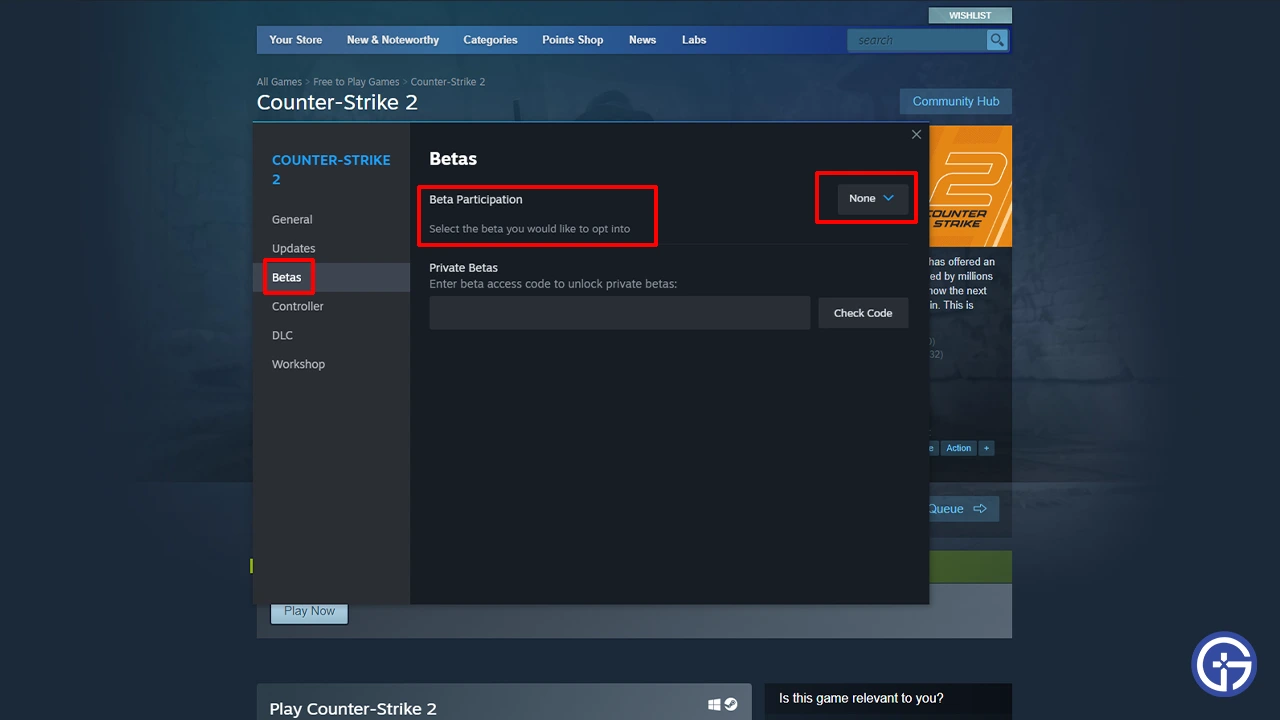
- Leave Beta Program: One of the reasons you may get this error is because you may have tried the game in its Beta.
- Launch Steam and go to your Library.
- Right-click on Counter-Strike 2 and click on Properties.
- Go to the Betas tab.
- Set the Beta Participation to none.
- Now, restart Steam and try playing CS2 you shouldn’t get this error now.
- Restart Steam: The best fix for this error is to close Steam from the system tray and restart it. Each time you restart Steam it updates. Now launch CS2 and check if you are still getting the error. Try restarting it a few times until it fixes before moving to next tricks.
- Restart your PC: If closing Steam from the system tray didn’t help much then you can also restart your PC. Upon each system restart, Steam will update.
- Verify file Integrity: There is a chance you are getting this error due to some possibly corrupt files. Scanning your game files can help fix it.
- Go to your Steam Library.
- Right-click on CS2 and choose Properties.
- Go to Installed Files and choose Verify Integrity of Game files.
- Wait for the scan to complete, once it is done play the game to see if you still get that issue.
- Reinstall the game: If verifying files didn’t work for you then you should uninstall the game and remove all its files from your system. Now do a fresh installation.
- Wait for Updates: Lastly, if none of the above fixes work you should wait for them to release an update that fixes this bug for good. Once it is out, update your game and you shouldn’t get this error anymore.
That’s all for how to fix the Client needs to update error for CS2. Be sure to check our Counter Strike 2 section for more help on other topics for this game.