
Are you looking to start or join a Clan in Diablo 4? Then you are at the right place as this guide is all you will need. While going through the terrifying dungeons, nothing works as good as teamwork. So the best thing you can do is create a clan and keep it privately for your friends or make it public and find players to go with you in the dungeon. Since you are here, you also have a team that you are waiting to take with you to a dungeon. Well, all you have to do is go through this guide as we will explain it all below.
How to Create or Join a Clan in Diablo 4
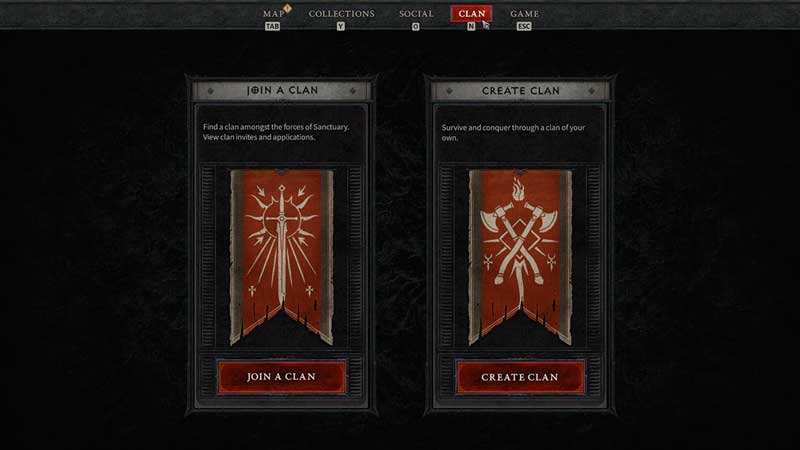
In Diablo 4, you can create your own clan in order to play with your friends or find players with similar playstyles. Fortunately, you don’t have to do much in order to create one. You don’t even have to complete any favor or quest in order to do that. There are just a few steps that you need to follow and you will have your own clan ready in no time:
- Once you open the Game Menu, you need to navigate to the Clan tab.
- While you are here, select the Create Clan option and then enter a name and tag for it.
- The remaining fields are optional but if it is a public one, you might do good by entering in the details.
- Now that you have completed the settings, you can simply create the clan the Diablo 4.
If you want to join an already created clan, you can see the Join Clan in the Clan tab.
How to Customize Clan
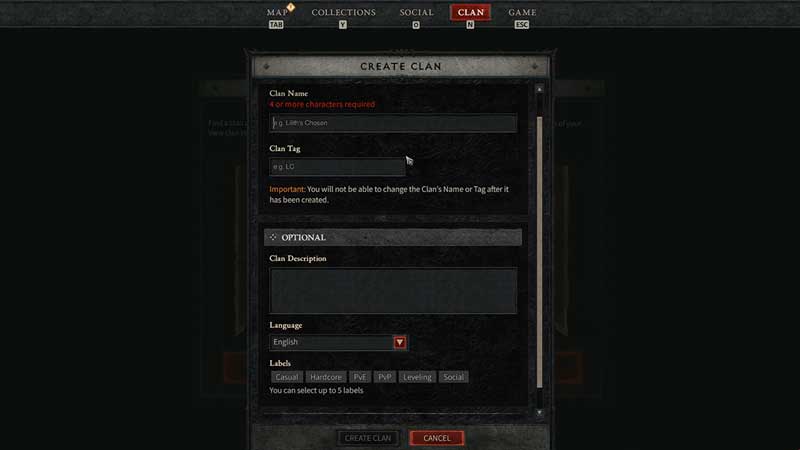
In Diablo IV, once you manage to create your own clan, you will have to customize it. This is necessary as you look to personalize it amidst others. While in the Clan menu, you simply have to hit Manage Clan and you can change a lot of things. For instance, you can change your banner, permissions, summary of the clan and other options.
How to Ban Player from Clan
Hopefully, it does not come down to this but if you need to remove a player from your Clan in Diablo 4, you need to head to the Manage Clan option. Ban will show up at the very end and players of certain ranks can unban them and change things when needed. Keep in mind, you need to designate these ranks and provide them with permissions to do so.
That’s all there is on how to start or join a clan in Diablo 4. While you are here, make sure you check out our other Diablo 4 guides right here at Gamer Tweak.










