
Home > Gaming Guides > How To Check Mail In Suicide Squad Kill The Justice League

How To Check Mail In Suicide Squad Kill The Justice League

Published Date :

One of the many ways you can collect rewards in Suicide Squad Kill The Justice League is by checking the mailbox. This happens mostly when a player has to go through some inconvenience due to the developer’s mistake. As compensation, the players get rewarded through in-game mail. The only trouble is that there is no dedicated option to check the mailbox in the menu. So how does one claim their reward?

In this guide, we will tell you exactly how to check your mail and claim rewards in Suicide Squad KTJL.

How to Check Mailbox in Suicide Squad KTJL
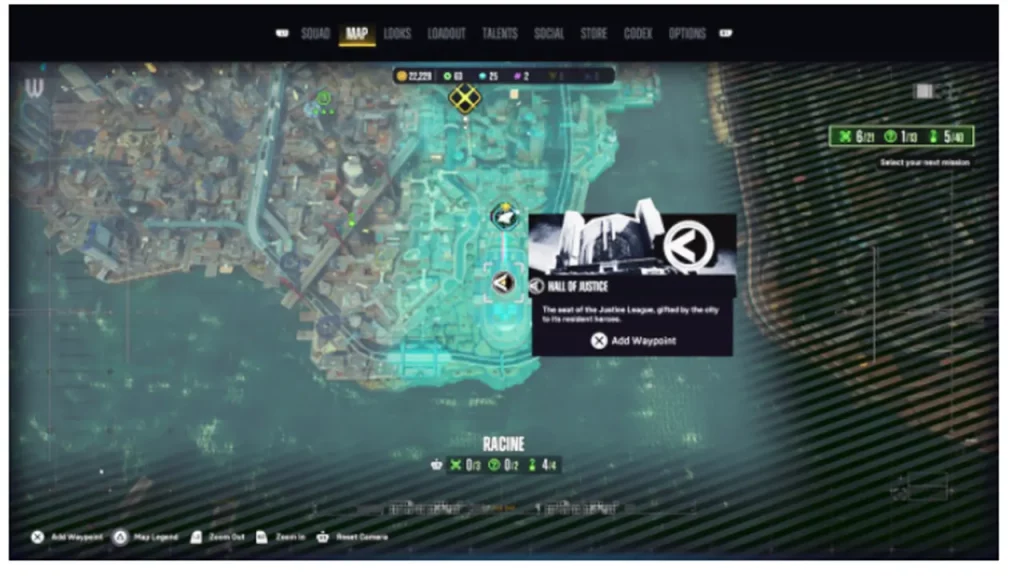
Where to Check Mailbox in Suicide Squad Kill the Justice League
Hall of Justice Location. Image Credits to Rocksteady

Actually, the option to check the mail is not there in the Main Menu. To do so, you will have to start a session and go to the Hall of Justice. If you are not sure where it is, use the above image as a reference. Once you reach the Hall of Justice, pass through the main door and turn left. You will be able to see a Superman cutout there. Right under it, there will be a console that you can use to access all your Mails in Suicide Squad Kill the Justice League.
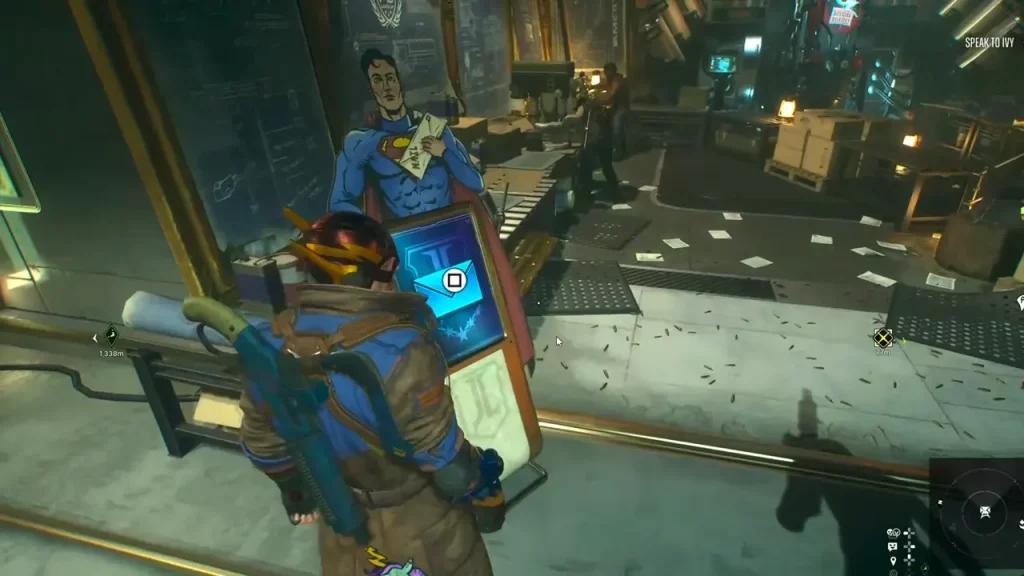
Checking mail in Suicide Squad Kill the Justice League
Checking Mailbox in Hall of Justice. Image Credits to IronWolfNetwork

This is where you can come and check your mails and collect rewards if there are any. Keep in mind that some messages in your mailbox are time-sensitive. So if you miss out on such time-sensitive mail, you might also lose the rewards associated with it. That is why, I suggest whenever you come to the Racine area, do enter the Hall of Justice and check your mails in Suicide Squad Kill the Justice League.

That’s all you can do to check your Mailbox in Suicide Squad Kill the Justice League. For more information like the one you just saw, be sure to stay connected with us. We have and we will cover plenty of relevant content for you.


  • GTA 6 Sprint Control Change: Rockstar Ditches Button Mashing?

    GTA 6 Sprint Control Change: Rockstar Ditches Button Mashing?

    Published Date :

    Rockstar is making a small but important change to how players sprint in GTA 6. The new instalment appears to be moving away from the button-mashing controls used in earlier GTA titles and switching sprinting to the left stick. This means running around Vice City should require fewer repeated button presses when playing as Jason… Read More

  • Dungeon Lootr Codes (September 2026)

    Dungeon Lootr Codes (September 2026)

    Published Date :

    Dungeon Lootr is a Roblox hack-and-slash game built around challenging dungeons, different classes, builds and plenty of loot. You can fight enemies, collect better gear, upgrade your weapons, and use different abilities as you progress and codes can give you useful items such as Luck Potions, Forge Stones, Aspect Gems, and Coins. If you don’t… Read More

  • U7BUY Steal a Brainrot Items Review: Pricing, Delivery Speed, and Service Quality

    U7BUY Steal a Brainrot Items Review: Pricing, Delivery Speed, and Service Quality

    Published Date :

    When playing Roblox Steal a Brainrot, you will be aware of the frustration it causes. You need a unit that actually earns $/sec, but those units have such low probability of appearance that you can only find one of them in 0.1% of cases. Many hours of farming sometimes lead to days, and still, you… Read More

  • MM2 of The Locust Codes (September 2026)

    MM2 of The Locust Codes (September 2026)

    Published Date :

    MM2 of The Locust is a Roblox horror game where you are trapped inside a dangerous nest with a giant creature hunting you. Your goal is to survive, find your way around the map, and escape before the Locust catches you. You can also collect Keys during your runs and use them to get different… Read More







