
If you are new to Overwatch 2 but are coming from Valorant then you can change your Sensitivity and use the same. Having the right crosshair and sensitivity is very crucial in any first-person shooter game. Thankfully the process to get your setting transferred is quite easy. So in this import guide let us check how you can convert your Sensitivity from Valorant to Overwatch 2.
How to Convert your Sensitivity from Valorant to Overwatch 2
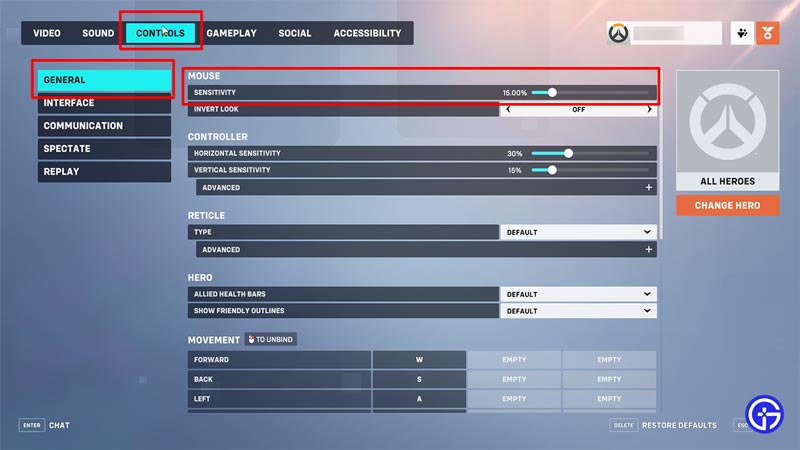
You can convert your Valorant Sensitivity to Overwatch 2 by simply multiplying it by 10.60. Once you have the new number here is what you have to do:
- Open the menu and go to Options.
- Next, head to the Controls tab.
- Here, select General from the left and go to change your Sensitivity under the Mouse section.
It might sound like an odd or a weird number but that is what it converts to. So if your sensitivity in Valorant is 1, in Overwatch 2 you should be using 10.60%. For example, I use 1.7 in Valorant so my sensitivity in OW2 will be 18.02%. This is a direct and manual way of converting your sensitivity.
Alternatively, you can also look up third-party websites to better fine-tune such conversions. You should use such sites in case you have your settings adjusted with your mouse’s DPI.
Why you Should use your Valorant Sensitivity in OW2?
It is not a compulsion that you have to import the same crosshair and sensitivity, but it using the same should be helpful. The catch is if you have been playing Valorant for some time now, your hand must be used to a lot of movements and crosshair placement. So while that game’s crosshair placement won’t be of much use here, what you can use is your fluidity in aiming. In case you do not want to use the same sensitivity at all then you can always try practicing and seeing what works best for you in OW2.
That covers this import guide on how to change your Sensitivity settings from Valorant to Overwatch 2. If you want to boost your performance and FPS in this game, then check out the best video settings for it. And for help on other similar topics be sure to check out our Overwatch 2 guides.











