
EA Sports has released the F1 22 and “it’s lights out and away we go”. While the game offers different game modes, including the online and offline modes, the race length differs. Default race length is set anywhere between 5-15 depending on the game mode. Although that is a fair length to complete different Grand Prix, it may not seem fulfilling to fans of this motorsport. Thus people are looking for ways to change race length for the different game modes in F1 22. If you are looking for the same, look no further as we have it covered.
How to Change Race Length in F1 22
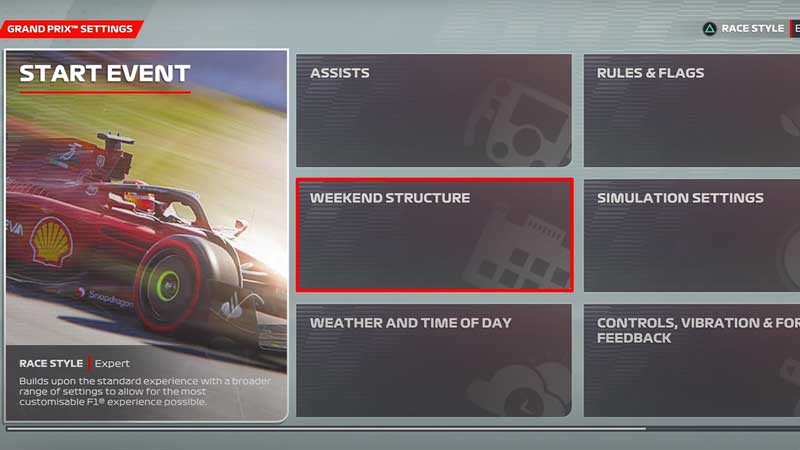
With multiple game modes on offer in F1 22, players get the chance to experience Solo Grand Prix, Online Multiplayer, and of course a career mode as an F1 driver. But each circuit and mode has been set differently in terms of weekend structure and race length. While there is no way to change the race length in a game mode you already started, here’s what you can do:
- While in the Solo mode, head over to the Grand Prix option and select.
- Next, you will have to start a new Grand Prix in F1 22.
- Once you complete selecting the Team and the driver of your choice, you will reach the Grand Prix settings with multiple options.
- While in this window, select the Weekend Structure.
- From this new window, you can change the format, increase the race length and even add practice and qualifying sessions.
- The process remains the same for other game modes as well.
- If you want to play multiplayer, once you create the lobby and come to the new window, select Settings.
- You will find the Weekend Structure in the new window and the rest of the process remains the same.
- Along with this, for the Career Mode, you will have to avoid using the recommended settings and select Custom Settings in the starting window.
- Once you open the Custom Settings, you will be able to select the Weekend Structure and change the race length in the game.
That’s all you need on how to change race length in F1 22. While you are here, make sure you do not miss out on our F1 22 guides, tips, and tricks with Gamer Tweak.











