Home > Gaming Guides > How To Change MyCareer Nickname In NBA 2K23

How To Change Nickname In NBA 2K23 (MyCareer)

Updated Date :

In NBA 2K23 you can customize a whole lot of things, including your MyPlayers height, weight, and other cosmetics. However, even after making the player unique, they’re only referred to as MP in the game. If your player is also referred to as MP by the commentators and you’d like to change that, then we’ve got you covered. Here’s a guide for you on how to change your MyPlayer Nickname for MyCareer in NBA 2K23.

How to Change MyPlayers Nickname in NBA 2K23?

In order to change MyPlayer Nickname for MyCareer in NBA 2K23, here’s what you’ll need to do. Also note, that by changing your secondary nickname you don’t need to be worried about your jersey because it won’t change your jersey’s name.

  • First, make sure that you’ve completed MyCareer’s Summer League quest.
  • After that, go to The City and open the Menu.
  • Next, simply scroll forward until you see the Options/Quit tab.
  • Then, click on the Settings option.
  • After doing that, go to the Secondary Nickname option and now you’ll be able you change your MyPlayer’s nickname.
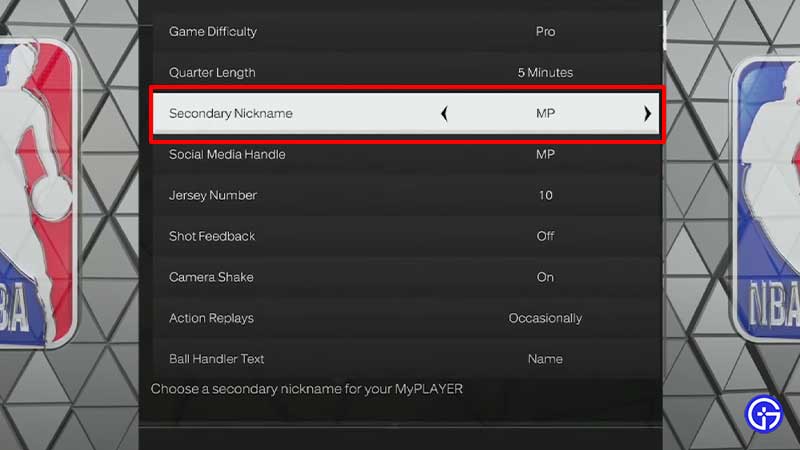
How To Change MyCareer Nickname In NBA 2K23

This is how you can change your MyPlayer nickname for MyCareer in NBA 2K23. However, there are only limited nicknames available in the game. For your reference, we’ve mentioned all the available secondary nicknames in the article below.

Also Read | Best NBA 2K23 Shooting Tips Guide

  • Mr.Clutch
  • Mr. Fundamentals
  • Mr. Incredible
  • Mr. Moves
  • P
  • Pres
  • Prime Time
  • Q
  • Rain Man
  • Red Hot
  • Shake n’ Bake
  • Shorty
  • Silk
  • Skinny
  • Slim
  • Smooth
  • Speedy
  • T
  • The Beast
  • The Bodyguard
  • The Bulldozer

These are all MyPlayer secondary nicknames available in NBA 2K23. Go on, choose the one you like the most and you’ll be no longer referred to as MP in MyCareer. This is all you need to know about changing nicknames for MyCareer in NBA 2K23. While you’re here, check out how to Fast Travel in the game.

  • Build an Ore Crusher Codes (July 2026)

    Build an Ore Crusher Codes (July 2026)

    Published Date :

    Building an efficient mining empire takes effort and in Build an Ore Crusher, your goal is to create a processing line that goes from Crushing ores to earning cash for profit. As your operation grows, you’ll unlock better equipment, automate production, and earn enough money to expand your factory even further. To add to it,… Read More

  • Build an ASMR Tower Codes (July 2026)

    Build an ASMR Tower Codes (July 2026)

    Published Date :

    If you enjoy satisfying building games, Build an ASMR Tower offers a relaxing experience where every upgrade helps you construct an even taller structure. As you continue stacking blocks and improving your tower, Gems become an important resource for unlocking new mechanics and progressing more efficiently. That’s where Build an ASMR Tower codes come in.… Read More

  • Excuse Me Sir Codes (July 2026)

    Excuse Me Sir Codes (July 2026)

    Published Date :

    If you’re looking for free Lucky rolls, Anime Crates, Cash potions and more boosts in Excuse Me Sir on Roblox, this list has all the codes you need to redeem. The developers disable rewards often, so it’s best to claim the goodies right away! Last checked for new codes on July 21, 2026 All Excuse… Read More

  • Speedsters Infinite Codes (July 2026)

    Speedsters Infinite Codes (July 2026)

    Published Date :

    Games based on speed and racing are always going to be a rage on Roblox, and if you’re a fan of leveling up your speed from zero to lightning fast, this one’s for you. In this game, getting faster means unlocking more Rebirths and better Speedsters, which will require Gems and MPH bonuses. This is… Read More