Home > Gaming Guides > Soulmask: How To Change Masks

Soulmask: How To Change Masks

Published Date :

Since this game is currently in its early access stage, players will be able to obtain ten masks. However, the developers will be adding more during the future updates. Additionally, the three early-game masks are quite easy to obtain as compared to the rest of the seven masks that you will gradually be able to collect as you progress through the game.

Similarly, while you are in the process of unlocking different masks, it is also essential to learn how you can change masks in Soulmask. If you need help with this, here’s everything you need to know about changing the mask your character is currently using.

How to Switch Masks in Soulmask
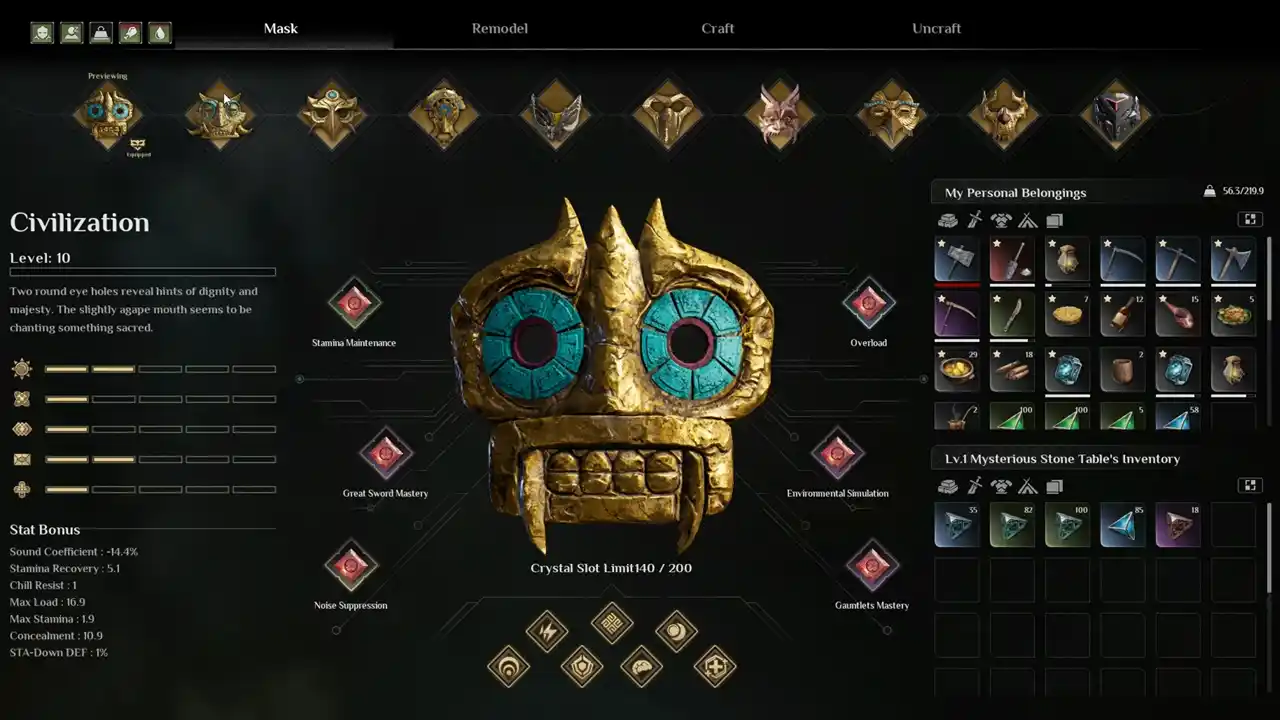
How To Switch Masks In Soulmask
Image Credits – wak4863 on YouTube

To quickly change masks in Soulmask, players will have to get the Mysterious Stone Table. You will find it in the Ancient Ruins Dungeons, and getting the table here will be easier, considering the enemies in this dungeon are not that tough to beat.

Apart from this, you can also go to other dungeons, like the Holy Ruins, to get the Mysterious Stone Table. Furthermore, before you enter the dungeon, make sure you are carrying some powerful weapons and are focusing on tackling only one enemy at a time if you are going solo.

Once you have defeated all the enemies in the dungeon and have fought the final boss, you will obtain the key to open the door that has unique loot and the table you are looking for. Hold the “E” key to pick it up, and use a mount to get it back.

Now, once you interact with Mysterious Stone Table, click on the “Masks” option. You can go through the list of masks you have unlocked and hit the “E” key to Embed/Remove. To transfer your awareness to a different mask, click on the “F” button. However, keep in mind that the red crystals won’t be transferred from one mask to another.

We have covered everything you need to know about switching your character’s masks in Soulmask. If this is your current favorite game, don’t forget to check out how you can tame NPCs and find out how you can get Feces, Premium Hardwood, and Logs.

  • GTA 6 Players in Australia May Need Age Verification Due to New Online Safety Rules

    GTA 6 Players in Australia May Need Age Verification Due to New Online Safety Rules

    Published Date :

    Australian players could have an extra requirement to meet before accessing Grand Theft Auto VI’s online features. Under the country’s updated online safety regulations, games classified as R18+ may need to verify that players are adults instead of relying on a simple age confirmation (as per news.com.au). If GTA 6 falls under those requirements, Rockstar… Read More

  • Tactical Swat Simulator Codes (July 2026)

    Tactical Swat Simulator Codes (July 2026)

    Published Date :

    This action-packed game is all about completing objectives, clearing the area, and stopping hostile suspects, and while you’re at it, you can earn plenty of cash. Luckily, Tactical SWAT Simulator codes also give you free Cash that can be put toward new gear and upgrades, helping you strengthen your loadout before heading back into the… Read More

  • Roblox Chameleon Codes (July 2026)

    Roblox Chameleon Codes (July 2026)

    Published Date :

    Meccha Chameleon’s virality is bringing similar games to Roblox, and this one’s called Chameleon! Blending into your surroundings is the key to staying hidden, but unlocking new cosmetics and customization options makes every match even more enjoyable. Roblox Chameleon codes give you free Coins that you can spend on new skins and other in-game items,… Read More

  • Reclone Codes (July 2026)

    Reclone Codes (July 2026)

    Published Date :

    Reclone is a sci-fi stealth horror game where you get on a research spaceship and survive the dangers that lurk. This means, you need all the boosts you can get which is exactly what Reclone codes provide! If you’re running short of Tokens or cash, make sure to redeem them quickly so that you have… Read More