
FIFA 23 is the most recent and 30th installment of the popular soccer game. The game comes with lots of additional features and content that can keep you entertained for hours. It was easy for this game to gain all the attention as the foundation was already laid by its predecessors. Moreover, football has a huge fan base of all ages and that is why FIFA 23 is being enjoyed all over the world. The game allows customization control over Languages so that players find no difficulty while accessing the game. It is possible to change the Menu UI language and Commentary language in FIFA 23 with almost no effort. Check out this guide to know how to change the language in FIFA 23.
How to Change Language in FIFA 23 (Menu)
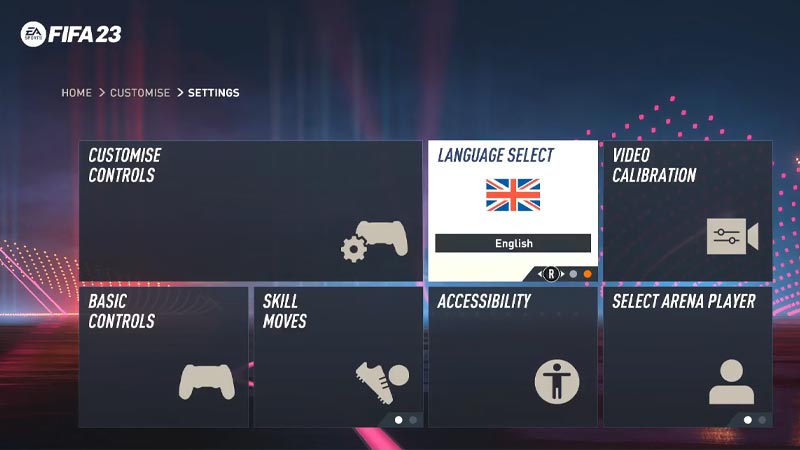
In case, you have accidentally changed the language in the game, here’s how you can change it:
- Launch FIFA 23 and enter the Main Menu screen.
- Thereafter, scroll all the way right and enter the Customization menu at the end of the list.
- Now, enter the Settings tab and hover over the Game Settings, which is the second tile.
- Do not enter that tab but use the Right-Analog Stick or Directional Keys to swipe a secondary language menu.
- From there, you can select the language of your choice in the game:
- English
- French
- Korean
- Chinese
- Portuguese
- Arabic
How to Change Commentary Language in FIFA 23
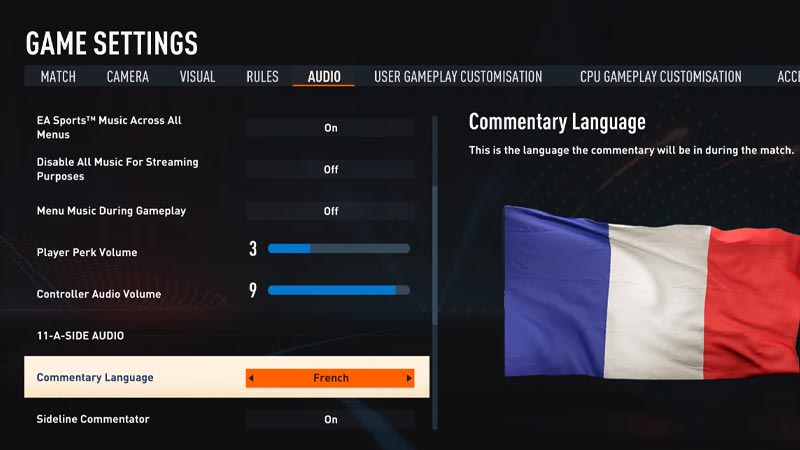
Double the fun by enjoying the in-game Commentary in a different language in the game. Here’s what you can do to change the Commentary language:
Launch FIFA 23 and enter the Main Menu screen.
Further, enter the Customization tab on the right. In that tab, enter the Game Setting and navigate to the Audio tab.
Later, scroll down to the 11-A-Side Audio section, and below that you will find the Commentary Language option.
You can change the Commentary language between English, French, and Spanish in FIFA 23.
That’s how to change the Main Menu Language and Commentary Language in FIFA 23. If you found this article helpful, then make sure to check out our other FIFA 23 guides.










