MultiVersus is the epic crossover game introduced by Warner Bros. Interactive Entertainment. The game has unlockable classic characters from Warner Bros., DC Comics, HBO, Turner Entertainment, and Cartoon Network. While there are 19 playable characters at the time of writing, 17 are unlockable and two more are to come soon. Although the primary format will be a 2v2 game mode, free-for-all and 1v1 will also be available. There are quite a lot of features and with the launch of the open beta, more and more competition is coming to the game. If you are already in MultiVersus and wondering how you can change your age, this guide is all you need.
How to Change Your Age in MultiVersus
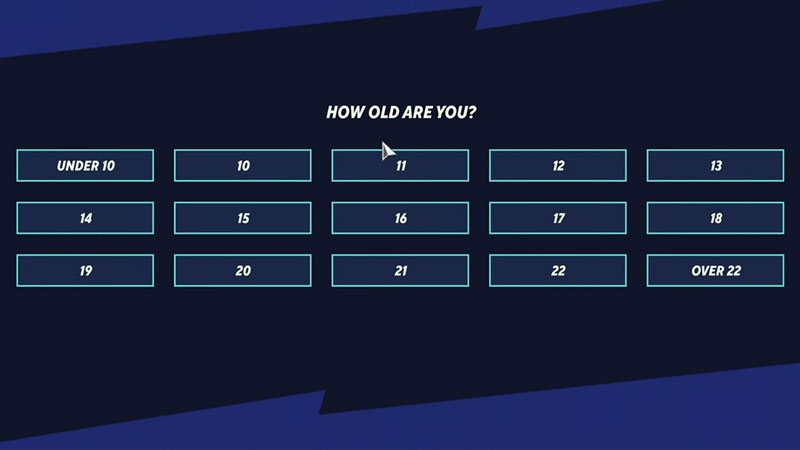
Unfortunately, there is no feature to change your age in the game. However, it is not completely impossible. The following method will help you change your age without reinstalling the game but it might delete your progress. Here’s what you need to do:
- Start by opening the File Explorer and on the top, click on View and tick the Hidden Items box to show the hidden files.
- Next, Go to Local Disk (C) and click on Users, and then click on the Username of your PC.
- After this, open App Data. The App Data folder is usually hidden so make sure you have followed the first step.
- While you are in the App Data folder, search for the MultiVersus folder.
- Once you have found the folder, click on it and then click on the Saved folder to open the new window.
- While you are in the new window, click on the SaveGames folder and delete the file named firstlaunch_save.sav from the folder.
- Next, Launch the game again, and once the display screen shows the option to choose your age, select Over 22.
Additionally, selecting a higher age will allow you to access the online mode in the game. This method might even save you a reinstall of the game.
Whether the creators of MultiVersus will adopt a better way to this problem remains to be seen. As of now, this is the only method to change your age apart from a complete reinstall.
That’s all you need on how to change your age in MultiVersus. While you are here make sure you check out our MultiVersus Guides, Jake Perks, Finn Perks, and more at Gamer Tweak.