Close Menu
    Facebook X (Twitter) Instagram
    Gamer TweakGamer Tweak
    • GT Originals
    • Guides
      • AC Mirage
      • Starfield
      • Wordle
      • Mobile
      • GTA 6
      • AC Valhalla
      • Genshin Impact
      • Honkai Star Rail
      • Minecraft
      • Discord
      • Street Fighter 6
      • Project Slayers
      • The Sims 4
      • Lies of P
      • Zelda TOTK
    • Roblox
      • Codes
      • Blox Fruits
      • Type Soul
      • Grow a Garden
      • 99 Nights in the Forest
    • Review
    • Codes
    • BG3
    • CS2
    Gamer TweakGamer Tweak
    Home > Gaming Guides > How To Buy Ship & Name Or Change Name In Sea Of Thieves
    Video Game Guides

    How To Buy, Name & Rename Your Ship In Sea Of Thieves

    Nikita HarinameBy Nikita HarinameAugust 6, 20223 Mins Read

    The long requested feature is here. With the Captaincy Update, players can now name or rename their own ships in Sea Of Thieves. Before we get to it, find out how to buy a ship, customize it’s appearance and give it an awesome new name.

    How to Buy a Ship in Sea Of Thieves

    • Make sure you have updated the game to Season 7. After that, click on Start Game.
    • Click on Play.
    • From Choose your Experience, click on Adventure.
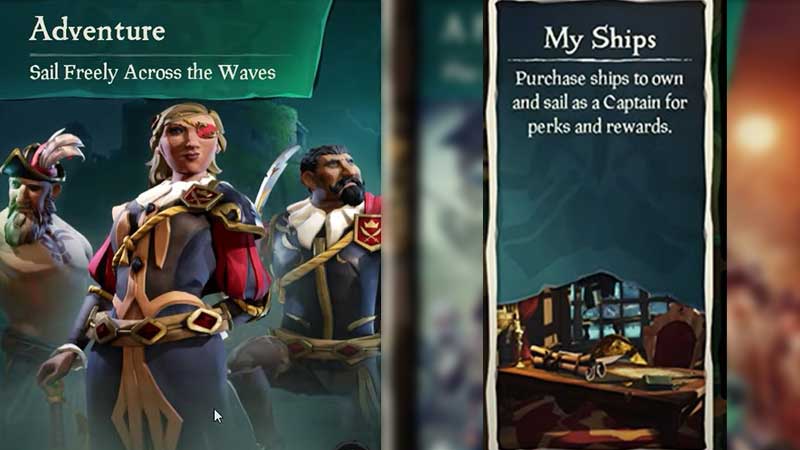
    choose ship type

    • Click on My Ships. This is where you can purchase ships to own and sail as a captain for perks and rewards.
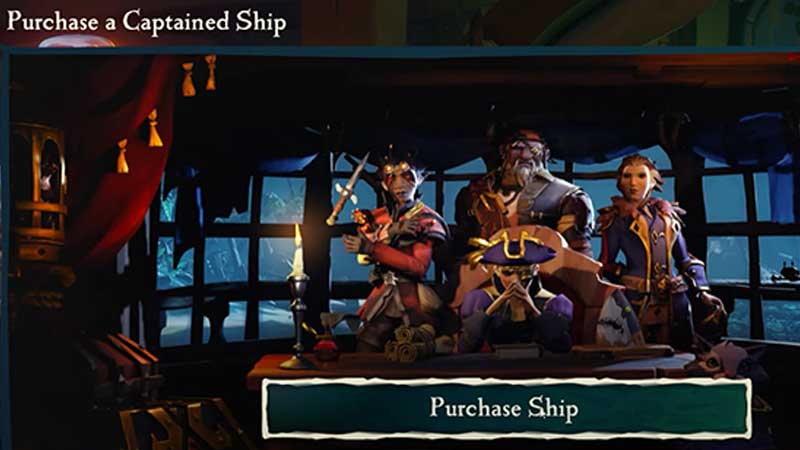
    captained ship

    • Next, click on Purchase Ship under Purchase a Captained Ship.
    • Now select a Ship Type. The options you have are: Galleon (Crew size: 4), Brigantine (Crew size: 2-3) and Sloop (Crew size: 1-2).

    Ship Types

    Galleon is a large, well-armed ship. Brigantine is a capable mid-sized ship and Sloop is a small, nimble shop with limited firepower and crew slots. Make sure you have enough Gold with you because you need a big amount to purchase a ship.

    The prices of Ships in Sea of Thieves are:
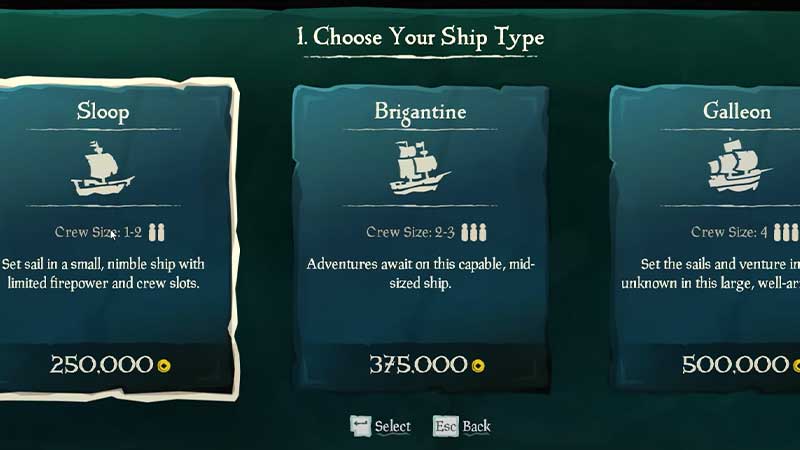
    buy ship with gold

    • Sloop: 250,000 Gold
    • Brigantine: 375,000 Gold
    • Galleon: 500,000 Gold

    Confirm your purchase and that’s it. This is how you can purchase a ship in Sea Of Thieves. Now that you have one, let’s take a look at how to name and rename your ship in Sea Of Thieves.

    How to Name & Rename Sea Of Thieves Ship
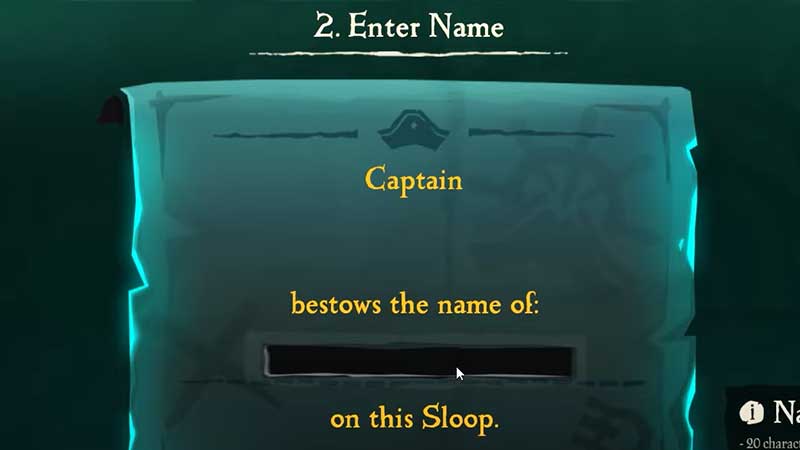
    how to name rename ship sea of thieves

    Once you have clicked on your Ship type, you will be asked to name your ship. As you know, the name of a ship gives it a personality, a character. A name can terrify opponents or it can make them laugh. So, to choose your name at this step, simply press the Enter key on your PC/A on Xbox. Type your desired name and click on Submit or hit the Enter key/Press A.

    How to Change Ship Name

    To rename your Ship in Sea Of Thieves, you have to purchase a Renaming Deed from the Pirate Emporium, so make sure you are choosing your name wisely.
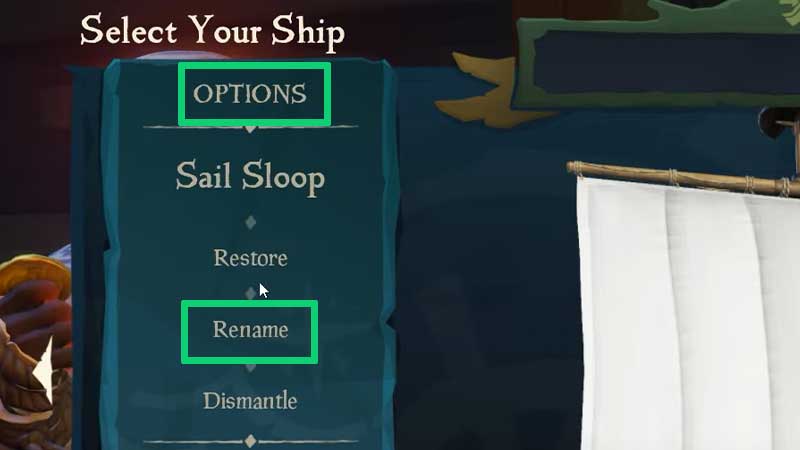
    how to change ship name sea of thieves

    Whenever you feel like you wish to rename your Ship, select it and under Options, find the Rename option. You can move forward with your Renaming Deed from here.

    Sea Of Thieves Name Requirements

    • 20 characters maximum
    • Cannot contain numbers
    • Cannot start or end with a space
    • Cannot use certain special characters
    • Also avoid using any bad or inappropriate words.

    That’s how to buy, name and rename a ship in Sea of Thieves. But if you’d like to read more about Sea of Thieves, don’t forget to check out our guides on Gamer Tweak.


    PC Sea of Thieves Tips and Tricks Xbox One Xbox Series S Xbox Series X
    Share. Facebook Twitter Pinterest LinkedIn Tumblr Email Reddit
    Nikita Hariname

    From making games to writing about them, she's been in the world of entertainment since a decade now. She writes features, the latest trending news and guides on games like Diablo 4, Overwatch 2, Roblox, codes and more fun stuff! Connect with her at - contactus@gamertweak.com

    Related Posts

    How to Fix if Helldivers 2 Update is Taking Forever

    November 5, 2025

    TF2 Marketplaces: A Guide to Choosing the Right Platform

    October 11, 2025

    Top 10 Fortnite Creative Games You Can Play With Friends in 2025

    October 8, 2025

    Most Expensive Desert Eagle (Deagle) Skins in CS2

    September 29, 2025
    Latest Codes

    Grow Anything Codes (November 2025)

    November 7, 2025

    Pixel Blade Codes (November 2025)

    November 7, 2025

    Anime Fight Codes (November 2025)

    November 4, 2025

    Monkey Climb Codes (October 2025)

    October 24, 2025

    Pixel Quest Codes (October 2025)

    October 24, 2025

    Parasite.exe Codes (October 2025)

    October 24, 2025
    Trending
    • What is Delta Executor for 99 Nights in the Forest?
    • How to Get Pet Mutation Shard Oxpecker in Grow a Garden
    • How to Get the Hammer in 99 Nights in the Forest
    • How to Get the Trinity Fruit in Grow a Garden
    © 2025 Gamertweak.
    • Advertise With Us
    • About Us
    • Team
    • Contact Us
    • Privacy Policy
    • Terms
    • Open Critic

    Type above and press Enter to search. Press Esc to cancel.