Home > Overwatch 2 > How To Block, Report & Unblock Players In OW 2

How To Block & Report Players In Overwatch 2

Published Date :

While the SMS protect feature is designed to protect players from toxicity in-game, some players may sneak past that and still cause trouble to others. In such a situation, you can block and report players in Overwatch 2 so that Blizzard takes an action against them if they keep getting reported.

An online multiplayer game like this one can have players who are completely new to the FPS genre and may fumble during their learning phase. There will also be “new” players in OW2 who are already veterans in the genre due to years of playing Fortnite, Valorant, Apex Legends, or CSGO. So, it’s very crucial to be kind to others in the chat, but if someone chooses to be abusive, follow the steps given below.

How to Block and Report Players in Overwatch 2

If a player is harassing you or a friend via voice chat or text chat, this is how you can block and report them in OW 2.

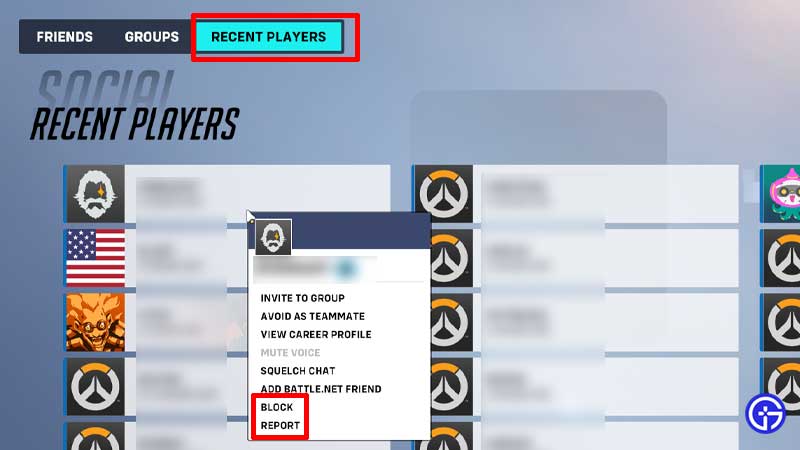
  • Go to the Social tab from the main menu, after a game where you encountered the toxic player.
blocking players ow 2

  • Click on Recent Players from the menu on the top.
  • Right-click on the player’s name and from the options that appear choose to either Block or Report them.
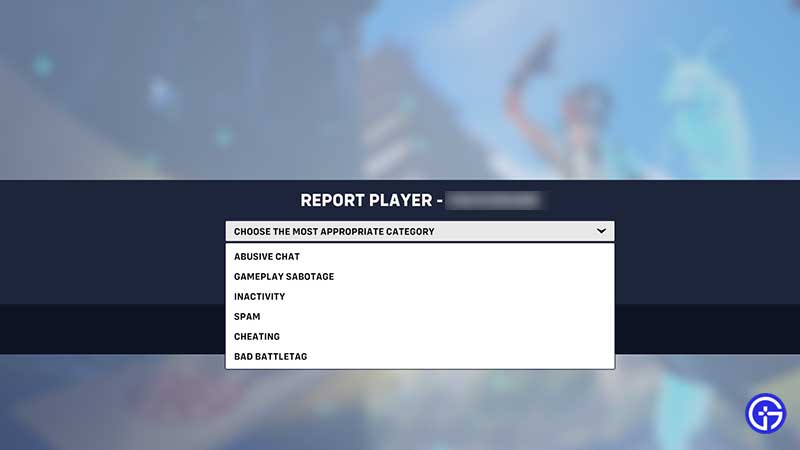
  • If you Report, you will be asked the reason behind it.
    • Abusive Chat
    • Gameplay Sabotage
    • Inactivity
    • Spam
    • Cheating
    • Bad Battletag
  • Choose the category that’s most appropriate and click on Continue to confirm the report.
reporting players ow 2

How to Unblock Players in OW 2?

how to unblock players ow 2

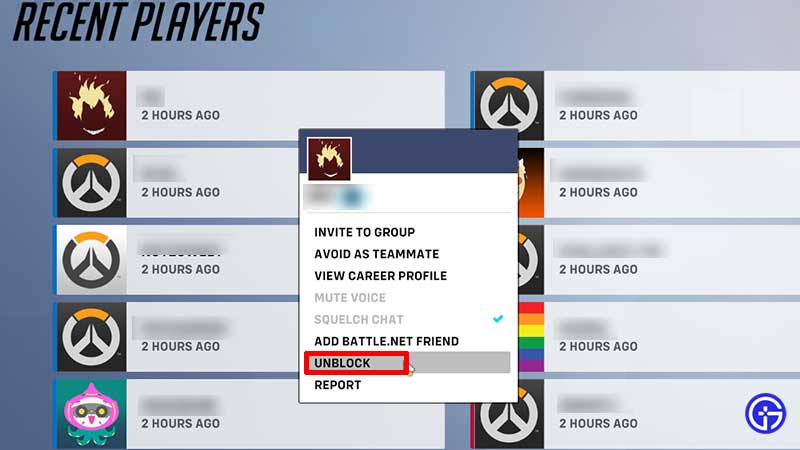
If you change your mind about a certain player, you can unblock them easily. Find the player’s name under Recent Players and right-click on their name to see the options. Select Unblock and they will be immediately unblocked.

That’s everything about blocking and reporting players in OW2. While you are here, don’t forget to find out what are souvenirs. And for more related to this game, head over to our Overwatch 2 guides.

  • Lurking Giants Codes (July 2026)

    Lurking Giants Codes (July 2026)

    Published Date :

    The name of this game says it all – lurking giants are hunting you down, and surviving isn’t going to be easy. As you continue playing, you’ll earn Coins that can be spent on unlocking new Giants, perks, emotes, and other shop items. Fortunately, you don’t have to rely entirely on gameplay to build up… Read More

  • Shinobi Way Codes (July 2026)

    Shinobi Way Codes (July 2026)

    Published Date :

    Every shinobi starts as a rookie, but mastering powerful jutsu and defeating dangerous enemies is what separates legendary ninjas from everyone else. In this adventure game, you’ll complete quests, battle opponents, strengthen your character, and unlock new abilities. Redeeming Shinobi Way codes is one of the best ways to level up your character because you… Read More

  • Digimon Up Codes (July 2026)

    Digimon Up Codes (July 2026)

    Published Date :

    Digimon Up codes provide various freebies, including DigiEmeralds, that you can redeem right away! Once you’ve picked the right partner, fed and trained them, as well as Digivolved them, you will be ready for battle and victory. The steps to redeem these goodies can be slightly confusing if it’s your first time, so we have… Read More

  • Build an Ore Crusher Codes (July 2026)

    Build an Ore Crusher Codes (July 2026)

    Published Date :

    Building an efficient mining empire takes effort and in Build an Ore Crusher, your goal is to create a processing line that goes from Crushing ores to earning cash for profit. As your operation grows, you’ll unlock better equipment, automate production, and earn enough money to expand your factory even further. To add to it,… Read More