
Battlefield 2042 has been having its fair share of critical bugs and issues ever since its launch. Although the most recent update reworked and resolved over 150 issues, it has a horizontal mouse input control error which disables the player to look left or right. This has affected only PC gamers, but there is no need to worry as the Battlefield community has posted several fixes to get the horizontal mouse working again. There is also an official fix by the Battlefield Direct Communication which was posted on Twitter, so let’s take a look at them all.
Battlefield 2042 Horizontal Mouse Not Working Fix
There’s been many workarounds and fixes for the horizontal mouse not working issue in BF 2042. Here’s our guide on the official, potential and an alternative fixes posted by the Battlefield 2042 community.
Official Fix by Battlefield Direct Communication
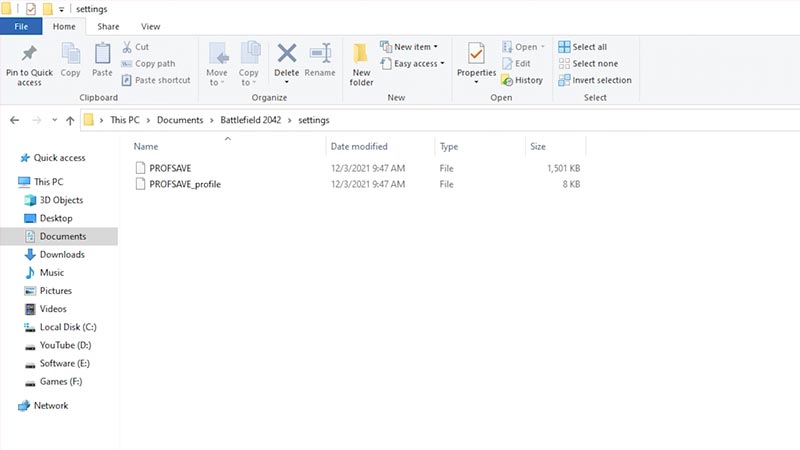
- Go to My documents and open Settings folder in the Battlefield 2042 folder
- Delete all the PROFSAVE files.
Doing this would erase all your in-game settings, and reset it to default but will get your horizontal mouse working smoothly again.
Potential Fix
These are the steps posted by DICE’s lead game designer Florian on Twitter:
- Go to Game settings and scroll down through the Mouse and Keyboard.
- Select On foot and then click on Restore default which would reset your On foot settings.
- Then, select key bindings box and click on Restore default which would reset your Key binds settings.
Another fix involves deleting the Battlefield 2042 folder in your Documents:
- Go to My documents.
- Delete Battlefield 2042 folder.
These fixes will reset your in-game settings but you can re-apply your previous settings for better gameplay.
Alternative fix
Here’s the fix posted on Battlefield Bulletin if you don’t want your in-game settings to be erased:
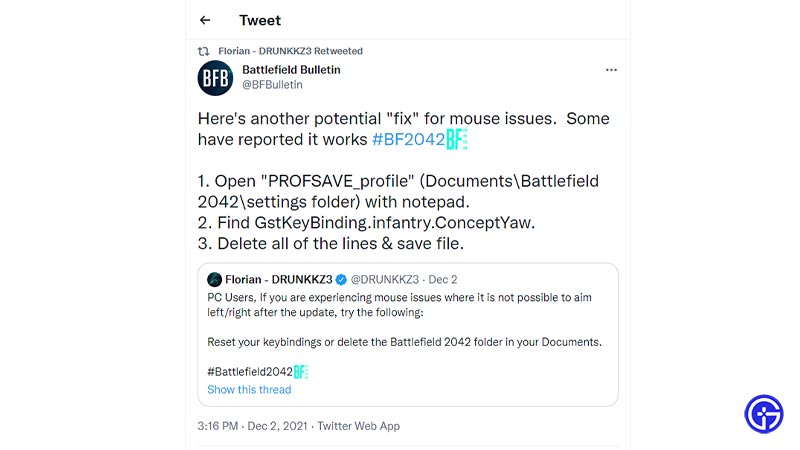
- Go to My documents and head to the settings folder in the Battlefield 2042 folder.
- Open the PROFSAVE_profile file via notepad.
- Press CTRL+F. Find the GstKeyBinding.infantry.ConceptYaw.
- Select the lines and delete all the GstKeyBinding.infantry.ConceptYaw. pertaining lines.
- Save the text file in the same folder and start the game.
- This would resolve the horizontal mouse input issue without erasing your previous in-game settings.
Hopefully, these potential fixes would resolve the horizontal mouse not working in Battlefield 2042. While you are here, make sure to check out our Battlefield 2042 Guides right here at Gamer Tweak.











