Many players are looking for the best Settings in V Rising that can help boost their FPS & Performance. Having the settings right can completely change the feel and experience of the game. It could be you have a high-end PC but you are accidentally using lower settings, hence aren’t getting the most FPS or visuals. Or it could also be your system is somewhat low-end but is suffering due to you using higher settings. If that is the case we can easily fix them by using these best graphics settings for V Rising to boost your FPS and Performance.
Best Settings in V Rising to Boost FPS & Performance
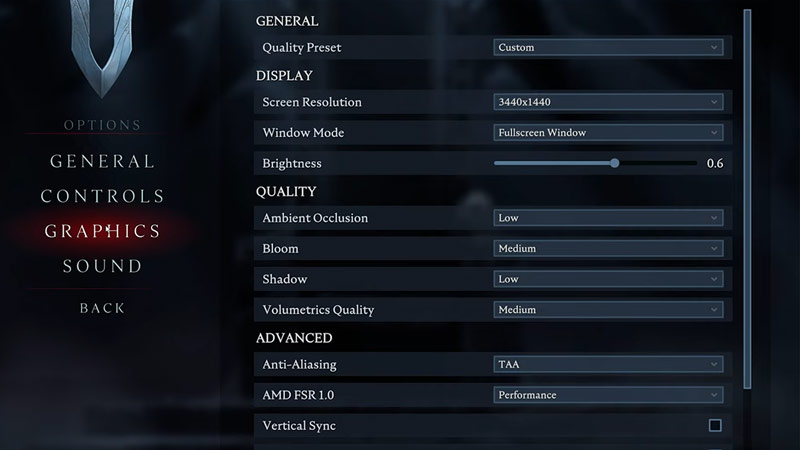
Here are the best graphics settings that should give most players a good boost on their Performance and FPS. The below settings don’t require you to have the latest system in the market and can allow the game to run smoothly in most systems. Although, if you have a really outdated system then the below settings might bear little to no fruit.
- Display
- Screen Resolution: Set it as the resolution of your monitor or your laptop screen. In case you have an older system and are not getting enough performance then you can use a lower resolution here. Remember, you may get better performance with a lower resolution, but your game will also start looking pixelated based on how low the resolution is that you kept.
- Window Mode: Fullscreen Window
- Brightness: Anywhere between 0.5 to 0.8
- Quality
- Ambient Occlusion: Low or Medium
- Bloom: Low or Medium
- Shadow: Medium
- Volumetrics Quality: Low or Medium
- Advanced
- Anti-Aliasing: None or TAA
- FSR 1.0: Performance
- Vertical Sync: Off
- Motion Blur: Off
- Depth of Field: Off
- High Quality Vegetation: Off
- Low Quality Atmosphere: On
- Blood Effects Enable: On
- Screen Shake: 50% or below
- Cloth Quality: Low or Medium
- Cloth Update Rate: Low or Medium
The reason I have given many settings as Low or Medium is that if your system is slightly better but not the latest. It might still handle the game while its quality isn’t completely low.
Best Settings for High-end systems
- Display
- Screen Resolution: Should be the same as the resolution of your monitor or your laptop screen.
- Window Mode: Fullscreen Window
- Brightness: Anywhere between 0.5 to 0.8
- Quality
- Ambient Occlusion: Medium or High
- Bloom: Medium or High
- Shadow: High
- Volumetrics Quality: High
- Advanced
- Anti-Aliasing: TAA
- FSR 1.0: Performance
- Vertical Sync: On
- Motion Blur: On
- Depth of Field: On
- High Quality Vegetation: On
- Low Quality Atmosphere: Off
- Blood Effects Enable: On
- Screen Shake: 50% or above
- Cloth Quality: High
- Cloth Update Rate: High or Very High
Try experimenting with the above settings to further improve your gameplay experience.
That covers this guide on the best graphics settings for V Rising to boost FPS & Performance. Don’t forget to check our other V Rising guides to get help on similar topics.