Close Menu
    Facebook X (Twitter) Instagram
    Gamer TweakGamer Tweak
    • GT Originals
    • Guides
      • AC Mirage
      • Starfield
      • Wordle
      • Mobile
      • GTA 6
      • AC Valhalla
      • Genshin Impact
      • Honkai Star Rail
      • Minecraft
      • Discord
      • Street Fighter 6
      • Project Slayers
      • The Sims 4
      • Lies of P
      • Zelda TOTK
    • Roblox
      • Roblox Codes
      • Blox Fruits
      • Type Soul
      • Grow a Garden
      • 99 Nights in the Forest
    • Review
    • Roblox Codes
    • BG3
    • CS2
    Gamer TweakGamer Tweak
    Home > Mobile > Best Settings To Use In Diablo Immortal
    Mobile

    Diablo Immortal: Best Settings To Use On PC & Mobile

    DarwinBy DarwinJune 3, 20222 Mins Read

    Diablo Immortal is an action MMORPG released by Blizzard for Mobile. It is based on the time between Diablo II & Diablo III takes place. In this game, play as one of 6 classes and battle the evils that are ahead with your Allies. Having the best Gear will help you beat your enemies but other factors come into play. One such factor is your Game Settings. Certain Settings in games can give you a tactical advantage which allows you to exert your Skill on enemies very easily. In this guide, I will show you the Best Settings to use in Diablo Immortal.

    Best Settings to Use in Diablo Immortal
    best settings diablo immortal

    Here is a list of Settings that you should use in Diablo Immortal.

    Best Settings for Mobile

    • General:
      • Auto Pick Up:
        • Auto Pick Up Items – Normal, Magic, Rare. (Enable all three).
      • Unstuck – It is a button that will teleport you to the nearest safe zone if you are in trouble.
    • Controls:
      • Primary Attack Aim – On. (Best suited for ranged characters as it gives you a reticle)
      • Canceling Skills – Slide to Cancel Icon.
      • Minimap – Large.
    • Graphics:
      • Quality:
        • Graphics – Highest possible. (Use Low if you’re using an Outdated Device)
        • Resolution – Highest possible. (Use Medium if you’re using an Outdated Device)
        • Image Sharpening – On.
      • FPS:
        • High FPS – On.
    • Notifications:
      • New Bounties Available – On.
      • Items Sold at Market – On.
      • Rift Leaderboard has Reset – On.
      • New Items at the Hilts Trader – On.
      • Battle Pass Ending Soon – On.
      • New Battle Pass Quests Available – On.

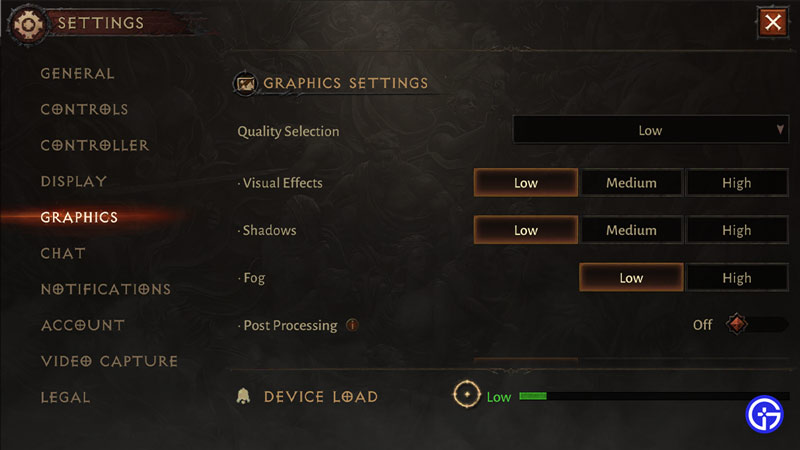
    Best Settings for PC:

    • Graphics:
      • Frame Rate – Uncapped.
      • Vertical Sync – Off.
    • Image Accuracy:
      • Image Sharpening – On.
    • Graphics Settings:
      • Quality Selection: Custom.
        • Visual Effects – Low.
        • Shadows – Low.
        • Fog – Low.
        • Post Processing – Off.
        • Anti-Aliasing – Low.
        • Environmental Details – Low.
        • Monster Effects – Low.
        • Bloom Effect – Off.
        • Vegetation Burning Effects – Off.
        • Global Lighting – Off.

    This was about the Best Settings to use in Diablo Immortal. Hopefully, this guide has helped you. You can also check out our guides like Diablo Immortal Controller Support.

    Android Diablo Immortal Guides iOS Mobile Games PC Tips and Tricks
    Share. Facebook Twitter Pinterest LinkedIn Tumblr Email Reddit
    Darwin
    • X (Twitter)

    Before you ask, yes my name is Darwin and no I am not Charles Darwin's cousin. But I do love everything Science, Games, and Anime. Think of me as your Baymax. Oh, I also like the Rubik's Cube.

    Related Posts

    Players Are Spending More Time in Virtual Worlds Than Ever Before, Showcasing the Largest Surge on Record

    December 3, 2025

    Unwritten Helldivers 2 Rules – Don’t Make These Mistakes!

    November 20, 2025

    Where Winds Meet Codes (December 2025)

    November 19, 2025

    User Experience in Quick Online Games – How to Retain Players

    November 11, 2025
    Latest Codes

    Anime Vanguards Codes (December 2025)

    December 4, 2025

    Last Letter Codes (December 2025)

    December 3, 2025

    The Forge Codes Roblox (December 2025)

    December 1, 2025

    Inazuma Strikers Codes (December 2025)

    November 26, 2025

    Deadly Delivery Codes (December 2025)

    November 26, 2025

    Roblox Hypershot Codes (December 2025)

    November 26, 2025
    Trending
    • Anime Vanguards Codes (December 2025)
    • How to Get Ruby in The Forge (Roblox)
    • Players Are Spending More Time in Virtual Worlds Than Ever Before, Showcasing the Largest Surge on Record
    • Last Letter Codes (December 2025)
    © 2025 Gamertweak.
    • Advertise With Us
    • About Us
    • Team
    • Contact Us
    • Privacy Policy
    • Terms
    • Open Critic

    Type above and press Enter to search. Press Esc to cancel.