If you have checked the heavy graphic recommendations for Ark Survival Ascended on Steam, you won’t really be surprised if it does not work well on PC. However, these Ark Survival Ascended graphics settings should give you close to the experience you need with the game along with some smooth gameplay.
While there have been reports of FPS drops and performance issues, if your PC can handle the load then you should definitely play the game to the fullest. Since many are unable to deal with the high graphics of the game, our guide also shows you the best settings to boost FPS and performance so do check them out.
Best Graphics Settings for Ark Survival Ascended
These are the Ark Survival Ascended graphics settings that you need to use to get the best graphic experience for the game.
Video Settings
- Graphics Presets – High
- Textures – High
- Post Processing – Medium
- Anti Aliasing – Low (If enabled)
- View Distance – Medium
- General Shadows – Medium
- Global Illumination Quality – Medium
- Effects Quality – High
- Foliage Quality – Medium
- Motion Blur – Off
- Max Frame Rate – Unlocked
- Light Bloom – Off
- Light Shaft – Off
- Low Light Enhancement – Off
- Enable Footstep Particles – Off
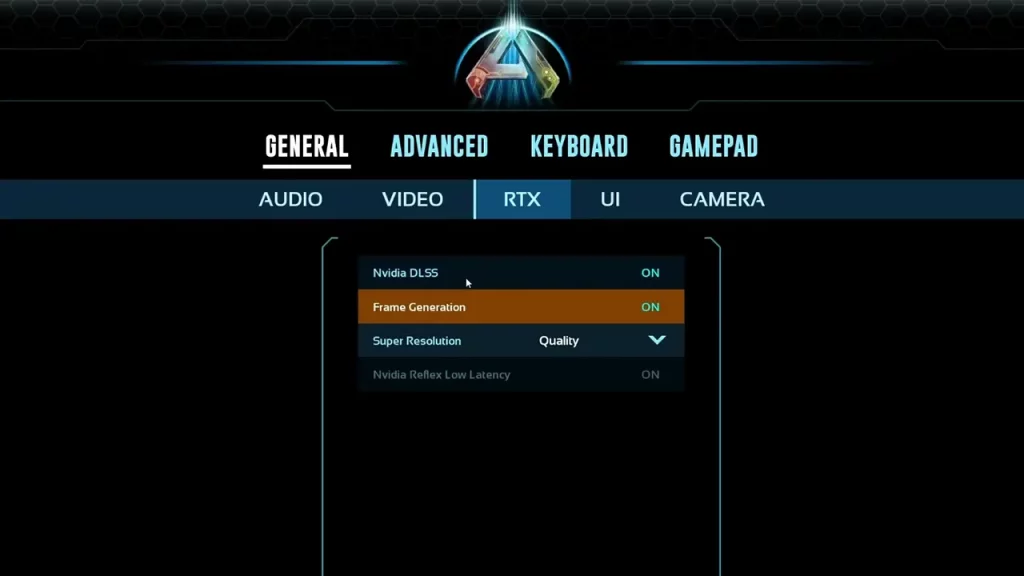
RTX Settings
- Nvidia DLSS – On
- Frame Generation – On
- Super Resolution – Quality or Balanced
Best Ark Survival Ascended Graphics Settings for FPS Boost
If your PC is facing FPS drops, there are a few tweaks in the graphics settings that can let you have a smooth gameplay experience.
Video Settings
- Graphics Presets – Medium or Low
- Textures – Medium
- Post Processing – Low
- Anti Aliasing – Low (If enabled)
- View Distance – Medium
- General Shadows – Low
- Global Illumination Quality – Low
- Effects Quality – Medium
- Foliage Quality – Medium
- Motion Blur – Off
- Max Frame Rate – Capped at 60 FPS
- Light Bloom – Off
- Light Shaft – Off
- Low Light Enhancement – Off
- Enable Footstep Particles – Off
RTX Settings
- Nvidia DLSS – On
- Frame Generation – Off
- Super Resolution – Quality
That’s all we have from this guide. If you found it useful, do check out our other Ark Survival Ascended guides while you are here at Gamer Tweak.